HS1 will be to 53/54 on the APIM. GWM, BCM, PCM all have HS1. This is used for ignition status for the APIM.
APIM Connector Versions.pdf (201.5 KB)
1 Like
Hi Chief150 and fpiu_2018
Great discussion here, I’m having the exact problem fpiu_2018 is having on my 17 FPIU. Ironically if I swap a Sync 2 in(albeit poorly programmed) I get the acm to start back up and everything that is programmed on the Sync 2 works. The phone connects and gets messages, I can play all radio and USB music functions.
Long story short, I tried connecting the pins 53 and 54 HS CAN to the diagnostic connector pins 6 and 14 and still can’t connect. Forscan also does not see the APIM or FCIM.
I also have a 2015 that was much easier to get all this working. Even NAV works great, of course there was no wiring for a GPSM so I powered it off the old 4"display connector and got it on the network at the diagnostic connector pins 3 and 11…works great on a 15.
If you try to connect a GPSM on a 2017 on pins 3 and 11 the powertrain modules will go bonkers. If I go backwards on the 17 and stay Sync 2 I need to know a better place to connect the GPSM to the medium speed can bus.
If I can get a Sync 3 to boot up I know I can use the Sync 3 GPS antenna so the medium speed can isn’t a problem anymore.
So, on a 17 or 18, where is the best place on the car to find a HS can to connect pins 53 and 54?
1 Like
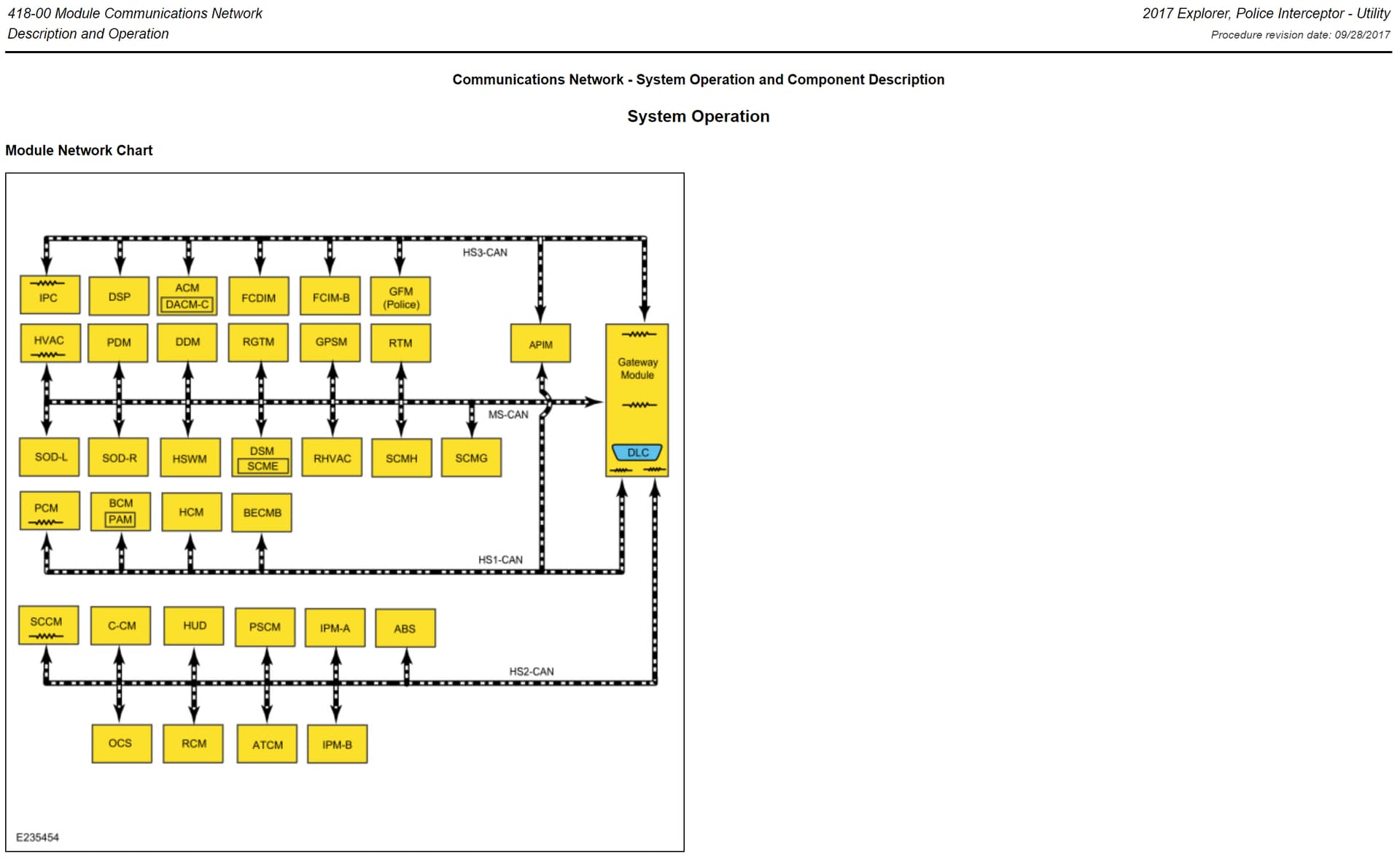
Either off the BCM or the GWM would be the closest and easiest to get to for HS1. Just make sure you twist it.
1 Like
Good to know I’m not alone. I haven’t found time to reattempt this install, but hopefully I will soon. First, though, I’m going to build a bench test setup to make sure that my new APIM and ACM are good to go.
2017 Explorer is CGEA 1.3 with GWM, would you use a GPSM? This would place conflicting data on the buss along with the MC data from the BCM via APIM GPS. The Sync 3 APIM GPS would supply the location and time data for the vehicle.
2015 Explorer is a CGEA 1.2 vehicle, so this will work as designed. But not on CGEA 1.3.
Exactly. Make sure you can see all modules on the MS-CAN and HS3-CAN busses. You absolutely have to have this first before you can go further. It seems your issue is with the HS3 buss, as you cannot see the FCIM or APIM. These do not connect to the MS-CAN for communication purposes.
I’m very interested in test bench also, I’m currently using a 2013 explorer shell but I might put a subframe in it and drive it in the winter.
There are some things I need to know to build the level of bench that I would like mainly, because I’d like to everything right down to EPS steering racks too.
I’m not sure at this point if I’m going to need a 2011-2015 and a 2016-2019 bench. If you find a forum page on that please share a link.
I’ll be in the explorer this weekend sorting out the CAN busses for the sync 3 for the 2017 and 2018’s so stay tuned and thanks for all your work so far!
Is this from alldata? It certainly isn’t in any of the FORD manuals I’ve laid hands on yet.
Honestly, sticking with a CGEA 1.3 (2016 onwards) environment would likely be best and a bit less work and expense than CGEA 1.2 (2011-2015). CGEA 1.2 is a legacy framework now and will not be supported further by Sync. In fact, Sync 3.3 was the last version to fully support CGEA 1.2 and it has been slowly deprecated in versions of Sync 3.4.
That diagram is from Ford Oasis. That is the best source for your documentation.
- FordServiceInfo.Com
1 Like
You guys are WAY over complicating all of this. Bench testing has already been done and is irrelevant in this thread.
That is directly from Ford. Like F150Chief said it’s from Oasis.