Hi Cyan labs
I followed the steps to create the USB to update from 320204 to latest version (all OK) and installed in the Ford Mondeo (all OK). All seemed OK, but now have error code PKG_ERR04.
What should I do to correct
Run the interrogator and upload the log.
What is your target version?
You need to read the documentation or you’re going to brick your APIM.
Hi Warlock12118, thank you for the reply. I certainly don’t want to be bricked!
Please bare with meas I am a novice and got excited thinking it would be simple…yes, I watched a YouTube segment where is was simple…
-
how do I run the interrogator and upload the log? I think this means create a new USB file and insert into car?
-
target version is
CYANLABS - SYN3 UPDATER - V2.12.5.0
Branch: Stable
Operating System: Microsoft Windows 10 Pro (2009)
PREVIOUS CONFIGURATION
Version: 3.0.20204
Region: ANZ
Navigation: True
Install Mode: Auto-Detect (reformat)
Install Mode Overridden: False
My20 Protection Enabled: Auto-Detect
DESTINATION DETAILS
Mode: Drive
Model: SanDisk Cruzer Blade USB Device
Size: 28.7GB
FileSystem: FAT32
Partition Type: MBR
REFORMAT.LST
VOICE=5U5T-14G391-DS_1660784642000.TAR.GZ
GRACENOTES=4U5T-14G423-DC_1615429585000.TAR.GZ
APPS=NU5T-14G381-AD_1689364279000.TAR.GZ
MAP=4U5T-14G421-DAH_1683053828000.TAR.GZ
VOICE_NAV=4U5T-14G422-DH_1644008342000.TAR.GZ
AUTOINSTALL.LST
; CyanLabs Syn3Updater 2.12.5.0 Stable - reformat Mode - Sync 3.4.23188 ANZ
[SYNCGen3.0_ALL_PRODUCT]
Item1 = RWDataCleaner TOOL - PU5T-14G386-BB_1690840002000.TAR.GZ
Open1 = SyncMyRide\PU5T-14G386-BB_1690840002000.TAR.GZ
Item2 = REFORMAT TOOL - 1u5t-14g386-cb.tar.gz
Open2 = SyncMyRide\1u5t-14g386-cb.tar.gz
Options = AutoInstall
FILES (7)
1u5t-14g386-cb.tar.gz (8.5MB)
PU5T-14G386-BB_1690840002000.TAR.GZ (3.2KB)
5U5T-14G391-DS_1660784642000.TAR.GZ (1GB)
4U5T-14G423-DC_1615429585000.TAR.GZ (896MB)
NU5T-14G381-AD_1689364279000.TAR.GZ (869.8MB)
4U5T-14G421-DAH_1683053828000.TAR.GZ (4.8GB)
4U5T-14G422-DH_1644008342000.TAR.GZ (1.5GB)
LOG
[16/06/2024 10:51:02 PM] Selected Region: ANZ - Release: Sync 3.4.23188 - Map Version: 2.22 (2022) - ANZ, SA and TW
[16/06/2024 10:51:02 PM] Install Mode: Auto-Detect (reformat) Forced: False
[16/06/2024 10:51:02 PM] MY20 Protection: Auto-Detect
[16/06/2024 10:51:02 PM] Formatting USB drive
[16/06/2024 10:51:02 PM] Re-creating partition table as MBR and formatting as ExFat on selected USB drive
[16/06/2024 10:51:36 PM] Checking Existing File: 1u5t-14g386-cb.tar.gz
[16/06/2024 10:51:36 PM] Downloading: 1u5t-14g386-cb.tar.gz
[16/06/2024 10:51:39 PM] Validating: 1u5t-14g386-cb.tar.gz
[16/06/2024 10:51:39 PM] Downloaded: 1u5t-14g386-cb.tar.gz
[16/06/2024 10:51:39 PM] Checking Existing File: PU5T-14G386-BB_1690840002000.TAR.GZ
[16/06/2024 10:51:39 PM] Downloading: PU5T-14G386-BB_1690840002000.TAR.GZ
[16/06/2024 10:51:39 PM] Validating: PU5T-14G386-BB_1690840002000.TAR.GZ
[16/06/2024 10:51:39 PM] Downloaded: PU5T-14G386-BB_1690840002000.TAR.GZ
[16/06/2024 10:51:39 PM] Checking Existing File: 5U5T-14G391-DS_1660784642000.TAR.GZ
[16/06/2024 10:51:39 PM] Downloading: 5U5T-14G391-DS_1660784642000.TAR.GZ
[16/06/2024 10:54:30 PM] Validating: 5U5T-14G391-DS_1660784642000.TAR.GZ
[16/06/2024 10:54:35 PM] Downloaded: 5U5T-14G391-DS_1660784642000.TAR.GZ
[16/06/2024 10:54:35 PM] Checking Existing File: 4U5T-14G423-DC_1615429585000.TAR.GZ
[16/06/2024 10:54:35 PM] Downloading: 4U5T-14G423-DC_1615429585000.TAR.GZ
[16/06/2024 10:56:55 PM] Validating: 4U5T-14G423-DC_1615429585000.TAR.GZ
[16/06/2024 10:56:58 PM] Downloaded: 4U5T-14G423-DC_1615429585000.TAR.GZ
[16/06/2024 10:56:58 PM] Checking Existing File: NU5T-14G381-AD_1689364279000.TAR.GZ
[16/06/2024 10:56:58 PM] Downloading: NU5T-14G381-AD_1689364279000.TAR.GZ
[16/06/2024 10:59:18 PM] Validating: NU5T-14G381-AD_1689364279000.TAR.GZ
[16/06/2024 10:59:22 PM] Downloaded: NU5T-14G381-AD_1689364279000.TAR.GZ
[16/06/2024 10:59:22 PM] Checking Existing File: 4U5T-14G421-DAH_1683053828000.TAR.GZ
[16/06/2024 10:59:22 PM] Downloading: 4U5T-14G421-DAH_1683053828000.TAR.GZ
[16/06/2024 11:13:04 PM] Validating: 4U5T-14G421-DAH_1683053828000.TAR.GZ
[16/06/2024 11:13:28 PM] Downloaded: 4U5T-14G421-DAH_1683053828000.TAR.GZ
[16/06/2024 11:13:28 PM] Checking Existing File: 4U5T-14G422-DH_1644008342000.TAR.GZ
[16/06/2024 11:13:28 PM] Downloading: 4U5T-14G422-DH_1644008342000.TAR.GZ
[16/06/2024 11:18:00 PM] Validating: 4U5T-14G422-DH_1644008342000.TAR.GZ
[16/06/2024 11:18:07 PM] Downloaded: 4U5T-14G422-DH_1644008342000.TAR.GZ
[16/06/2024 11:18:07 PM] Preparing USB drive
[16/06/2024 11:18:07 PM] Checking Existing File: 1u5t-14g386-cb.tar.gz
[16/06/2024 11:18:07 PM] Copying: 1u5t-14g386-cb.tar.gz
[16/06/2024 11:18:08 PM] Validating: 1u5t-14g386-cb.tar.gz
[16/06/2024 11:18:09 PM] Copied: 1u5t-14g386-cb.tar.gz
[16/06/2024 11:18:09 PM] Checking Existing File: PU5T-14G386-BB_1690840002000.TAR.GZ
[16/06/2024 11:18:09 PM] Copying: PU5T-14G386-BB_1690840002000.TAR.GZ
[16/06/2024 11:18:09 PM] Validating: PU5T-14G386-BB_1690840002000.TAR.GZ
[16/06/2024 11:18:09 PM] Copied: PU5T-14G386-BB_1690840002000.TAR.GZ
[16/06/2024 11:18:09 PM] Checking Existing File: 5U5T-14G391-DS_1660784642000.TAR.GZ
[16/06/2024 11:18:09 PM] Copying: 5U5T-14G391-DS_1660784642000.TAR.GZ
[16/06/2024 11:19:53 PM] Validating: 5U5T-14G391-DS_1660784642000.TAR.GZ
[16/06/2024 11:20:42 PM] Copied: 5U5T-14G391-DS_1660784642000.TAR.GZ
[16/06/2024 11:20:42 PM] Checking Existing File: 4U5T-14G423-DC_1615429585000.TAR.GZ
[16/06/2024 11:20:42 PM] Copying: 4U5T-14G423-DC_1615429585000.TAR.GZ
[16/06/2024 11:22:09 PM] Validating: 4U5T-14G423-DC_1615429585000.TAR.GZ
[16/06/2024 11:22:50 PM] Copied: 4U5T-14G423-DC_1615429585000.TAR.GZ
[16/06/2024 11:22:50 PM] Checking Existing File: NU5T-14G381-AD_1689364279000.TAR.GZ
[16/06/2024 11:22:50 PM] Copying: NU5T-14G381-AD_1689364279000.TAR.GZ
[16/06/2024 11:24:13 PM] Validating: NU5T-14G381-AD_1689364279000.TAR.GZ
[16/06/2024 11:24:53 PM] Copied: NU5T-14G381-AD_1689364279000.TAR.GZ
[16/06/2024 11:24:53 PM] Checking Existing File: 4U5T-14G421-DAH_1683053828000.TAR.GZ
[16/06/2024 11:24:53 PM] Copying: 4U5T-14G421-DAH_1683053828000.TAR.GZ
[16/06/2024 11:33:07 PM] Validating: 4U5T-14G421-DAH_1683053828000.TAR.GZ
[16/06/2024 11:37:41 PM] Copied: 4U5T-14G421-DAH_1683053828000.TAR.GZ
[16/06/2024 11:37:41 PM] Checking Existing File: 4U5T-14G422-DH_1644008342000.TAR.GZ
[16/06/2024 11:37:41 PM] Copying: 4U5T-14G422-DH_1644008342000.TAR.GZ
[16/06/2024 11:40:18 PM] Validating: 4U5T-14G422-DH_1644008342000.TAR.GZ
[16/06/2024 11:41:31 PM] Copied: 4U5T-14G422-DH_1644008342000.TAR.GZ
[16/06/2024 11:41:31 PM] Generating reformat.lst
[16/06/2024 11:41:31 PM] Generating autoinstall.lst
[16/06/2024 11:41:31 PM] ALL FILES DOWNLOADED AND COPIED TO THE USB DRIVE SUCCESSFULLY!
Only requires a small USB.
Its under tools in the updater
i’ve tried twice to create the USB using tool (successful) insert into car and wait for “installation in progress” to end - both times I get the same error message as first time - ERR04
The USB has no XML file to upload
Photo’s of the current status, if this helps.
Also, a question, one USB port apple plays works, the other USB port it works intermittently. Is this software of hardware?
Otherwise it does seem to be operating
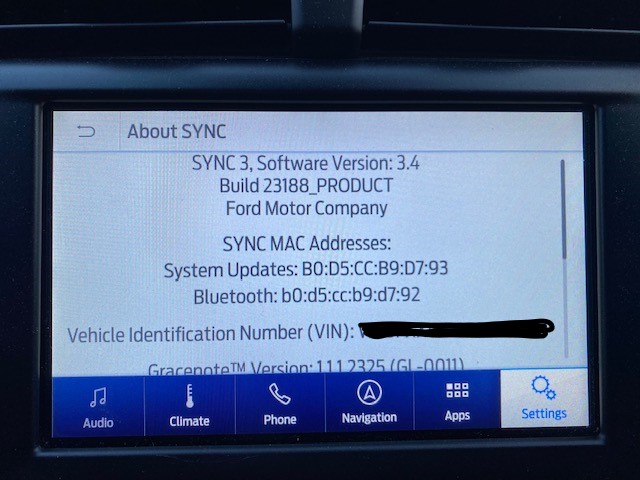
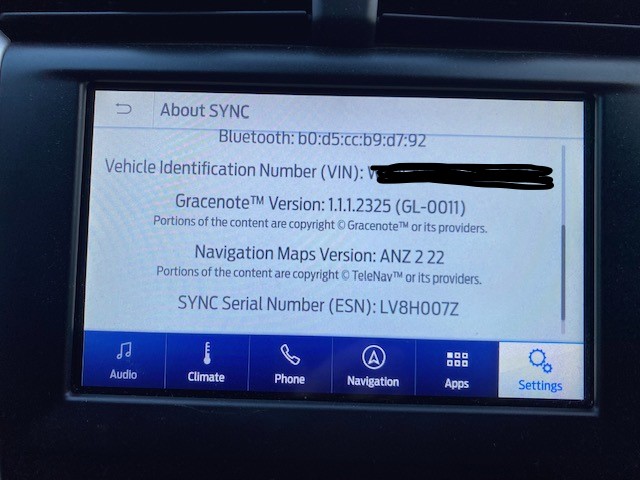
Did you do the master reset on the unit after the update? Ive done a few now and they all do funny things until the master reset is done
Side note the interigator xml file appears insode the syn3updater file
Thanks Brad
No I did not perform a master reset.
How do I do this?
Hi Brad
Yes I found it
It was too obvious!
Thanks for the tip
You found the xml or the master reset on the unit?
Sorry - master reset in unit.
No sign of xml file on usb
Well i would see how it goes after the reset, that has fixed every issue i have ever had.
When i get the xml i leave the usb in for a couple of minutes after the unit says the process is complete and it is always there
cheers Brad, I’ll try again and leave for a few minutes.
- Make sure that you have absolutely NOTHING plugged into the other USB port.
- Try using the other USB port
- Make sure the USB is formatted for exFat
Hello.
You should had followed the guide, specifically this step:

So… simply removing the USB as and when instructed would had prevented this (user) “error”…
OK thank you [SaNdMaN]
I thought I only removed the USB when it said so, but …
Is there a process/method to fix?
There’s nothing to fix, the error you got is because you didn’t remove the USB when instructed and the reformat tried to run after upgrading to 3.4, but the package is blacklisted on the 3.4 version you are, thus showing that error…
So if there is nothing to fix then the upgrade is correctly installed?
It’s all ok?