I have a 2019 Ford F150 Raptor with OEM 8inch Sync 3 unit. I updated my sync 3 unit last night to Sync 3.4 with no issues and proceeded to install my 12 inch Lincoln base screen from Carabc. It utilizes the OEM sync 3APIM and from what I can tell an OEM 12 inch lincoln screen. Everything is working very nicely. I know how to change the start up logo to the Raptor variant, but not sure how to change the shut down logo. What I mean is, every time I turn off the truck instead of it displaying a Raptor and Ford performance animation, it presents a Lincoln navigator animation. Any Ideas on how to change the shut down animation?
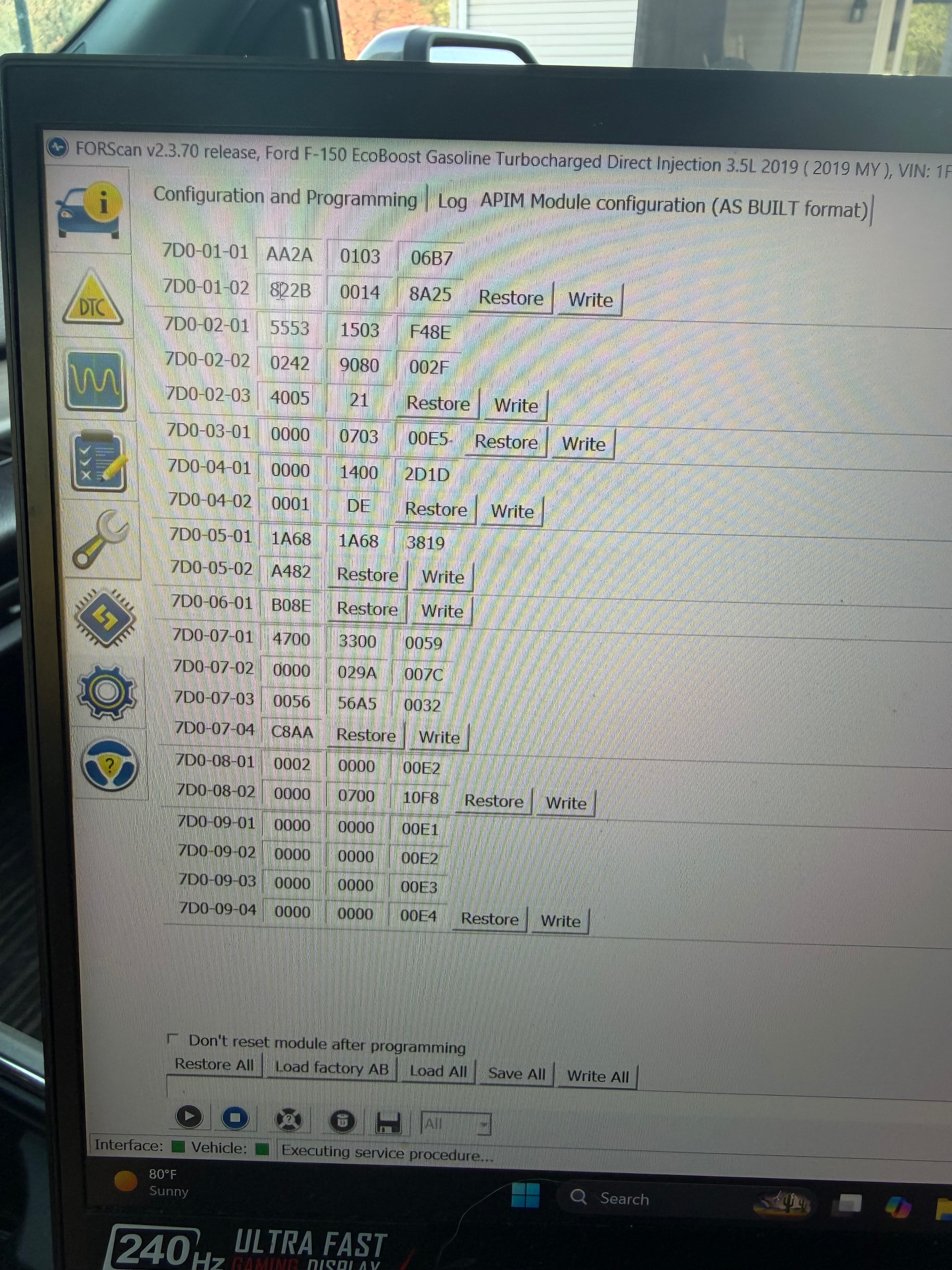
Have you compared the following asbuilt values between the APIMs?
DE01/7D0-02-01: xxxx-**xx-xxxx
DE02/7D0-03-01: xxxx-**xx-xxxx
Also, check 7D0-01-02: *xxx xxxx xxxx (theme master).
I haven’t, let me check on that. Thanks.
Your are welcome. Keep in mind there’s a DB for asbuilt values at https://cyanlabs.net/asbuilt-db/sync3-apim/ … So that you can know what the values the units have configured do…
Your suggestion worked. For the most part, lol. Raptor splash screen enabled, vehicle theme was corrected to identify as a Ford. The shut down screen now shows the generic Ford Logo instead of the Navigator. Not sure how to set it as the Raptor shut down screen. The picture attached are my before values. I changed all you recommended besides 7D0-03-01 as it seemed to be the best option as it was already.
There is no provision for changing the shutdown screen.
The shutdown screen should be the same as the welcome screen.
Only in certain themes. No theme has a provision to change the shutdown screen other than the themes at FMods.
Hi. Did this inadvertently return your screen back to 8" mode?
I changed the as-built from 7D-01-02: 8229 to 7D-01-02: 0229 as shown in the linked directory and it did turn my splash screens (start up and shut down) to the blue oval but it also went to 8" mode.
Do you have a photo of the as-built with it all working?
You changed the APIM from Lincoln to Ford mode…