

2015 F-150 Platinum FX4 701A 5.0 V8, Technology Package, White Platinum Metallic
Sync 3 V3.4 Gen3 APIM (KL3T-14G370-PCH) w/IPMB 2016 firmware update (Pixel line).
FordPass TCU w/Hotspot Upgrade (JL3T-14G087-CF) with 2 ea PIFA Antennas (HS7Z-19A390-A)
SiriusXM X40 Upgrade (KL3T-18D832-CH)
SDARS/GPS Antenna (JL3T-19C175-AA) with Antenna Splitter Cable (JL1T-19C181-AA)
Expedition FCIM Upgrade (KL1T-18E245-BA)
Lincoln Navigator Power Running Board Module (JL7T-16C478-AN)
Sync 4 8" Screen (ML3T-18B955-FE/LQ08Y5LX27)
Sony Sound System with Infinity Kappa Speakers and Rockford Fosgate Sub/Amp
Seat Guru Kits for Heated/Cooled Seats w/FORScan Modifications
Interior Actuated Tailgate Release thru FCIM Button
F-150 Limited Steering Wheel
F-150 Limited Shifter Handle
US Speedo IPC Gauge Faces
Superchips Tune 93 Octane
S&B Cold Air Intake Kit with Intake Tube
Borla Cat Back Exhaust - Touring Series
Bilstein Struts and Shocks, 1.5" Level
Hellwig Rear Sway Bar
Husky Wheel Well Liners
BAKFlip G2 Tonneau
FORScan Modifications
7 Likes
Hi! Came across this post and was curious about “Interior Actuated Tailgate Release thru FCIM Button”. Would be interested in doing this myself. Any information on this mod you’d be willing to share? Nice looking truck BTW!
I’m on vacation right now and don’t have access to my files but if you remind me next week I can send you the info on how to do this…
1 Like
Happy new year - friendly bump/reminder!
Thanks for the bump, been busy…
So what I did was to pin a switch to the BCM which will activate the tailgate release. Since it goes thru the BCM, the tailgate will not open while you are moving, all the safety guards are intact.
Below is a pic of the FCIM and switches above the screen. I changed my FCIM to a 2019 Expedition unit, but the button functions are the same as a 2015, except there are just 3 sets instead of 2. In the pic the buttons are Hill Descent/Traction Control, Hazard (single button), and Tailgate Release (still had the hazard logo then)/360 Camera. I used the small hazard button for the tailgate release. I blacked out the button for now, but want to get a logo for it…
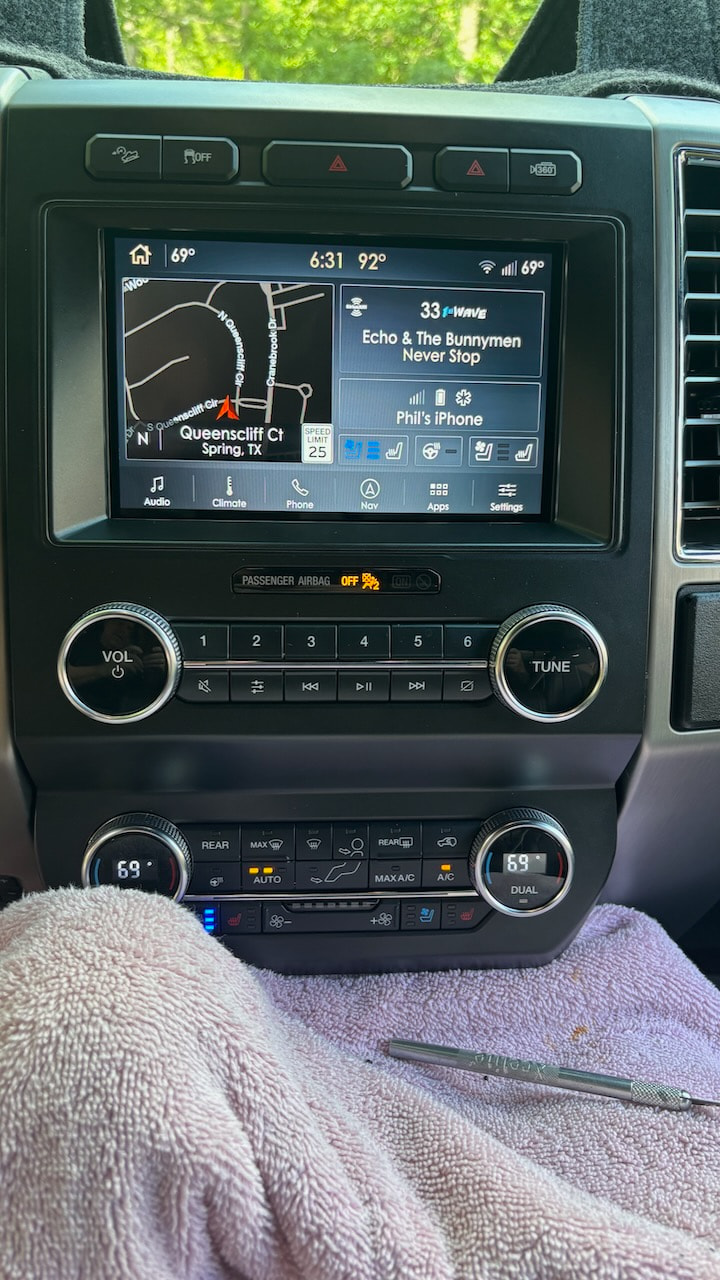
Anyways, the wiring is very straightforward for this. See attached FCIM Switch Pinout for reference. This is how each switch operates.
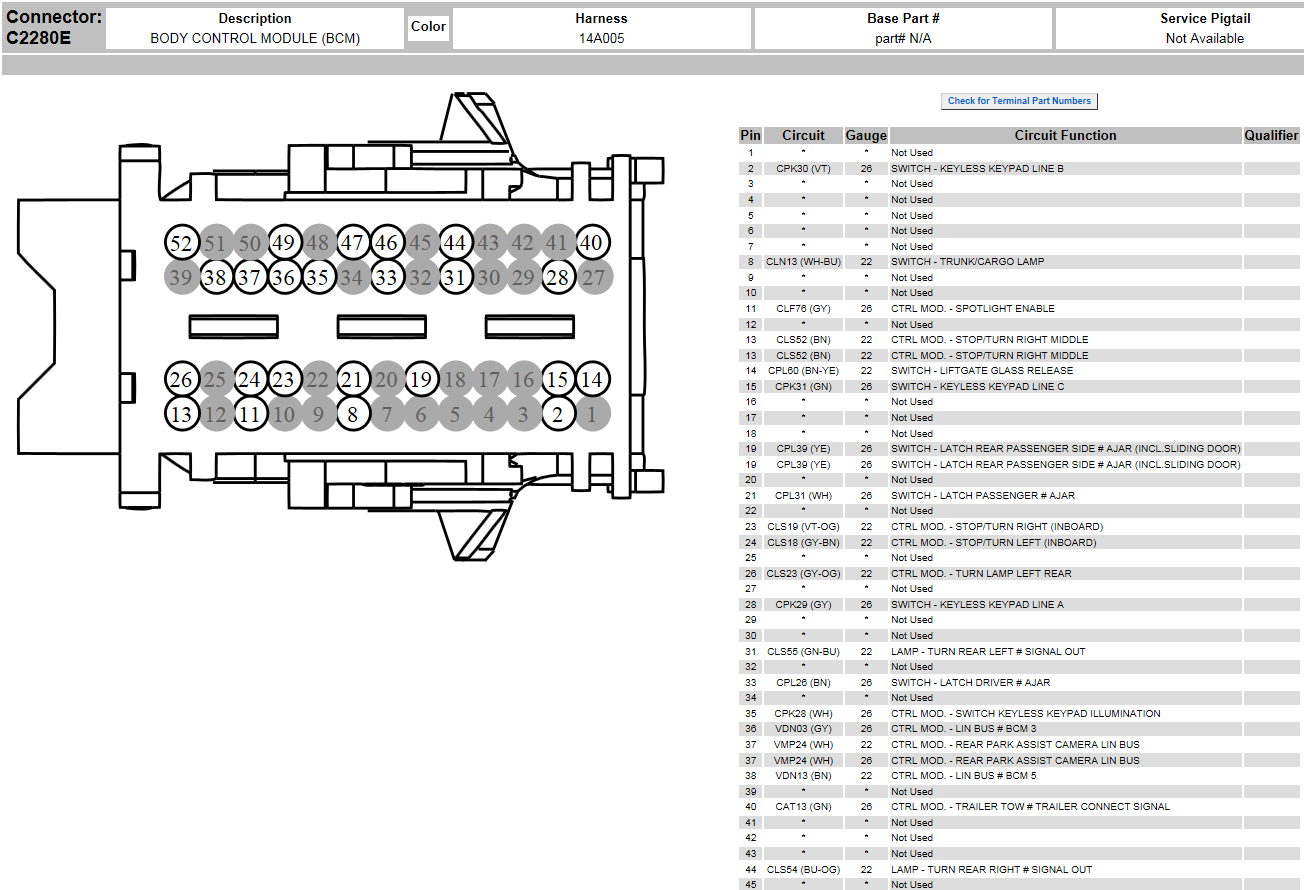
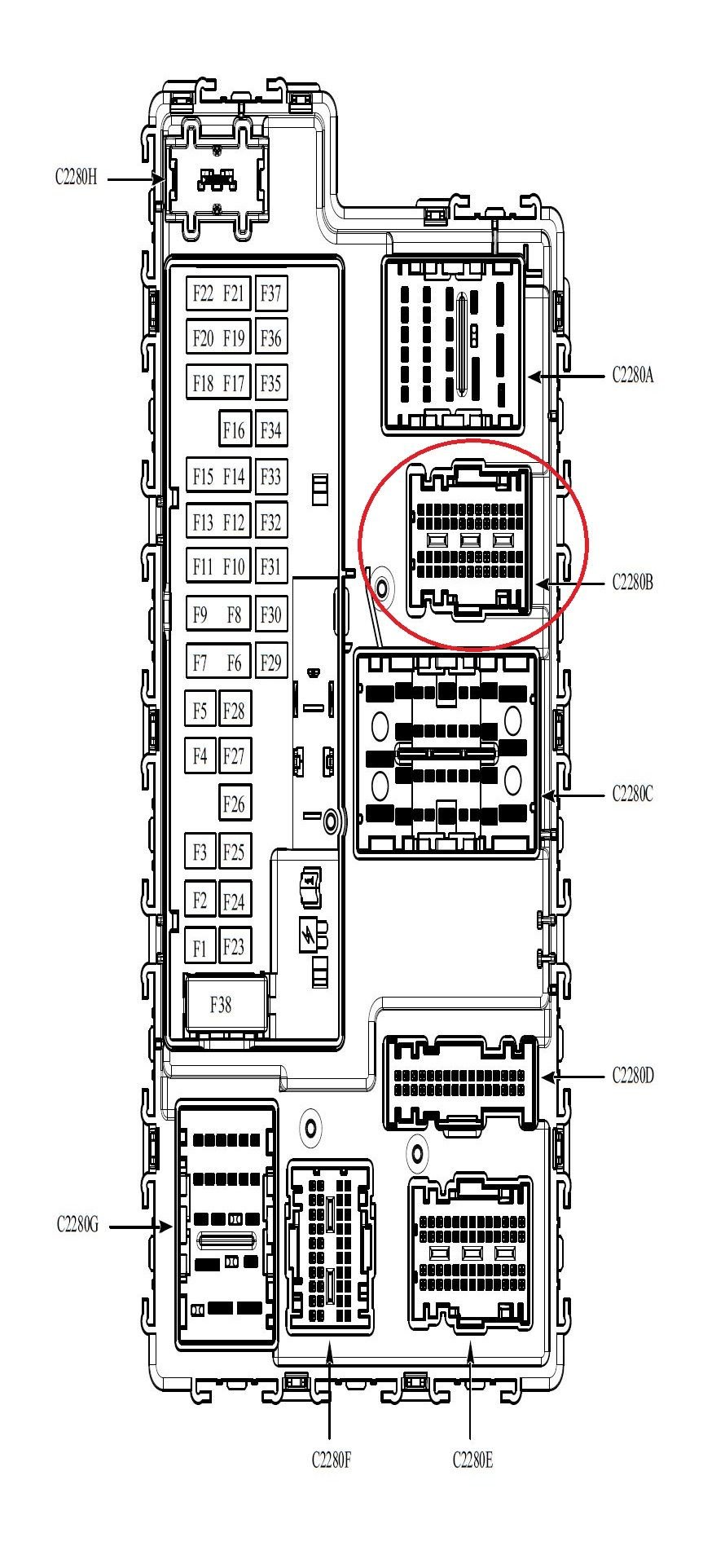
I moved the wiring for the hazard function to the large single switch in the center and wired to the small dual hazard switch a wire directly to the BCM module. I wired from pin 4 of the small hazard switch to C2280B Pin 1. Basically, you are grounding the BCM C2280B Pin 1 to activate the tailgate. Make sure you have a ground on pin 3 or the switches will not work.
FCIM Switch Pinouts.txt (1.4 KB)
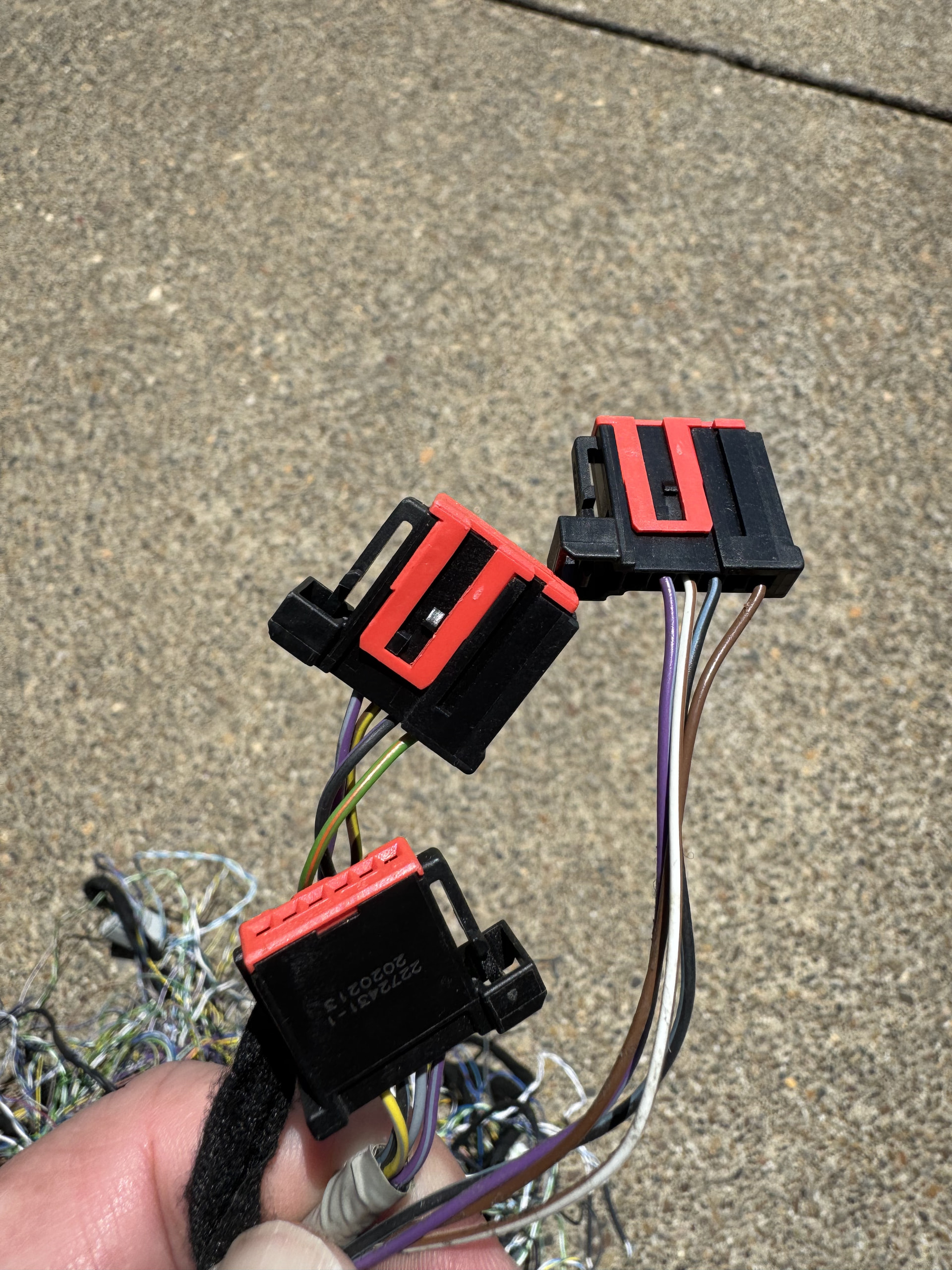
These are the connectors on the back of the switches in the FCIM. They are keyed specifically per switch, but all the pinouts are consistent between the switches. I had to trim a key on one to fit properly, but works fine.
2 Likes
Awesome, thank you for the info! Looking to doing the expedition panel swap on my F150 as well so this will be very helpful. Have you done anything with the “REAR” A/C control button on the expedition panel? Trying to think of a way to “blank” it out so it’s not functional and looks like a dead button or possibly rear purpose it, if that’s even possible.
I did not do anything with it. You will have several persistent DTC’s for the rear climate since there is no rear climate in the trucks
What trim level is your truck?
Here are the part numbers for the Platinum panels…
KL1T-18E245-DA
2019 Ford Expedition
With CD Slot.
KL1T-18E245-BA
2019 Ford Expedition
Without CD Slot.
This is the asbuilt I ended up with…
2015 Platinum_FCIM_KL1T_new climate.abt (239 Bytes)
Thanks! Will be on the lookout for one with a CD slot preferably - It’s a 2015 Lariat 502a with tech package. I’ve also done the Sync 3 swap, if that’s factors in at all. Would the posted asbuilt be a good starting point or any other parameters I should be mindful of when doing the swap?
For the FCIM, yes. The APIM might need some adjustment, but we can get to that when you do the rest of the swaps…
2 Likes
Hello, I came across this post and I was wondering how you the the IPMB update for the pixel line issue? Did you have to take it to a dealer?
You can do this yourself…
You will need FORScan paid version for firmware updates…
FORScan Software Version 2.4.x Releases and Information, 2.4.21 beta, 2026-01-28 - Ford / Information - CyanLabs Official Community
…and a good OBD USB adapter recommended by FORScan.
You will need to load the IPMB with 2016 F-150 IPMB w/360 View firmware.
IPMB - Image Processing Module B
Part Number (F113) GL3T-19H423-AD
Cal Level GL3T-14F023-AE
Hardware Number (F111) GL3T-14F023-AD
Secondary Boot Loader FL3T-14F019-AA
Strategy (F188) GL3T-14F017-AE
ECU Configuration (F124) GL3T-14F018-AE
1 Like
Hello, I came across this post and I was wondering how to configure the “REAR” button.
I recently upgraded from 4 inch screen to 8 inch in my 2020 Expy using identical radio bezel, just the one without heated seats.
Everything seems to be working fine with the upgrade except the “REAR” button doesn’t activate.
Having rear AC vents working would be quite useful since there is no separate rear climate control module, all rear climate control settings were on the driver side on the old bezel.
I highly appreciate any insights.
Updating the post with more details:
After FORScan running into following DTCs:
FCIM DTCs
B1379:15-48 - Rear Cabin Temperature Sensor
B10B3:15-48 - Right Panel Air Discharge Temperature
B10B4:15-48 - Right Floor Air Discharge Temperature
B11E6:15-48 - Right HVAC Damper Position Sensor
B14D3:15-48 - Left Rear Panel Discharge Sensor
B14D4:15-48 - Left Rear Floor Discharge Sensor
B1A63:15-48 - Right Solar Sensor
B1A64:15-48 - Left Solar Sensor
After switching back to 4 inch Bezel everything works fine and no DTCs, wondering why these codes
pop up with 8 inch Bezel.
Thank you
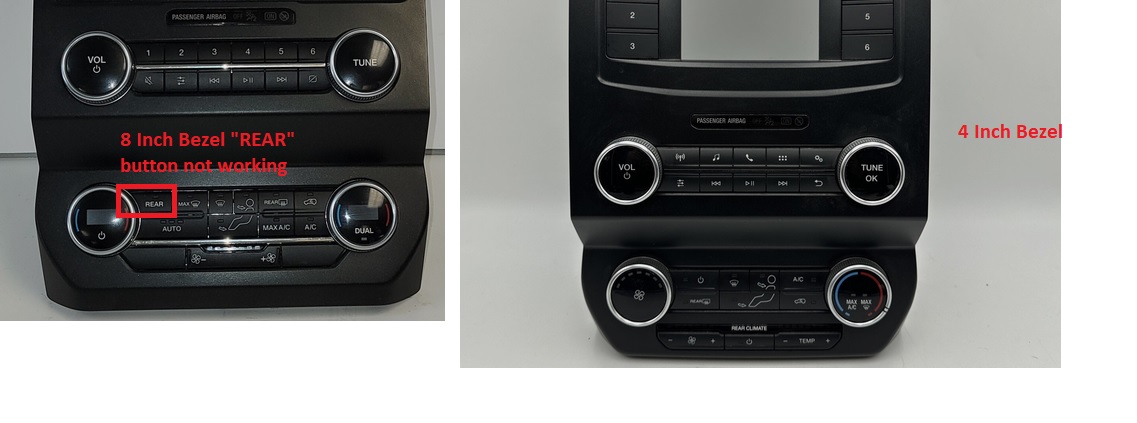
I would need to see the asbuilt data for the old and new bezels and the part numbers for these.
Hello @F150Chief thank you so much for the response,
Sure below are the requested FCIM details:
4 inch Bezel FCIM Part Number: LL1T-18E243-AA
4 inch bezel Default asbuilt:
7A7G1G130B6018C3C5F
7A7G1G25A11E4018283
7A7G1G36000845C4638
7A7G1G418C0845C46B1
7A7G1G5521000000016
7A7G1G6800000000035
7A7G1G70000B6
8 inch Bezel FCIM Part Number: LL1T-18E245-CA
8 inch Bezel Default asbuilt:
7A7G1G12076098C3C17
7A7G1G25A51E4418203
7A7G1G36644845C4682
7A7G1G41840845C4631
7A7G1G5521000000016
7A7G1G6800000000035
7A7G1G70000B6
8 inch Bezel Modified asbuilt (currently configured):
7A7G1G12076018C3C0F
7A7G1G25A11E4018283
7A7G1G36000845C4638
7A7G1G418C0845C46B1
7A7G1G5521000000016
7A7G1G6800000000035
7A7G1G70000B6
Thank you again I hope this helps.
This looks like you bought an Automatic HVAC panel for a Manual HVAC vehicle, as indicated by the original FCIM asbuilt. The LL1T-18E245-CA is definitely a more advanced panel than the original. Also, your vehicle may not have the equipment related in the DTC’s.
This asbuilt is from a -BA panel rather than a -CA.
7A7-01-01 2076 C98C 3CD7
7A7-01-02 5A59 E441 820B
7A7-01-03 6644 845C 4682
7A7-01-04 1840 845C 4631
7A7-01-05 5210 0000 0016
7A7-01-06 8000 0000 0035
7A7-01-07 0020 D6
Make sure your VIN coding is correct for 7A7-02-xx…you may experience issues if it is not. It is in your original FCIM.
Thank you @F150Chief for sharing asbuilt from a BA panel.
I tried quite a few combinations from the database but no changes to the FCIM behavior.
I doubt if the FCIM is really using the applied settings or just sticking to the defaults.
Also are there any H/W revisions between the JL1T (2018), KL1T(2019) and LL1T(2020) version of the panels? I am wondering if switching to an older H/W version would help.
Thank you
You should be able to get a 2020 (L) series panel to work but your vehicle may not have the equipment for the panel to control. For instance, I replaced my 2015 F-150 Platinum FCIM with a 2019 Expy Platinum FCIM. My truck does not have rear HVAC so I have persistent DTC’s for the missing HVAC associated equipment. I set the FCIM asbuilt to reflect the proper settings for the vehicle, no HVAC, and the DTC’s still remain and will remain unless I could somehow find a firmware version for that panel that does not have the rear control. Unfortunately, unless I try to code that myself (not gonna happen) that’s the way it is.
I think you have the exact same issue with your Expy. If all the controls are working, it will be fine. But you say the fan isn’t controllable thru the panel. This is likely due to the fact that the -CA panel is for Auotomatic HVAC, not manual. Try setting the HVAC type and the functions to Manual in the asbuilt.
Thank you @F150Chief I tried setting HVAC type and related functions to Manual but no luck.
But I managed to borrow a J series FCIM and now the air is flowing through the rear vents!
“REAR” button on the bezel stays ON and only turns off when MAX A/C or MAX Heat is pressed.
One observation I would like to share is as soon as I make any changes to the FCIM, even a simple change like updating a VIN (in Hex) it disables the rear climate and it never comes back even after rolling back to as-built, this is quite strange.
For now J series FCIM is working as-is no changes :).
Still interested in investigating why the L series FCIM was never restored after as-built rollback.