my fpiu has the 4" screen, mic is installed was wanting to know what I need to install some sync functionality ie:nav and phone connect for calls. I have forscan paid and an adapter..
where do i start?
my fpiu has the 4" screen, mic is installed was wanting to know what I need to install some sync functionality ie:nav and phone connect for calls. I have forscan paid and an adapter..
where do i start?
A good start would be telling us what vehicle you have.
I guess I did not state in the title 2018 FPIU (Ford Police Interceptor Utility)
What revision SYNC does it have, is it OEM?
Scott there is not limit on what you can install on this car. It comes down to money and skill. If you have a MIC than you have Sync and should be able to make phone calls on it. I would check the manual on the Ford site as it seems you already have what you need.
I cannot tell if there is sync no way to pair Bluetooth, that I can tell I don’t think I have the module or it was disabled, where would it be located? and if it not there what would I need to do to set it up? I do not have the voice button , I have the aux buttons on steering wheel
unknown if it does. where would the module be?
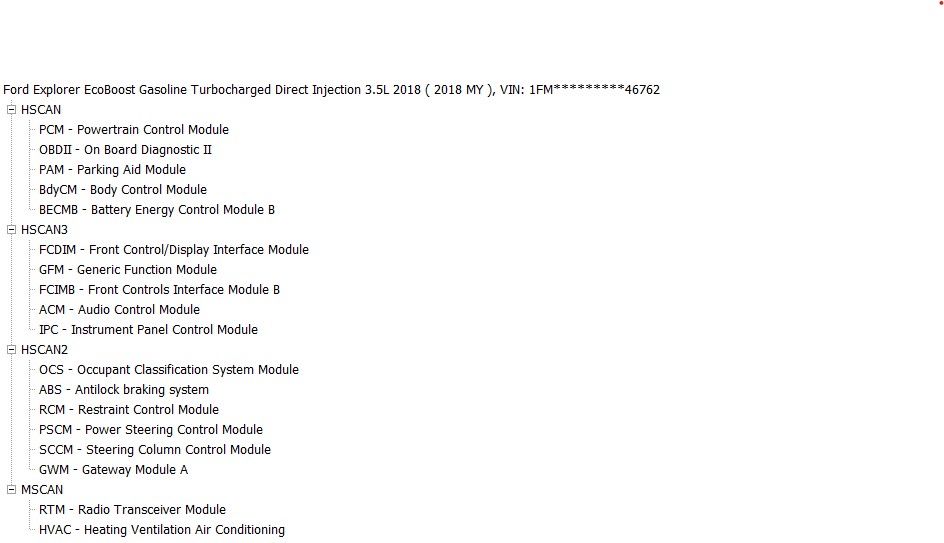
Here is a update, I recently purchased a Sync 3 apim, 8" to replace the 4" setup in my FPIU purchased a 4" to 8" conversion harness from pctoo68 on ebay (paid too much), and have to spilce 4 wires on drivers side to connect mic and camera.. installed the apim, and controls. problems I am having is i dont see the apim (probably the cable) and volume control does not work and no hot and cold just straight a/c , i have ordered a hvac controller to replace the one that I have to the right of the steering wheel I do have the little fan and thermister in the dash gps works radio works cd works and I haveto connect the antenna for the sirrius. programming wise like I said I dont see FCIM or the APIM in forscan… and I’m here now asking for help…
Thanks
this is a 2018 FPIU 3.5 Twin Turbo
Have you deleted the old profile for your Explorer and started a new one? Forscan will not see new modules until you do this.
Yes this must be swapped as the PIU one has a different calibration.
This module does not have AB options in the Explorer so you will not see anything but a calibration update option in Forscan for the FCIM.
Yes I deleted the profile and still don’t see the apim… I was thinking that the cable I bought may be missing a pin.. but I don’t know for sure also the issue of the volume control not working…
For the SWC I cannot help much. I swapped to a heated wheel and new Clockspring. I put in the new AB settings in the SCCM and I never had a problem.
Here are the PIN outs for the APIM specific to the 18 Explorer. Make sure you have all the Canbus wires in the right spots.
I can send you a copy of my asbuilt maybe that will help you in figuring this out
I fixed the volume by switching the gb5t module and now my volume works again one of my GB 5T modules pops the fuse and the new hvac is in and now my rear cooling heating doesn’t work at all
@RD4154 did you have this issue with yours?
I didnt have that specific issue. It sounds like its stemming from the wiring harness maybe the pins are in the wrong places?
For my harness which I got from 4dtech, it came with all the wires already run for everything for the exception of the x40 data wires which I added.
The PIU has a SWC that you cant really change believe me I tried, the civilian ones are wired differently so youd have to change alot.
I also added the hswm and wheel from a donor platinum explorer I just had to run some wires to the pins and swap the clock spring.
My original kit came from infotainment.com which included a new hvac module. Otherwise I had none of his issues. I no longer own the car but I do have access to it. I can try and copy the AB and send it over to him. But that wont be till like Wednesday or thursday.
Thank you I appreciate any help I think the person that I bought the cable from may not have had certain wires in there or something I don’t know for sure there’s four tag wires that I have to attach to the mic and the camera over on the driver side left