Hello dear forum members.
I would like to ask for help.
I have a Transit Connect 2019 model year.
The car only had a regular radio, 1 din.
I wired it up, installed a 6.5 inch display, an apim module, an audio module, with a factory-cut cable.
My apim module is 64gb eu. Nothing appears on the display. The module communicates with forscan, I can write and read the data in it. I also have a 16gb Apim module, it works with it, but I don’t have navigation. I would like full navigation in my car.
My apim module: NU5T-14G371-GAE (64GB)
Can this module be forced to work with the 6.5 inch display, or should I look for another module?
I’ve changed the display size in forscan, but it won’t start with my 64GB device.
Can you give me any tips or ideas on where to go next?
Is it possible to downgrade to an older version of the 64GB module, which will make it start with the 6.5-inch display?
I’m waiting for your answer, Tams.
Hi.
What’s the 16GB APIM’s model?.
Does the 64gb unit boot into a black screen but remains operational?. (that is, audio, USB ports powered up).
The 16gb: NU5T-14G371-AAE.
The 64gb makes no sound, no sign of life, only communicates with forscan. The phenomenon is that it does not start, only communicates.
I made a backup of the 16gb unit, put it on the 64gb, but it does not start either.
That PN does not exist in our hardware DB, are you sure about it?.
Is that what Forscan reads?, if so can you share an image of the APIM’s sticker?.
Are you sure the unit is operational then?. Even if there’s a wrong asbuilt value for the theme, it should boot into a black screen. The unit being recognized by Forscan does not mean the unit is operational, bricked APIMs are recognized by Forscan.
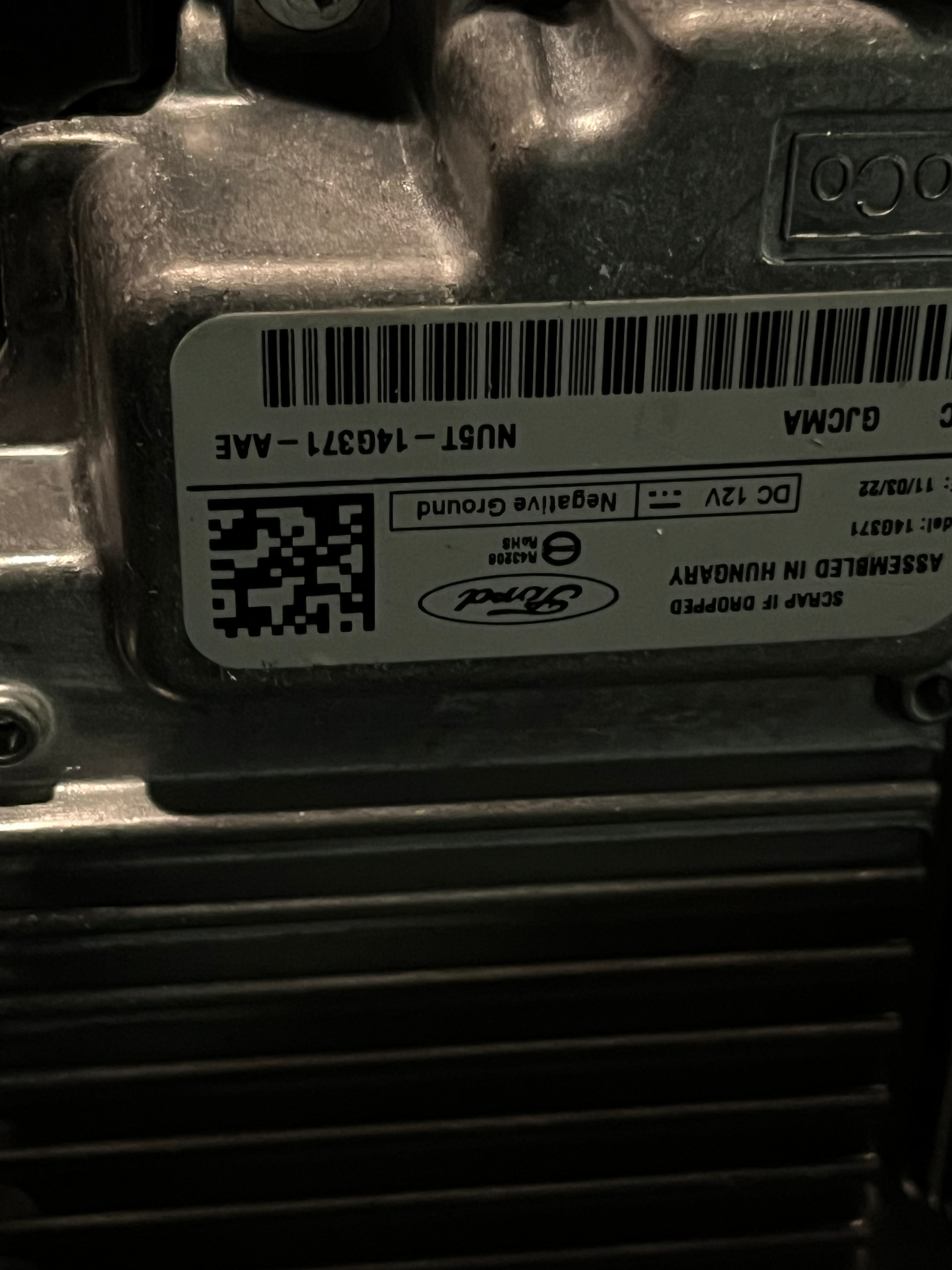
Ok, so far we can’t say anything about the 64GB one since we do not know if it works. Do you have a picture of the sticker?.
About the 16GB one, does that PN appear on forscan as well?.
PS: avoid sending multiple messages, put all the information in a single message. I’ve merged your comments.
I’ll send a photo of the 64gb tomorrow. Sorry for the multiple messages..Forscan sees the 16gb number.
Don’t worry, we can continue tomorrow.
So, these are random ideas I have:
- the 16GB APIM sticker looks odd, , but if the APIM presents itself as that PN via Forscan, we have to trust Forscan
- It’s also odd that you are the first user in the world to come by that model, since it’s a model from 2022. There’s always a first time, right?.. but after 4 years?..
- one thing you could try is applying your 16GB asbuilt onto the 64GB APIM (make a backup first). Again, a wrong theme value should not prevent the unit from booting, so USB ports should be powered for example
- about the screen not working, is it fully black? or is the backlight on?
I’m the first.. but not the last..
I made a backup from the 16gb os, uploaded it to the 64gb, but it didn’t start either. I’m starting to suspect that it’s faulty. I made the backup with forscan in build mode, and uploaded it to the 64gb anyway. The screen doesn’t light up, it’s like it’s completely unusable.
I’ve been on it for 5 days now.. I’ve tried quite a few things..
Not even the backlight?. Let me tell you this: a bricked APIM would even turn the screen on (*), but only the backlight… it would exhibit a “blank screen”, but the screen itself would light up.
Unless there’s a real incompatibility between the 64GB unit and the screen (which does not make a lot of sense, since as per the PN both are recent APIMs), I’m thinking your 64GB is not working as it should.
Have you contacted the seller?.
EDIT:
(*) Do not quote me on this, I’m not 100% sure at the moment…
I bought it over 50 days ago, and now I have had time to deal with it.
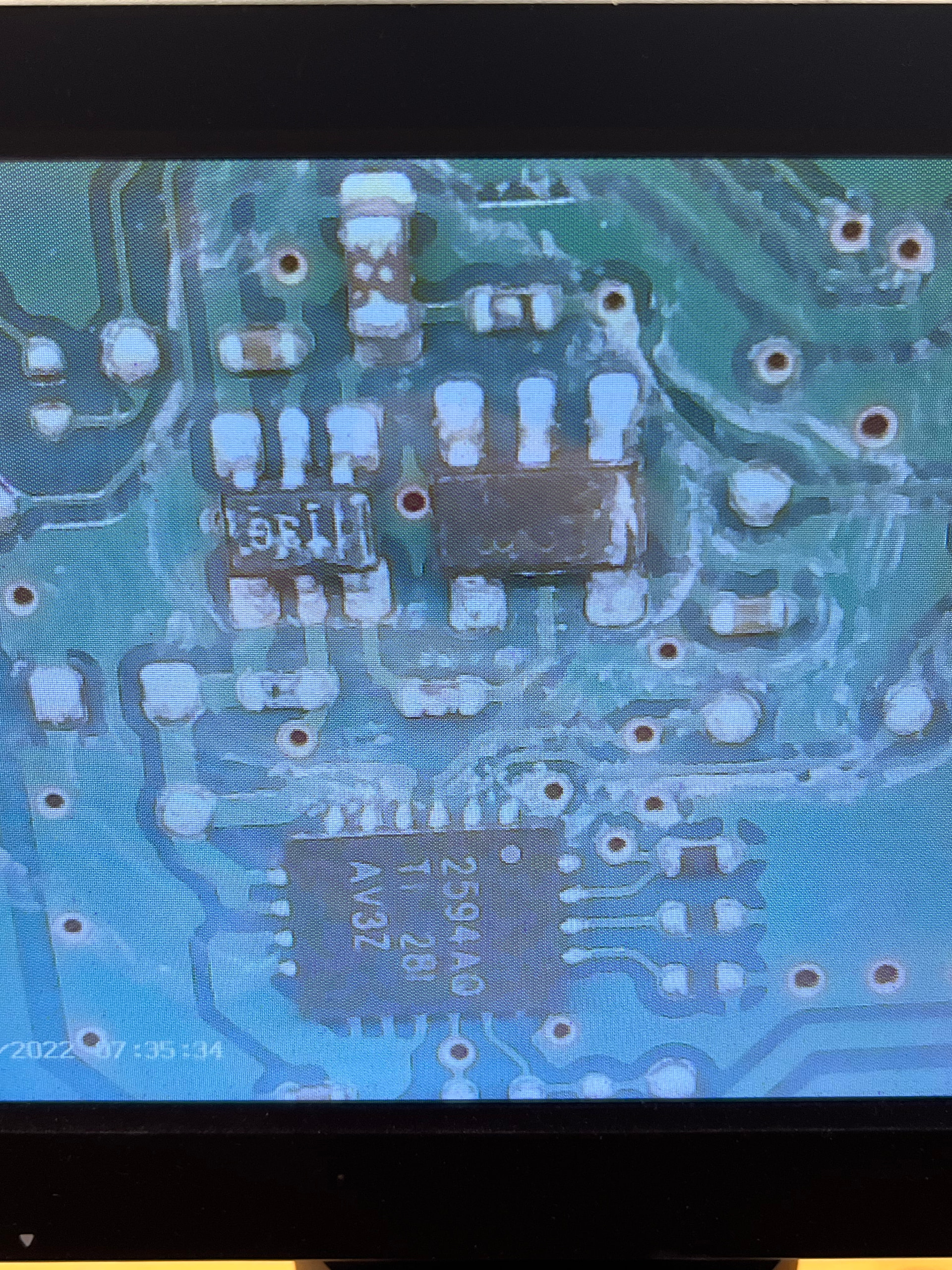
 Water damage.
Hi guys, my working apim module has arrived, there is a picture with it, and all functions work. I want to update silent maps, I would like to ask for help with this. I downloaded the update assistant application, here, sync3 updater.
I made the update pendrive with the program, but it doesn’t want to update even after 1 hour of waiting. My apim won’t restart and won’t start the installation. Could you help me with the process, what am I doing wrong?
My apim number: lu5t-14g371-gnc.
My apim: Version 3.4, build20282, gracenote version 1.1.1.22118 (eu-0020), map version f9.
Can I update the build, is it worth it?
I found the map 2026, sync 3 updater downloaded it.
I can choose the build version in the updater, I need to update this or not.
Thank you in advance for your helpful answers.
Cant say, since you didn’t provide any relevant troubleshooting information (like a log) other than “it does not work”, so I’m not sure what you are doing.
It’s MY20, do not reformat it with Syn3updater, only autoinstalls.
Yes, it’s up to you.
There’s no 2026 maps, I’m not sure what you are talking about.
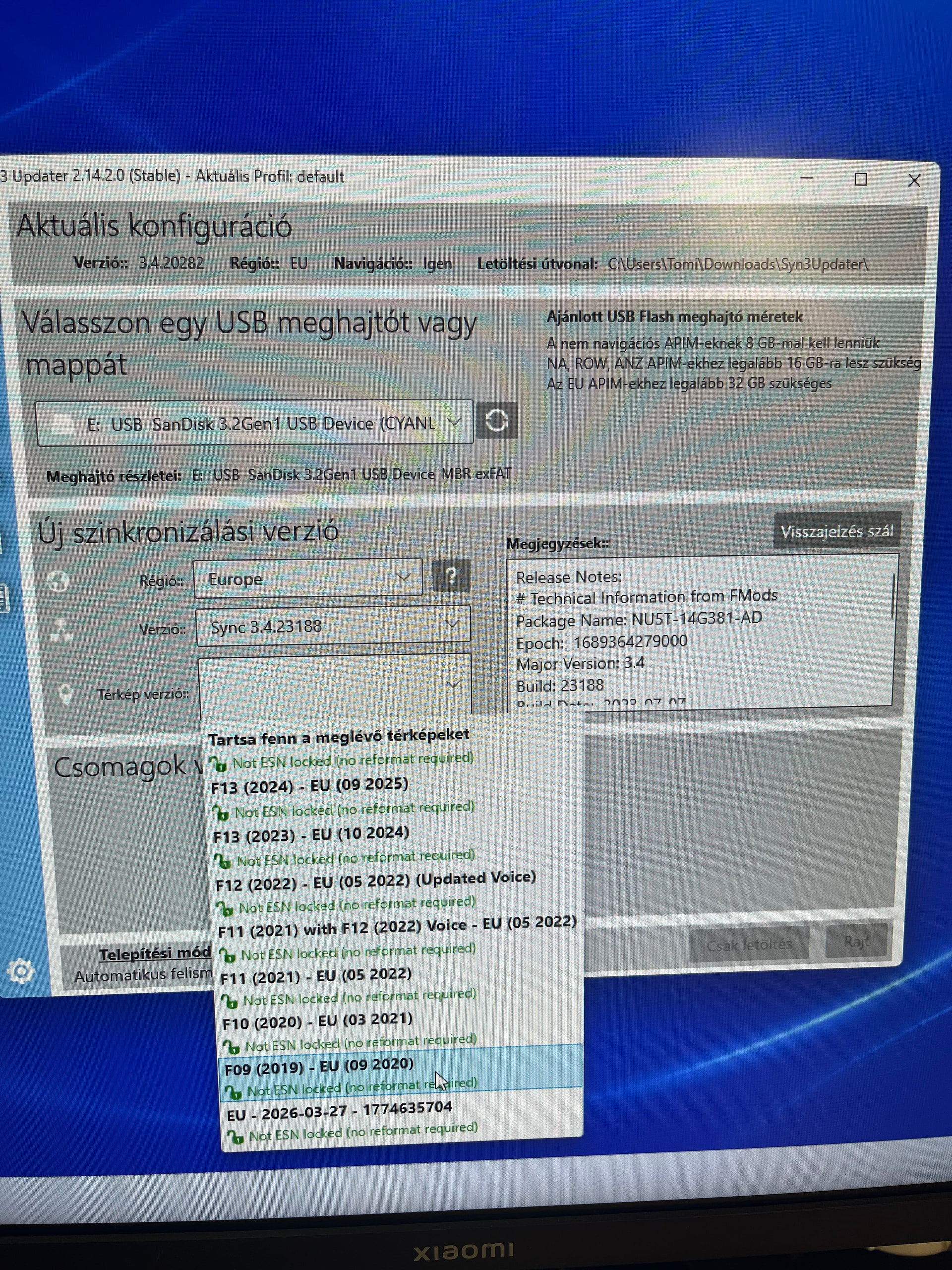
What should I make a “log” about? Should I paste the log from the sync updater here? I’m a little confused on the topic. The sync3 updater gives several options:
-region: eu
version: (I can choose here, I choose 3.4.23188)
I can also choose the map version, a tab opens here, and there I see the 2026 map, eu-2026-03-27-1774635704
When the pendrive is ready, it asks me to put it in the car, I do this, and my dad then starts again. I put the pendrive back in the sync3 updater, and it downloads the maps, then indicates at the end that it’s done. I put the pendrive back in the car, then the software update text appears, but after 1 hour, only this text is readable on the display. The installation process does not start.
And that’s why I don’t know what I’m doing wrong.
CYANLABS - SYN3 UPDATER - V2.14.2.0
Branch: Stable
Operating System: Microsoft Windows 11 Pro (2009)

PREVIOUS CONFIGURATION
Version: 3.4.20282
Region: EU
Navigation: True
Install Mode: Automatikus felismerés (autoinstall)
Install Mode Overridden: False
My20 Protection Enabled: Engedélyezve

DESTINATION DETAILS
Mode: Drive
Model:  USB  SanDisk 3.2Gen1 USB Device
Size: 28,7GB
FileSystem: exFAT
Partition Type: MBR
LOG
[2026. 03. 28. 7:06:55] Selected Region: EU - Release: Sync 3.4.23188 - Map Version: F13 (2024) - EU (09 2025)
[2026. 03. 28. 7:06:55] Install Mode: Automatikus felismerés (autoinstall) Forced: False
[2026. 03. 28. 7:06:55] MY20 Protection: Engedélyezve
[2026. 03. 28. 7:06:55] Formatting USB drive
[2026. 03. 28. 7:06:55] Re-creating partition table as MBR and formatting as ExFat on selected USB drive
[2026. 03. 28. 7:07:02] Checking Existing File: PU5T-14G386-BB_1690840002000.TAR.GZ
[2026. 03. 28. 7:07:02] Validated: PU5T-14G386-BB_1690840002000.TAR.GZ (Skipping Download)
[2026. 03. 28. 7:07:02] Checking Existing File: 5U5T-14G391-AT_1660763323000.TAR.GZ
[2026. 03. 28. 7:07:05] Validated: 5U5T-14G391-AT_1660763323000.TAR.GZ (Skipping Download)
[2026. 03. 28. 7:07:05] Checking Existing File: 4U5T-14G423-AC_1615425645000.TAR.GZ
[2026. 03. 28. 7:07:07] Validated: 4U5T-14G423-AC_1615425645000.TAR.GZ (Skipping Download)
[2026. 03. 28. 7:07:07] Checking Existing File: 1U5T-14G658-AH_1644006443000.TAR.GZ
[2026. 03. 28. 7:07:07] Validated: 1U5T-14G658-AH_1644006443000.TAR.GZ (Skipping Download)
[2026. 03. 28. 7:07:07] Checking Existing File: NU5T-14G381-AD_1689364279000.TAR.GZ
[2026. 03. 28. 7:07:09] Validated: NU5T-14G381-AD_1689364279000.TAR.GZ (Skipping Download)
[2026. 03. 28. 7:07:09] Checking Existing File: 1U5T-14G421-BAM_1748461682000.TAR.GZ
[2026. 03. 28. 7:07:14] Validated: 1U5T-14G421-BAM_1748461682000.TAR.GZ (Skipping Download)
[2026. 03. 28. 7:07:14] Checking Existing File: 1U5T-14G421-BBM_1748459859000.TAR.GZ
[2026. 03. 28. 7:07:15] Validated: 1U5T-14G421-BBM_1748459859000.TAR.GZ (Skipping Download)
[2026. 03. 28. 7:07:15] Checking Existing File: 1U5T-14G421-BCM_1748460093000.TAR.GZ
[2026. 03. 28. 7:07:19] Validated: 1U5T-14G421-BCM_1748460093000.TAR.GZ (Skipping Download)
[2026. 03. 28. 7:07:19] Checking Existing File: 1U5T-14G421-BDM_1748460770000.TAR.GZ
[2026. 03. 28. 7:07:21] Validated: 1U5T-14G421-BDM_1748460770000.TAR.GZ (Skipping Download)
[2026. 03. 28. 7:07:21] Checking Existing File: 1U5T-14G421-BEM_1748461035000.TAR.GZ
[2026. 03. 28. 7:07:25] Validated: 1U5T-14G421-BEM_1748461035000.TAR.GZ (Skipping Download)
[2026. 03. 28. 7:07:25] Checking Existing File: 1U5T-14G421-BFM_1748461472000.TAR.GZ
[2026. 03. 28. 7:07:31] Validated: 1U5T-14G421-BFM_1748461472000.TAR.GZ (Skipping Download)
[2026. 03. 28. 7:07:31] Checking Existing File: 1U5T-14G421-BGM_1748462187000.TAR.GZ
[2026. 03. 28. 7:07:35] Validated: 1U5T-14G421-BGM_1748462187000.TAR.GZ (Skipping Download)
[2026. 03. 28. 7:07:35] Checking Existing File: 1U5T-14G421-BHM_1748462644000.TAR.GZ
[2026. 03. 28. 7:07:41] Validated: 1U5T-14G421-BHM_1748462644000.TAR.GZ (Skipping Download)
[2026. 03. 28. 7:07:41] Checking Existing File: 1U5T-14G421-BJM_1748462970000.TAR.GZ
[2026. 03. 28. 7:07:41] Validated: 1U5T-14G421-BJM_1748462970000.TAR.GZ (Skipping Download)
[2026. 03. 28. 7:07:41] Checking Existing File: 4U5T-14G422-BAM_1748464396000.TAR.GZ
[2026. 03. 28. 7:07:47] Validated: 4U5T-14G422-BAM_1748464396000.TAR.GZ (Skipping Download)
[2026. 03. 28. 7:07:47] Checking Existing File: 4U5T-14G422-BBM_1748464677000.TAR.GZ
[2026. 03. 28. 7:07:52] Validated: 4U5T-14G422-BBM_1748464677000.TAR.GZ (Skipping Download)
[2026. 03. 28. 7:07:52] Checking Existing File: 4U5T-14G422-BCM_1748464896000.TAR.GZ
[2026. 03. 28. 7:07:56] Validated: 4U5T-14G422-BCM_1748464896000.TAR.GZ (Skipping Download)
[2026. 03. 28. 7:07:56] Checking Existing File: 4U5T-14G422-BDM_1748465073000.TAR.GZ
[2026. 03. 28. 7:08:00] Validated: 4U5T-14G422-BDM_1748465073000.TAR.GZ (Skipping Download)
[2026. 03. 28. 7:08:00] Checking Existing File: 1U5T-14G424-BP_1748959609000.TAR.GZ
[2026. 03. 28. 7:08:00] Validated: 1U5T-14G424-BP_1748959609000.TAR.GZ (Skipping Download)
[2026. 03. 28. 7:08:00] Preparing USB drive
[2026. 03. 28. 7:08:00] Checking Existing File: PU5T-14G386-BB_1690840002000.TAR.GZ
[2026. 03. 28. 7:08:00] Copying: PU5T-14G386-BB_1690840002000.TAR.GZ
[2026. 03. 28. 7:08:00] Validating: PU5T-14G386-BB_1690840002000.TAR.GZ
[2026. 03. 28. 7:08:00] Copied: PU5T-14G386-BB_1690840002000.TAR.GZ
[2026. 03. 28. 7:08:00] Checking Existing File: 5U5T-14G391-AT_1660763323000.TAR.GZ
[2026. 03. 28. 7:08:00] Copying: 5U5T-14G391-AT_1660763323000.TAR.GZ
[2026. 03. 28. 7:08:58] Validating: 5U5T-14G391-AT_1660763323000.TAR.GZ
[2026. 03. 28. 7:09:01] Copied: 5U5T-14G391-AT_1660763323000.TAR.GZ
[2026. 03. 28. 7:09:01] Checking Existing File: 4U5T-14G423-AC_1615425645000.TAR.GZ
[2026. 03. 28. 7:09:01] Copying: 4U5T-14G423-AC_1615425645000.TAR.GZ
[2026. 03. 28. 7:09:27] Validating: 4U5T-14G423-AC_1615425645000.TAR.GZ
[2026. 03. 28. 7:09:29] Copied: 4U5T-14G423-AC_1615425645000.TAR.GZ
[2026. 03. 28. 7:09:29] Checking Existing File: 1U5T-14G658-AH_1644006443000.TAR.GZ
[2026. 03. 28. 7:09:29] Copying: 1U5T-14G658-AH_1644006443000.TAR.GZ
[2026. 03. 28. 7:09:31] Validating: 1U5T-14G658-AH_1644006443000.TAR.GZ
[2026. 03. 28. 7:09:32] Copied: 1U5T-14G658-AH_1644006443000.TAR.GZ
[2026. 03. 28. 7:09:32] Checking Existing File: NU5T-14G381-AD_1689364279000.TAR.GZ
[2026. 03. 28. 7:09:32] Copying: NU5T-14G381-AD_1689364279000.TAR.GZ
[2026. 03. 28. 7:10:24] Validating: NU5T-14G381-AD_1689364279000.TAR.GZ
[2026. 03. 28. 7:10:26] Copied: NU5T-14G381-AD_1689364279000.TAR.GZ
[2026. 03. 28. 7:10:26] Checking Existing File: 1U5T-14G421-BAM_1748461682000.TAR.GZ
[2026. 03. 28. 7:10:26] Copying: 1U5T-14G421-BAM_1748461682000.TAR.GZ
[2026. 03. 28. 7:14:01] Validating: 1U5T-14G421-BAM_1748461682000.TAR.GZ
[2026. 03. 28. 7:14:06] Copied: 1U5T-14G421-BAM_1748461682000.TAR.GZ
[2026. 03. 28. 7:14:06] Checking Existing File: 1U5T-14G421-BBM_1748459859000.TAR.GZ
[2026. 03. 28. 7:14:06] Copying: 1U5T-14G421-BBM_1748459859000.TAR.GZ
[2026. 03. 28. 7:14:54] Validating: 1U5T-14G421-BBM_1748459859000.TAR.GZ
[2026. 03. 28. 7:14:55] Copied: 1U5T-14G421-BBM_1748459859000.TAR.GZ
[2026. 03. 28. 7:14:55] Checking Existing File: 1U5T-14G421-BCM_1748460093000.TAR.GZ
[2026. 03. 28. 7:14:55] Copying: 1U5T-14G421-BCM_1748460093000.TAR.GZ
[2026. 03. 28. 7:17:37] Validating: 1U5T-14G421-BCM_1748460093000.TAR.GZ
[2026. 03. 28. 7:17:40] Copied: 1U5T-14G421-BCM_1748460093000.TAR.GZ
[2026. 03. 28. 7:17:40] Checking Existing File: 1U5T-14G421-BDM_1748460770000.TAR.GZ
[2026. 03. 28. 7:17:40] Copying: 1U5T-14G421-BDM_1748460770000.TAR.GZ
[2026. 03. 28. 7:19:24] Validating: 1U5T-14G421-BDM_1748460770000.TAR.GZ
[2026. 03. 28. 7:19:26] Copied: 1U5T-14G421-BDM_1748460770000.TAR.GZ
[2026. 03. 28. 7:19:26] Checking Existing File: 1U5T-14G421-BEM_1748461035000.TAR.GZ
[2026. 03. 28. 7:19:26] Copying: 1U5T-14G421-BEM_1748461035000.TAR.GZ
[2026. 03. 28. 7:22:11] Validating: 1U5T-14G421-BEM_1748461035000.TAR.GZ
[2026. 03. 28. 7:22:14] Copied: 1U5T-14G421-BEM_1748461035000.TAR.GZ
[2026. 03. 28. 7:22:14] Checking Existing File: 1U5T-14G421-BFM_1748461472000.TAR.GZ
[2026. 03. 28. 7:22:14] Copying: 1U5T-14G421-BFM_1748461472000.TAR.GZ
[2026. 03. 28. 7:25:58] Validating: 1U5T-14G421-BFM_1748461472000.TAR.GZ
[2026. 03. 28. 7:26:03] Copied: 1U5T-14G421-BFM_1748461472000.TAR.GZ
[2026. 03. 28. 7:26:03] Checking Existing File: 1U5T-14G421-BGM_1748462187000.TAR.GZ
[2026. 03. 28. 7:26:03] Copying: 1U5T-14G421-BGM_1748462187000.TAR.GZ
[2026. 03. 28. 7:29:17] Validating: 1U5T-14G421-BGM_1748462187000.TAR.GZ
[2026. 03. 28. 7:29:21] Copied: 1U5T-14G421-BGM_1748462187000.TAR.GZ
[2026. 03. 28. 7:29:21] Checking Existing File: 1U5T-14G421-BHM_1748462644000.TAR.GZ
[2026. 03. 28. 7:29:21] Copying: 1U5T-14G421-BHM_1748462644000.TAR.GZ
[2026. 03. 28. 7:33:27] Validating: 1U5T-14G421-BHM_1748462644000.TAR.GZ
[2026. 03. 28. 7:33:32] Copied: 1U5T-14G421-BHM_1748462644000.TAR.GZ
[2026. 03. 28. 7:33:32] Checking Existing File: 1U5T-14G421-BJM_1748462970000.TAR.GZ
[2026. 03. 28. 7:33:32] Copying: 1U5T-14G421-BJM_1748462970000.TAR.GZ
[2026. 03. 28. 7:33:34] Validating: 1U5T-14G421-BJM_1748462970000.TAR.GZ
[2026. 03. 28. 7:33:34] Copied: 1U5T-14G421-BJM_1748462970000.TAR.GZ
[2026. 03. 28. 7:33:34] Checking Existing File: 4U5T-14G422-BAM_1748464396000.TAR.GZ
[2026. 03. 28. 7:33:34] Copying: 4U5T-14G422-BAM_1748464396000.TAR.GZ
[2026. 03. 28. 7:37:11] Validating: 4U5T-14G422-BAM_1748464396000.TAR.GZ
[2026. 03. 28. 7:37:16] Copied: 4U5T-14G422-BAM_1748464396000.TAR.GZ
[2026. 03. 28. 7:37:16] Checking Existing File: 4U5T-14G422-BBM_1748464677000.TAR.GZ
[2026. 03. 28. 7:37:16] Copying: 4U5T-14G422-BBM_1748464677000.TAR.GZ
[2026. 03. 28. 7:40:56] Validating: 4U5T-14G422-BBM_1748464677000.TAR.GZ
[2026. 03. 28. 7:41:01] Copied: 4U5T-14G422-BBM_1748464677000.TAR.GZ
[2026. 03. 28. 7:41:01] Checking Existing File: 4U5T-14G422-BCM_1748464896000.TAR.GZ
[2026. 03. 28. 7:41:01] Copying: 4U5T-14G422-BCM_1748464896000.TAR.GZ
[2026. 03. 28. 7:43:44] Validating: 4U5T-14G422-BCM_1748464896000.TAR.GZ
[2026. 03. 28. 7:43:48] Copied: 4U5T-14G422-BCM_1748464896000.TAR.GZ
[2026. 03. 28. 7:43:48] Checking Existing File: 4U5T-14G422-BDM_1748465073000.TAR.GZ
[2026. 03. 28. 7:43:48] Copying: 4U5T-14G422-BDM_1748465073000.TAR.GZ
[2026. 03. 28. 7:47:04] Validating: 4U5T-14G422-BDM_1748465073000.TAR.GZ
[2026. 03. 28. 7:47:09] Copied: 4U5T-14G422-BDM_1748465073000.TAR.GZ
[2026. 03. 28. 7:47:09] Checking Existing File: 1U5T-14G424-BP_1748959609000.TAR.GZ
[2026. 03. 28. 7:47:09] Copying: 1U5T-14G424-BP_1748959609000.TAR.GZ
[2026. 03. 28. 7:47:09] Validating: 1U5T-14G424-BP_1748959609000.TAR.GZ
[2026. 03. 28. 7:47:09] Copied: 1U5T-14G424-BP_1748959609000.TAR.GZ
[2026. 03. 28. 7:47:09] Generating Autoinstall.lst
[2026. 03. 28. 7:47:09] ALL FILES DOWNLOADED AND COPIED TO THE USB DRIVE SUCCESSFULLY!
Guys, I succeeded..the latest build, and map. It wouldn’t restart before installing, I had to wait 1.5 hours, and it said that the sync was updated.
 As previously said, please do not post multiple consecutive messages, use the edit button instead. I’ve merged your messages, again.
When someone says something does not work, we are blind to that until we see the log for the USB used for upgrading. The log tells us exactly what you wanted to do.
You were using a cutdown map package, why?.
This is fine, this is the whole package.
From the log you sent before, it’s an autoinstall. Full SYNC+MAP update for EU units via autoinstall will take about 3 hours and will have multiple reboots, I believe there are 3 reboots.
So if it only took just over an hour, I would say you have a partial installation.
Have you double checked everything is correctly installed?, you can do that via the interrogator log utility.
Sync_N0B100BT_WF06XXWPG6JA35519.xml (11.4 KB)
I have checked the log. Can you tell me if the installation was successful?
Thank you for your help and patience.
From that, it’s a partial installation:
Installed Packages
1U5T-14G421-BAM
1U5T-14G421-BBM
1U5T-14G421-BCG
1U5T-14G421-BDG
1U5T-14G421-BEG
1U5T-14G421-BFG
1U5T-14G421-BGG
1U5T-14G421-BHM
1U5T-14G421-BJG
1U5T-14G658-AF
1U5T-14G424-BP
5U5T-14G391-EM
4U5T-14G423-AB
4U5T-14G422-BAM
Maps are the 14G421 packages, there are mixed (-BxM and -BxG versions), NAV_VOICES surely are mixed as well.
I’ve just noticed the log you sent before it’s edited (I do not know why you did that), but you can double check the list of files listed there with what’s on the unit.
Also, the APIM has a lot of free space, which should not be the case for EU NAV APIMs.
Today I’m running the installation again, waiting 3 hours. What’s confusing is that I don’t know when it’s finished and how it indicates it.
It’s working until the software update install is displayed on the screen. How does it indicate completion?
Carefully read the screen, just before reboot for the first sections I think it says something like “installation will continue after reboot” (or something among those lines)…
Also, double check the autoinstall.lst file, you will see 3 sections of operations. Each section is a reboot.
So you can also do this: if all the files from the 1st section are already installed, you can edit the autoinstall.lst file to remove such section, so only 2 sections will be there to process.