USB sticks not detected by APIM (Ford Escape 2016, SYNC 3 v1.0)

Hello everyone,

I have an issue with the APIM / SYNC 3 in my Ford Escape Titanium EcoBoost, model year 2016.
The vehicle is located in the Dominican Republic, and unfortunately there is no Ford dealer nearby, so dealer support is not an option for me.

Problem description:
No matter which USB stick I use, it is not detected at all by the system.
USB does not appear as a source (e.g. Audio → Source), and there is no reaction when a USB stick is plugged in.

What I have already checked:

  • Tested two different USB hubs

  • Current USB hub installed: HC3Z-19A387-F, brand new, original Ford

  • Tested multiple USB sticks (FAT32, empty / with files)

  • Same behavior every time → no USB detection

Current software status:

  • SYNC 3 version 1.0

  • Build 15139

  • No update performed, because USB does not work

I contacted Ford Live Chat, and they told me that the APIM likely needs to be reprogrammed or software-configured in order for USB devices to be recognized again.

My questions:

  • Are there known cases where USB is disabled in the APIM configuration?

  • Is it possible to reconfigure or re-initialize the APIM using FORScan so that USB becomes active?

  • If yes, which As-Built values or procedures should be checked?

  • Or does this behavior point more toward a faulty or misconfigured APIM?

For reference:
I already have FORScan installed with Extended License and I also have an OBD2 adapter available.

Any help or guidance would be greatly appreciated.

Thank you very much!
Hello.

Have you checked if the port gets power?.
Is this installation OEM?.

About upgrades, have you tried connecting the vehicle to internet to perform an OTA?.

As far as I’m aware, there’s no setting you could toggle in Forscan to enable/disable the USB port.

I bought the vehicle used, and as far as I know nothing has been modified on the vehicle or the APIM. Therefore, I assume it is still in its OEM configuration.

As already mentioned, Ford Support told me that the APIM might need to be reprogrammed, but they could not confirm this with 100% certainty.
Unfortunately, there is no accessible Ford dealer here in the Dominican Republic, which makes an official diagnosis difficult.

One important observation regarding the USB hub:

  • When the new USB hub is installed before starting the vehicle, nothing happens.
    USB sticks are not detected, only charging works, but no data connection is available.

  • If I connect the USB hub while the engine is already running, SYNC displays a message stating that the USB hub is not supported.

This at least indicates that some form of communication or data connection exists, but the APIM does not properly initialize or enable the USB hub.

Have you checked the wiring?. Power and data don’t go the same way.
This sounds like more like a hardware issue, either on the APIM, the harness or the HUB (this last one is unlikely since you changed it already).

That is exactly my point:
The issue most likely lies within the APIM.

The fact that SYNC displays a “USB hub not supported” message when the hub is connected with the engine already running shows that the system does detect the presence of a USB hub.
This strongly suggests that power, wiring, and basic communication are working, which in my opinion rules out a cable or hub defect.

Therefore, the problem appears to be either:

  • a configuration issue within the APIM, or

  • a fault in the APIM itself.

That is why my main question here is:

Has anyone experienced a similar issue before, or does anyone know how to properly diagnose or reconfigure the APIM using FORScan (e.g. checking As-Built data, USB-related settings, or re-initialization procedures)?

Any guidance or real-world experience would be greatly appreciated.

It seems you already made up your mind that there’s something wrong with the APIM and the only the APIM… If you wanna test your theory get a cheap junkyard APIM and see how it goes…

That is exactly the issue for me:
In theory, the APIM could of course be replaced, but in my case that would mean having to import a compatible APIM.

As mentioned before, the vehicle is located in the Dominican Republic, which makes such steps significantly more complicated in terms of availability, shipping, cost, and coding.

Therefore, my goal is to first determine whether this can be resolved on the software side, for example by:

  • checking or reconfiguring the APIM using FORScan, or

  • confirming whether there are known cases where USB was completely disabled due to an incorrect APIM configuration.

Only if this can be clearly ruled out would an APIM replacement be a realistic option.

What changes have you made with Forscan?

I do have FORScan, an Extended License, and an OBD2 adapter available, but I am currently a bit limited in time, as I have visitors at the moment.
Therefore, I have not yet been able to read out the APIM, and it may take another one or two days.

That is exactly why I am asking in advance:
Does anyone know which APIM settings or As-Built sections are relevant when it comes to checking or reconfiguring USB functionality?

This would allow me to focus on the correct parameters once I read out the APIM with FORScan, instead of searching blindly.

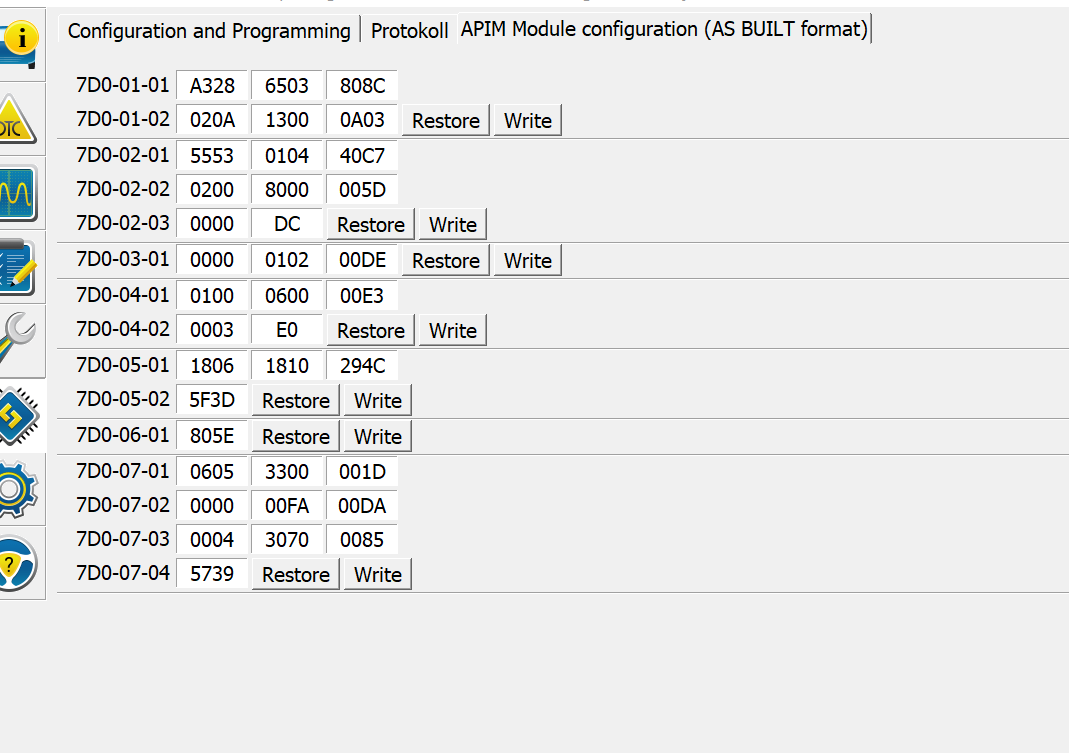
Here is the AS Built data from my vehicle. That’s how it was originally. I then changed A328 to A338, which automatically changed the last value from 808C to 809C, as well as the second line. The APIM probably adjusted this automatically.

However, USB is still not displayed under Source.

As already mentioned, I have Sync3 version 1.0 build 15139.

What I don’t know and haven’t tried yet is to use the automatically created update stick that I created here. I think, or thought, that the APIM should also display an MP3 stick on FAT32, or am I wrong? Would the update stick be recognized differently? So FAT32 no, but update yes???

I do not think it rules out a harness issue as a bad harness can be a cause of degraded communication between hub and APIM giving you problems. Unless someone has been inside the dash already, I do think this would be low on the suspect list.

The USB hub has only two physical connections:
One is a small 2-pin connector, which most likely supplies power only for the hub’s illumination, and the other is the USB data cable that connects directly to the APIM (depending on model year, this is a Mini-USB or a Ford-specific connector).

The following behavior is noticeable:
The message “This USB device is not supported” appears only when the engine is running, if the USB hub is unplugged and plugged back in.
If the vehicle is off and then started normally, this message does not appear.

This raises the fundamental question of whether this behavior could still indicate a possible wiring or cable issue between the USB hub and the APIM — for example degraded or incomplete data communication that may trigger some reaction but does not allow stable operation.

Additionally, I would like to know whether, with SYNC 3 version 1.0 (build 15139), it is possible that a FAT32-formatted USB stick containing MP3 files is not detected or not shown as an audio source, while a pure update USB stick might still be detected.
I have already created a CyanLabs update USB stick, but have not tested it yet.

In this context, I have read that a USB 3.0 flash drive may not be suitable for updating from SYNC 3 v1.0 (15139) to a newer version.
I would appreciate a clear technical clarification on whether this is actually true.

I am genuinely open to any ideas, as I am close to giving up trying to get this working.
To make matters more difficult, I am located in the Dominican Republic, where the only Ford dealer in the country is about 300 km away, and it is uncertain whether they have sufficient experience with SYNC 3 issues at this technical level.
For this reason, I am truly dependent on any help.

I am also willing to try replacing the USB data cable between the hub and the APIM, but I would need to order it first.
If anyone can provide a specific part number, cable specification, or purchase link, that would also help me significantly.

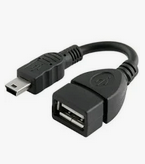
Get one of these and connect it to the back of the APIM. Plug in your USB drive and format it as exFAT. If it works, the issue is not your APIM.

Use a multimeter to check voltage at the USB hub connector. You should have 12 V on pin 1 and ground on pin 4 (verify pinout to be certain before probing).

Also, confirm whether your APIM has two mini-USB ports. Which one are you using—the gray port or the black port?

Update completed successfully.
The update went through without any issues, and I’m now on version 3.4. Since this was an automatic update followed by a reconfiguration, it did not install the very latest version.

CarPlay works perfectly, and the installation via a USB 3.0 flash drive was smooth and problem-free. Contrary to some reports here, I can confirm that USB 3.0 does work.

Most likely, my older USB 2.0 stick with MP3 files simply wasn’t recognized. I haven’t tested MP3 playback further yet, but I’ll try again using a USB 3.0 stick and will report back.

Overall, everything works great—with one exception: the navigation doesn’t open. The navigation button at the bottom of the screen can’t be selected, so it likely needs to be updated separately.

Well thats great it works now. No one knew any better because of what you said before.

So if you look at the APIM asbuilt you posted it is programmed for NAV….but you don’t mention loading the nav files.

USB for media should be formatted as ntfs as recommended by Ford.

1 Like