2017 MKC stock with the exception of a 4g TCU - Awhile back I updated the firmware in the APIM and am now stuck with a U3000 DTC code. Where can I find what files I should flash to make everything happy?
This is the log when connecting to the APIM using Firmware Update.
[20:41:35.481] APIM Module firmware update has been started
[20:41:35.491] Reading vehicle info…
[20:41:35.653] Unable to read current firmware p/n, use assembly p/n: GB5T-14G375-CA
[20:41:35.764] Unable to read current firmware p/n, use assembly p/n: GB5T-14G379-BA
When I initially updated the firmware I was having a black screen issue and can’t remember what I had before. The files listed above was the end result that got everything working but resulted in U3000 DTC. Any ideas on what I can do to make this right?
SYNC Region: NA
Navigation Variant: Nav
Manufacturer Year: Pre MY20
Install Type: OEM
Old SYNC Version: 3.0
New SYNC Version: 3.0
Do you have a error message, if so what is it?
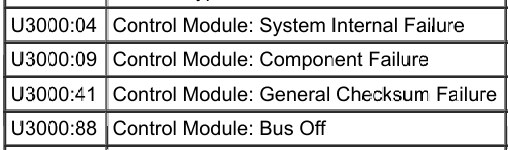
DTC U3000
I don’t think I tried that. So your says just load the current APIM AB configuration and force write it? Just want to be sure I understood correctly. Murphys law follows me heavily LOL
Hey, I’ve reloaded the current configuration below, write all, and did two master resets back to back with the same U3000:41
7D0-01-01 222A 0500 244E
7D0-01-02 828B 0000 8A71
7D0-02-01 5553 0104 C047
7D0-02-02 8240 9000 002D
7D0-02-03 4005 21
7D0-03-01 0000 0202 00DF
7D0-04-01 0100 0C00 1B04
7D0-04-02 0001 DE
7D0-05-01 1860 186A 2900
7D0-05-02 5432
7D0-06-011 805E
7D0-07-01 1200 3300 0024
7D0-07-02 0000 1A0A 0004
7D0-07-03 0056 5675 0002
7D0-07-04 7E60
After the first attempted I tried to rewrite all again along with two master resets but still no dice. For the hell of it I tried load factory AB and below is the only line that changed.
7D0-02-03 0005 E1
I tried to write all along with two master resets and same DTC U3000:41 So I gave it another write and two resets and still no dice.
It will drive you nuts trying to get rid of it. I got rid of it one time and than a week later it came back. I gave up since it does not effect anything.
I’ve seen the CB potentially causing bricked units in other post but assumed since it was already loaded I was safe. I did however try to check out swapping it with CD but when I change it to custom and try looking for the file it’s not downloaded. I tried to click download but then get a message that I’ve already have all necessary files downloaded. Wasn’t sure where to grab the CD file to attempt to rewrite.