So I’ve run into a couple issues I thought I would see if others have had it as well and see if there were any answers found.
This is on a MY18 Focus RS. I have the latest Forscan (2.3.70) with a 1yr license I purchased to allow (or thought) the ability to update APIM calibration files.
Also have the “vLinker FS v2.3.04 MIC3322 V2.3.04 (ELM327 v2.3)” which was a recommended OBDII on Forscans site.
I possibly may have a few issues which I will get to later after.
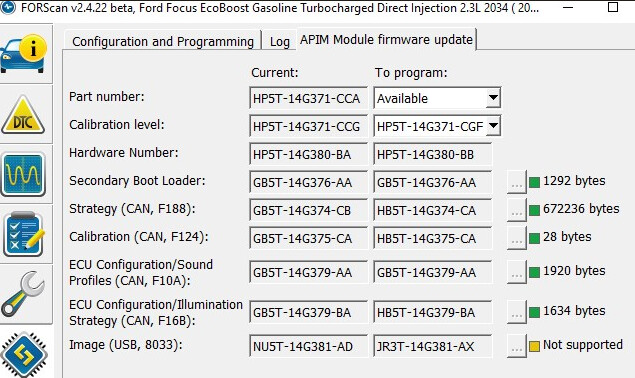
IGNOREanswer found below in post 3 > First up, has anyone successfully updated their calibration files? If so, then you had the “APIM Module Firmware Update” in the Configuration and Programming menu. Cause I do not and only have the two APIM Module Configuration selections. Haven’t found why I wouldn’t see the update portion.
Should look like this I believe?
2)Second up, do older ForScan work better than the newer? When I first connected a long while ago and downloaded all my module configs I was able to connect to them just fine.
I now can connect to all the modules without issue, with the exception of the two APIM which is getting the “service procedure interrupted”.
If I try a few times to connect to the APIM (as-built) it will eventually connect however it only displays two of the addresses.
I looked at DTC and do not see any errors.
So I’m at my wits end on what to do and can’t seem to find an answer searching…I’m hoping someone may have had a similar issue that they could point me in the right direction. Or is this something to discuss with ForScan Forums?
Quick side note - I did read where everyone says to use v2.4.x, however I have to be blind as I search for that (even used the links folks provided) and no dice.
SMH - I swear this is always how it works….I search and look, read and read, trying to find out where things might be. Give up after long search and post.
While waiting for an answer, I continue to give more time. Low and behold, I finally found a link to DL the v2.4.x.
For the uninitiated and don’t spend the frustrating time of searching - quick how to…
you MUST log into ForScan (had an account and thought I was logged in…)
@F150Chief - yeah my intention was to look and update the calibration files for APIM.
However after trying to look back through the APIM files I attempted it with the newest version (and 2.3.69) and it is giving me the same communication interrupted.
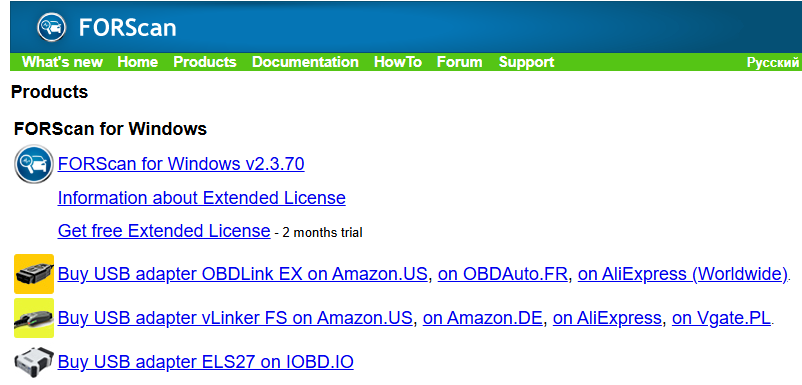
The Vlinker was a supported unit at one time. Plus when I went to ForScan’s site to vet this in their DL section it shows the following:
Am I missing a communication somewhere from their site? Or that info is just not updated currently?
I suppose I can ask the guys at ForScan which version was the last version that the VLinker was supported so that at least I can attempt to communicate for the time being. However I’m then guessing that I should not attempt any calibration file updates if I can’t communicate any longer with the APIMs
Vgate is using a USB chip with compatibility issues, and they outline the workaround on their webpage. Not speaking for the FORScan guys, but until Vgate resolves the issues it will likely remain off the list unless something has recently changed with the adapter.
However, this does not mean the device will not work, but you will need to modify the setup of the device. See the Vgate website…
I have now looked at what APIM updates are available, I have read a few different threads and don’t want to conflate things I’m reading. If it’s best I push this to the current “Updating APIM” thread I will remove this and put it there.
So my understanding is I have a pre-18.5 that is a gen2? Currently using Sync 3.4 v23188.
And because of the gen2, I believe the most current FW I should only use are:
Strategy:HB5T-14G374-CA
Calibration:HB5T-14G375-DA or FA(as I have NAV)
And it looked like it is not recommended to use any of the 1U5T FW files as it could brick and there are no advantages to doing so?
My end goal was to ensure I had APIM cal files updated so that I can then turn to start using FMods. Then I saw their “how to” on updating the APIM files here: https://www.fmods.net/community/viewtopic.php?t=243
As I read through this thread what threw me was A-Team mentioned MY18.5 calibration files can be used on all APIMs. This threw me a bit of a curve ball or I just misunderstood the his meaning.
The last piece of the pie for me, is where does one go to DL the calibration files or it looks like it might be just requesting it from the forum members of the ones needed?
FMods is correct, you CAN use the MY18.5 files on all APIMs, but older ones can have issues doing so. You should be able to use the newer files on an H series APIM. I would recommend using the -DA version, but you could go further IF a mod requires it.
@F150Chief - have I sadly missed where the repository of .vbf files are available for DL? I’m beginning to feel like I have passed it over in everything I’ve read up until now.
Or is it a simple request in the forum?
Originally the APIM update instructions were to DL available firmware for programming and use those to upgrade.
Updated instructions talk about DL custom firmware files and use those for upgrade. Correct me if I’m wrong but there is no custom DL, that custom is just used to select the files you want to select for an upgrade.
I will follow your recommendation of using the -DA file for the calibration - thank you for that.
So I will need to obtain the Calibration:HB5T-14G375-DA file as it wasn’t during the available DL. Then also grab the 1U5T-14G374-CA and 1U5T-14G375-DA (in case for later use on any FMods I may grab that need it).
Appreciate all your time and help in contributing to this forum and helping others.
Cheers!
Just to tie this last part together for getting the files…I had to get them from someone who had them. I never found any information on where to go and download them.
"Hi @F150Chief, I am very sorry to jump in on your post like this. I am new to the forum and I’m just wondering if you could direct me in the way of requesting calibration files?
I’m working on a 2014 UK Fiesta power-fold mirror retrofit. I have successfully flashed the DDM/PDM to CV1T-14C064-AG, but I’ve got a protocol mismatch with my IPC (AV1T-15K600-EK). FORScan 2.4.x is 404ing on the binary downloads and I can’t get past it.
Could you please help me find these files so I can sync the mirrors?
SBL: C1BT-14C025-BB
Strategy: C1BT-14C026-XP (or AR / XN)
Signal: C1BT-14C088-XP (or AR / XN)
I really appreciate any help you can give me to get this sorted. Once again I do apologise, I hope I haven’t broken any rules of some sort."
Thank you so much for the quick response and for confirming that about the Ford site—it saves me a lot of time banging my head against a 404 error!
I really appreciate you pointing me in the right direction. Since I am a paid FORScan user, I’m trying to handle the engineering and calibration side manually to get this retrofit sorted properly. I’m essentially looking for the final legacy revisions for the CGEA 1.2 protocol that will actually ‘handshake’ with my 2014 IPC while supporting the power-fold logic.
If you happen to have the SBL, Strategy, and Signal files in your archive, or if you could point me toward a mirror that still hosts them, I would be incredibly grateful. I’m just trying to bridge that protocol gap so everything finally ‘sinks’ together.
Thanks again for your time and for all the help you provide to the community, it’s massively appreciated!"
 Please stop posting multiple consecutive messages, use the edit button instead. I’ve merged all your messages… You are basically talking to yourself…