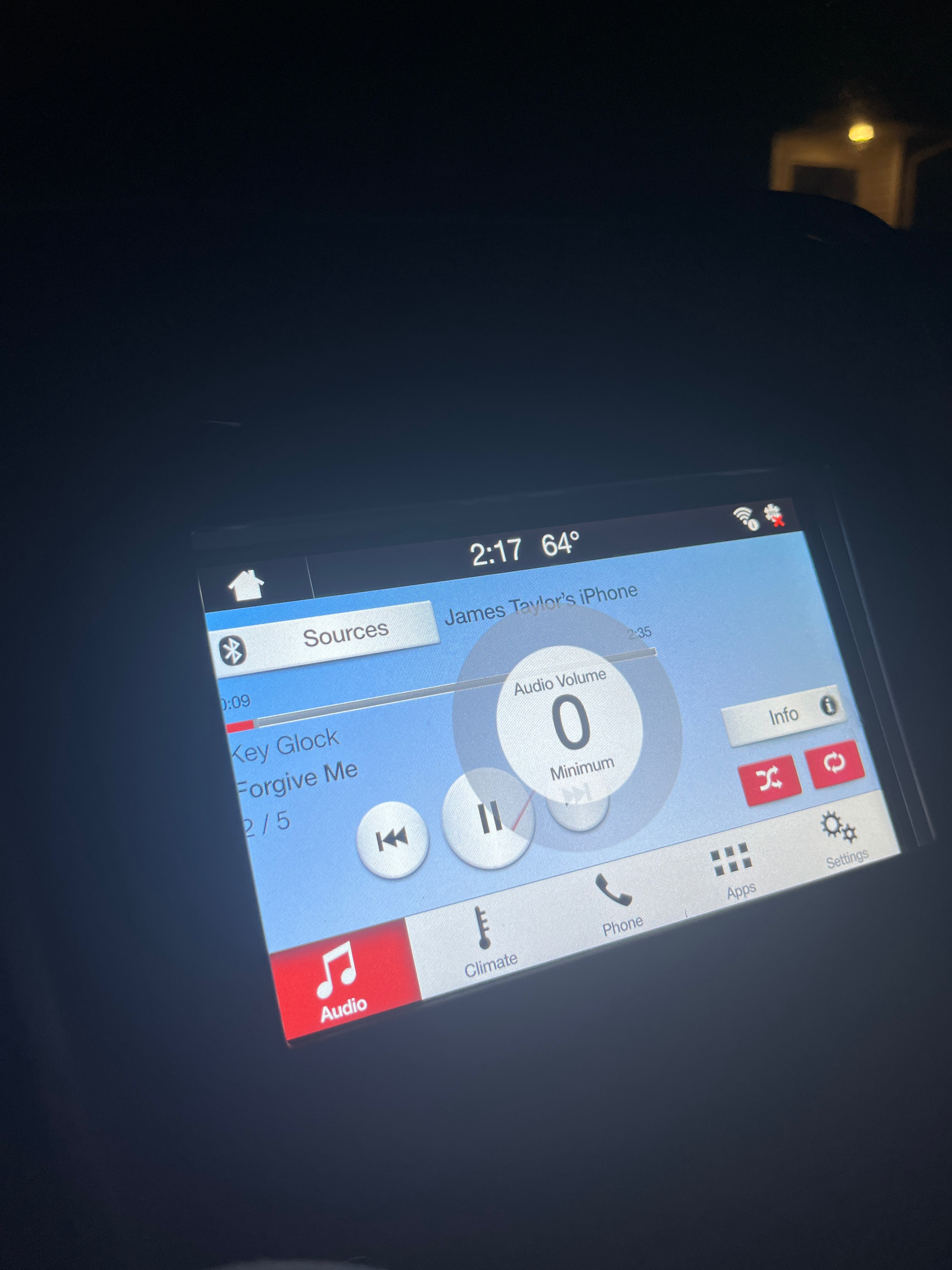
Hello all, I am new to this forum and to Fords in general, so any help would be greatly appreciated.
I recently bought a 2014 Fusion SE with the 4 inch sync system. I bought a used Sync 3 from a 2018 Ford Fusion. It came with the APIM and Display tied together still. I also got a climate control bezel from a 2016 fusion. I bought a conversion harness on Amazon, and I bought the new USB hub that’s required for Sync 3. When I started my install, basically the first thing I did was unplug the old sync module that is down in the footwell area, plugged the conversion harness into it and ran it up through the radio area, and then I plugged the new Sync 3 display into the harness. The radio came on and surprisingly everything worked without needing to hook anything else up. I unhooked that and started to hook everything that goes onto the harness together. After connecting everything, I now have no audio at all. My door chime is back to the cluster, the Sync 3 display still works but has no audio, will not open the “Audio” menu or display any volume or mute setting when any button is pressed. The Siri does work when I do it from my steering wheel but can’t hear it. If I hook everything up how it was from the factory with the 4 inch display, that one will only show the date&time and temp outside. Attempting to power it on just shows the splash screen for a moment and then back to the time. I did try disconnecting the battery and unhooking the 2 fuses that power the radio and center stack under the dash, but no luck. I did not adjust any ForScan data, and it doesn’t even show up with my APM as a module at all. It did before but now it won’t. I’m sure this has been asked and answered a million times, but I couldn’t find anything that matched my situation. Haven’t updated anything. Thanks again.
The FCIM you put in the car was intended for a car with Auto/dual climate controls, you need to fix the APIM config for that.
Audio problem would indicate that more than likely the APIM came from a Ti/Platinum/Sport with the Sony audio, you need to fix the APIM audio config with Forscan.
So, here’s where to start, get the VIN for a 2017 SE with the tech package from a used car site and download the factory AB from https://www.motorcraftservice.com/Asbuilt/ .
Start ForScan without a saved profile so that it can pickup the new APIM & FCIM, load the AB from the 2017SE into the APIM, after the reset tweak the little items to match (eg the car doesn’t have heated seats or NAV so removed them from the APIM settings).
This should give you back you’re audio controls, after this you’ll need to fix the climate in the APIM to match the fact that you have manual not dual/auto and update the VIN in the FCIM.
Thank you for the reply. So just to confirm, this isn’t ACM related? My vehicle did have the static/slight popping before the conversion, and it did still have it while it was briefly able to play audio with the new Sync 3 HU. What would cause the ACM to no longer show in ForScan? Why did it work the first time I hooked it up, but stopped after finishing the whole setup? Also, what would I need to do to return the system to stock Sync 1 in the event I can’t get this going? I hooked up all my original tech and everything booted, but same issue. 4 inch stuck on black screen with the date and time. It isn’t frozen, it does show the splash screen when i hit the power button but it ends up back on the clock screen. When I scanned the first few times, it showed the ACM in my service procedures, programming, and my code reading. Now, it’s like it doesn’t even exist. No error codes for it, it’s like it doesn’t remember it’s supposed to have one. Also, I was having issues attempting to adjust AsBuilt data for the ACIM. It spat an error code at me. I will update later with the specifics of what the computer says. Thank you again for your help!!!
Forgot to ask, but in regards to the climate, there is no other effects if I leave it wired wrong, other than my heat and cool are backwards? I noticed last night that if I set to max AC, its hot air, but if i set to 85 degrees then its ice cold. I don’t have a problem with that as I will be the one that rides the car until the wheels give in, as long as it will not cause other issues.
Gotcha thanks, I’ll take a look when I’m off work. So, if the pin out was wrong, wouldn’t that have prevented the system from playing audio the first time I hooked it up? Or is it one of those things where the computer needed some time to realize it was confused and go into lockdown? What could be preventing my original sync 1 system from working now if I didn’t make any adjustments other than physically swapping modules, no programming or updates? Sorry if I’m asking a lot of questions, just want to make sure I fully understand what I’ve gotten into. Thanks for your time!
So, I got home and pulled out the good old ForScan to program the APIM. I pulled the data off a 2017 Fusion SE with the center display, same FCIM as mine. I programmed all the asbuilt data to the APIM and rebooted it, I did see some changes but nothing torwards my goal of getting audio back. Most of the changes were just the correct features being implemented instead of the ones that were from a higher trim vehicle that the unit came from. I did notice that if I load up the profile I originally had saved from before I ever tinkered with the radio, it shows the ACM but will not allow me to do anything to it. It shows module detected and then says unable to read DTC. Trying to edit or reboot it shows not supported.
It’s an ELM327 with the HS/MS switch. I haven’t heard the greatest of the quality from these, but I haven’t had any issues with it. Up until this swap, it read and wrote every module I needed to just fine. Also, it’s only seeing the ACM when I load from my very first saved profile. It isn’t actually recognized I don’t think, because it shows Sync 1.1 as my version but if I load without a profile, it shows Sync 3. I honestly just want my music back lol, so whatever I have to do to get the audio working whether with my sync 1 or sync 3, I’m willing to try it. I did jump the gun and buy a new ACM but I am not convinced it will fix the issue. Thanks
Since the radio worked before hooking the adapter harness fully up, I would suspect the harness.
Have you unhooked the harness and put everything back to OEM to see if everything works?
Unfortunately the harnesses you get from different e-tail sites may have the appropriate connectors but not necessarily all the wires in the correct place. One harness that I got for my conversion had the APIM connectors in reverse order. Only reason I caught it is that I will verify wiring harnesses I get from e-tail places with OEM wiring diagrams before I use them.
So, after I hooked it up initially I literally had the wires completely outside of the dash and ran down by the passenger seat to the module down there. I hooked the screen up and it turned on, I connected my phone to see if this one boomed any louder than the old one. Tested it, unplugged the screen, and pushed the wires through the little cavity by the module and up into the hvac / radio area. No dice after that. If I unhook all the harness’ and put my factory equipment back in, it turns on but is the exact same way. I can interact with it, but a lot less than the sync 3. The only thing I can do is open menu and the only settings to change is clock and display. Reboot doesn’t fix, battery cycle doesn’t fix, nothing i have tried is fixing it. My phone still connects to it. I tried that before I messed with any asbuilt data or programming. Thanks for your help
Since you were pushing wires through a cavity, check the wires for any breakage.
If Forscan cannot see the ACM either the unit is bad, no power going to the unit from the harness, bad ground to the unit, or a break in the communication wires to the unit.
Since you bought a new ACM, plug it in with everything connected OEM. If it does not work, then somehow the OEM harnessgot damaged.
fuse is all good. New ACM arrived today. I unhooked the harness and plugged it directly into the factory harness, but still have the sync 3 screen hooked up on the harness connected to the sync module. The ACM boots and is recognized by ForScan. Still no audio. If I reboot the ACM, i can use the audio menu for a short time until it boots back up. There is no sound during this time that it lets me use the menu.
Hooking up the original sync 1.1 with this new APIM shows better results than originally. I can get past the splash screen on this one, and it will open the radio and Bluetooth but still no audio, I also notice the eq is not adjustable from flat. It moves one bump and returns to center.
So, when I hooked up the sync 3 after having the sync 1 back in and trying to get it working, the Audio tab was working on the sync 3. The volume was staying stuck at zero though. I toyed with some stuff in ForScan and I’m back to the same result of no audio tab, no volume indications.
while I had everything hooked up, I decided to try swapping the original ACM back into it. This gave me some audio, and the audio menu back, but now my volume is stuck at zero. It does give audible feedback when I make selections on the touchscreen. I’m at a loss
So what are the Ford numbers for your original and new ACM and your original SYNC1 and new SYNC3 APIM?
Upload pictures of the stickers and the connectors found on each unit.
Point me in the direction of the wiring harness adapter you bought.
Post the asbuilt of the SYNC3 APIM.
I had a volume issue one time when I updated my ACM for enhanced SiriusXM capability. I had to add a couple of wires between the APIM and ACM followed by an asbuilt adjustment of the APIM to get it to work. All that to say, sometimes it is wiring, sometimes it is programming, and sometimes it is both.
Honestly, I think I got to a decent stopping point. When I switched the original APM back in, I found that the audio was back and working. The volume level doesn’t display but the volume does change. I’ll take it as a win. I’m surprised it is working with all the mixed up asbuilt info that I tried from other cars. Thank you guys for your help!!!