How to get HD Radio to work

My 2019 Mustang had the 4" screen and I bought a 8" screen and APIM and a matching ACM from a wrecked higher trim 2019 Mustang. I installed it and did nothing else and it works. However I remember that the ACR said HD Radio on it and I do not see that available on the screen. What do I need to do to enable HD Radio? I have read online that I need to reprogram the VIN in the ACM to match my VIN. I also read about incrementing a register by one to turn on HD Radio. Could you clear up what I need to do? Thanks


SYNC Region: NA

Navigation Variant: Nav

Manufacturer Year: Pre MY20

Install Type: Retrofit

Old SYNC Version: 12345

New SYNC Version: 12345

Do you have a error message, if so what is it?
Not a sync upgrade issue.

Update Method: Official Ford
There is no VIN in the ACM.

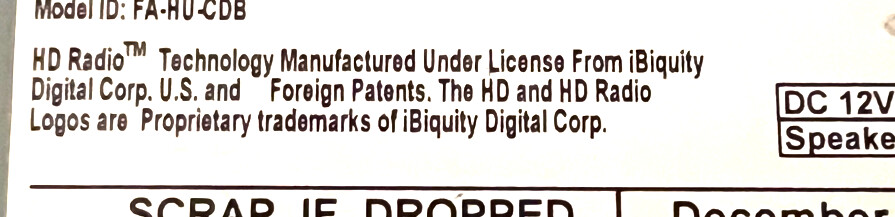
You need to use Forscan to make sure the APIM has HD Radio turned on. Double check you ACM to make sure it has a sticker like the one below to ensure it has the capability.

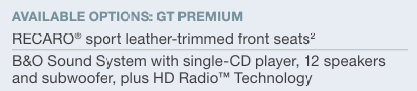
After a little more searching it appears that you have to have the B&O system in the Premuim packages before HD radio is added. I did not find it in any other trim so hopefully thats what you got.

image

Assuming you have an HD radio ACM here are the ForScan options to make the enable/disable button show on the screen.

DE00/7D0-01-01: xxxx-xxx*-xxxx

Values

0=DAB Disabled, Dual Zone, Steering Wheel Angle Relative, HD Radio Disabled
1=DAB Disabled, Dual Zone, Steering Wheel Angle Relative, HD Radio Enabled
2=DAB Disabled, Dual Zone, Steering Wheel Angle Absolute, HD Radio Disabled
3=DAB Disabled, Dual Zone, Steering Wheel Angle Absolute, HD Radio Enabled
4=DAB Disabled, Single Zone, Steering Wheel Angle Relative, HD Radio Disabled
5=DAB Disabled, Single Zone, Steering Wheel Angle Relative, HD Radio Enabled
6=DAB Disabled, Single Zone, Steering Wheel Angle Absolute, HD Radio Disabled
7=DAB Disabled, Single Zone, Steering Wheel Angle Absolute, HD Radio Enabled
8=DAB Enabled, Dual Zone, Steering Wheel Angle Relative, HD Radio Disabled
9=DAB Enabled, Dual Zone, Steering Wheel Angle Relative, HD Radio Enabled
A=DAB Enabled, Dual Zone, Steering Wheel Angle Absolute, HD Radio Disabled
B=DAB Enabled, Dual Zone, Steering Wheel Angle Absolute, HD Radio Enabled
C=DAB Enabled, Single Zone, Steering Wheel Angle Relative, HD Radio Disabled
D=DAB Enabled, Single Zone, Steering Wheel Angle Relative, HD Radio Enabled
E=DAB Enabled, Single Zone, Steering Wheel Angle Absolute, HD Radio Disabled
F=DAB Enabled, Single Zone, Steering Wheel Angle Absolute, HD Radio Enabled

I did some more reading online. I read that I need to write to a register in the ACM.

727-01-01

x0xx-xxxx-xxxx

Do I need to do this or just the APIM register?

You shouldnt do anything to the ACM without doing the APIM first to see if a change is even needed.

Once the bit is flipped you should have a button to enable/disable HDR.

Keep in mind depending on your area you may have no HD stations or quite a few of them.

Nope, You dont need to do anything with the ACM. It should already be set for it to be turned on if you have an ACM that is HD compatable.

You cant just turn it on if it does not have the hardware.

“It should already be set for it to be turned on if you have an ACM that is HD compatable.”

Not entirely true, the ACM will have the HD tuner in the last state it was in.

If HD radio was turned off on the donor vehicle prior to the ACM being pulled, dropping the ACM in another vehicle will not immediately turn the HD tuner on, the APIM toggle/button has to be used to enable it.

Conversely, take and drop an ACM with the HDR active in a vehicle without the setting in the APIM for HDR enabled you’ll get the HDR stations (eg 100.1 -1, 100.1-2) but tuning may be a little wonky trying to get to the extended HD stations (say double or triple push to go from 100.1-1 to 100.1-2).

Not true, the APIM will turn off HD Radio in the APIM so you will not have the option but it will not effect the ACM. The ACM does not know the difference and still recives and processes those signals.

Where are you getting this info?

I’ve actually done it and seen it.

The first time I ran into this was from dropping an HDR ACM, enabled the APIM control in an SE without it, car went into the dealer 3 months later to get the PSCM replaced and the tech took the whole car back to AsBuilt, so the HD radio channels showed on the ACM but it was hard to jump between them. Flipped the bit on the APIM to enable the HD enable/disable toggle and all was good.

Had another one where the guy ordered an HDR from a guy on eBay, part was right but the HD stations wouldn’t show, enabled the APIM bit so the control showed on the screen, toggle showed off, flipped it on and everything worked.

The APIM HDR toggle enables/disables the iBiquity IC function, its not a question of it it receives the signal its a case of if it presents that tuner for use.

Take your 2020 Fusion, disable the HDR using the APIM control button, then change the APIM to remove the HDR toggle, you’ll have no HDR available. Then go in, enable the toggle, flip the HDR on, then remove the toggle on the APIM, the HDR will still work.

The ACM follows last state the iBiquity IC was in, the APIM bit just gives it the logic needed to control the iBiquity IC, enabling the bit in the APIM doesn’t by default flip the iBiquity IC on or off.

OK. I had a chance to go out and try it. I updated the bit in the APIM it was a 2 and I changed it to 3 to enable the button. Then after the power down and up it had the button shown. It was already enabled. However, I am not getting any HD radio stations. I am in Dallas and we have a lot of them. It is interesting that the button was already on. I tried cycling the button off and on, but it made no difference. I know the label matches the one bill32399 posted. It says HD radio on it. In fact, this came up because I recently bought a 2019 Escape Titanium and it gets lots of HD stations. Any more ideas? Do I need to write something the ACM?

OK. I made another change and its still not working. I found the definition on Cyanlabs for ACM 727-01-01. Second bit. Mine was set to 8 and that has HD radio disabled. I changed it to 0 so that HD radio would be enabled. Still no HD stations. Any ideas?

I think the issue may be that the ACM does not support HD radio. I looked in Forscan and it says the ACM is KR3T-18D832-BC. I would swear it said HD radio on it though. It has Sirius radio. Do you all know if this can support HD Radio or not. I am getting mixed answers online.

This ACM does not contain the HD chipset. It came out of a GT but it was not the GT Premium that has the HD Radio. You are correct it would have Sirius.

That would also explain why the AB Value in the ACM was set to disabled.

Thanks for that. If I were to look for one that does have HD radio on Ebay what would be the correct part number? Also, will it work with the base speakers? I bought the base model with the small screen because it was cheap. The upgrade to the larger screen has been great.