Possible new F14 map version

I always had updated my Kuga PHEV 2020 Sync3 and maps with official method/web from Ford. Last time upgrade from 3.4.23188 to 3.4.26057 didn’t workef, so I used Syn3 Updater and then worked like a charm.

Just after uploading the upgrade XML file to Ford’s web, a new “full version” (25GB) of the maps appeared. I have downloaded it several times but I always get the same error LST_ERR03. I read in the forum this could be related with a wrong autoinstall.lst file, but reviewing all file names they seem to be in the right place.

Cause that error my intention was to use Syn3 Updater to upgrade maps as well but the ones downloaded form Ford look newer (file name is Map_25317896074_Update.zip and .tar.gz files inside it are from 25th of June 2026) than latest ones in the applicattion: F13 (2024) - EU (09 2025).

Maybe these maps downloaded from Ford are the new F14 version? Please, could you help me installing them into my unit?


SYNC Region: EU

Navigation Variant: Nav

Manufacturer Year: MY20

Install Type: OEM

Old SYNC Version: 3.4.23188

New SYNC Version: 3.4.26057

Do you have a error message, if so what is it?
LST_ERR03

Update Method: Official Ford

Lets make this simple.

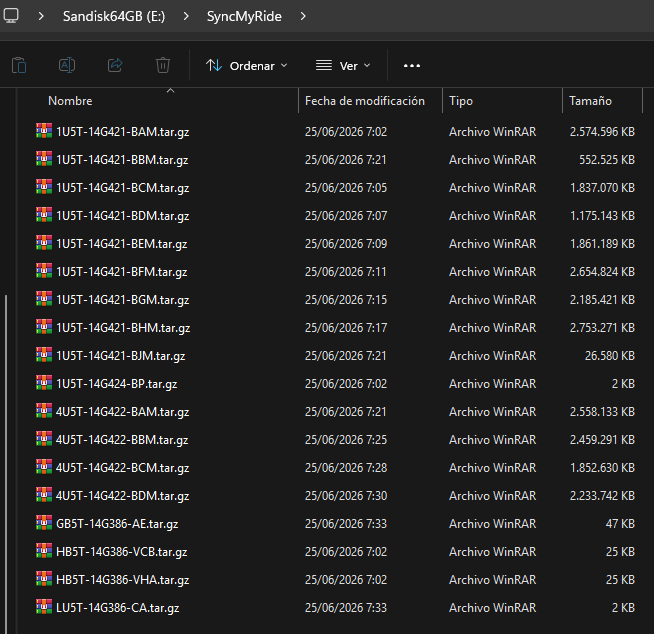
Share the autoinstall.lst file you are talking about, and provide a list/screenshot of whatever files are in the SyncMyRide folder, with the full name shown.

This is the autoinstall.lst file included in the ZIP file downloaded from Ford’s website, but I have also tried changing the version number to the newer one:

; SYNC3 Consumer Application Upgrade - Release 3.4.23188 - Only for Nav/EU assemblies.

[SYNCGen3.0_3.4.23188_PRODUCT]
Item1 = HB5T-14G386-VCB
Open1 = SyncMyRide\HB5T-14G386-VCB.tar.gz
Item2 = HB5T-14G386-VHA
Open2 = SyncMyRide\HB5T-14G386-VHA.tar.gz
Item3 = 1U5T-14G424-BP
Open3 = SyncMyRide\1U5T-14G424-BP.tar.gz
Item4 = 1U5T-14G421-BAM
Open4 = SyncMyRide\1U5T-14G421-BAM.tar.gz
Item5 = 1U5T-14G421-BCM
Open5 = SyncMyRide\1U5T-14G421-BCM.tar.gz
Item6 = 1U5T-14G421-BDM
Open6 = SyncMyRide\1U5T-14G421-BDM.tar.gz
Item7 = 1U5T-14G421-BEM
Open7 = SyncMyRide\1U5T-14G421-BEM.tar.gz
Item8 = 1U5T-14G421-BFM
Open8 = SyncMyRide\1U5T-14G421-BFM.tar.gz
Item9 = 1U5T-14G421-BGM
Open9 = SyncMyRide\1U5T-14G421-BGM.tar.gz
Item10 = 1U5T-14G421-BHM
Open10 = SyncMyRide\1U5T-14G421-BHM.tar.gz
Options = AutoInstall
[SYNCGen3.0_3.4.23188]
Item1 = HB5T-14G386-VCB
Open1 = SyncMyRide\HB5T-14G386-VCB.tar.gz
Item2 = HB5T-14G386-VHA
Open2 = SyncMyRide\HB5T-14G386-VHA.tar.gz
Item3 = 1U5T-14G421-BJM
Open3 = SyncMyRide\1U5T-14G421-BJM.tar.gz
Item4 = 1U5T-14G421-BBM
Open4 = SyncMyRide\1U5T-14G421-BBM.tar.gz
Item5 = 4U5T-14G422-BAM
Open5 = SyncMyRide\4U5T-14G422-BAM.tar.gz
Item6 = 4U5T-14G422-BBM
Open6 = SyncMyRide\4U5T-14G422-BBM.tar.gz
Item7 = 4U5T-14G422-BCM
Open7 = SyncMyRide\4U5T-14G422-BCM.tar.gz
Item8 = 4U5T-14G422-BDM
Open8 = SyncMyRide\4U5T-14G422-BDM.tar.gz
Options = Delay,Include,Transaction
[3,SYNCGen3.0_ALL]
Item1 = GB5T-14G386-AE
Open1 = SyncMyRide\GB5T-14G386-AE.tar.gz
Item2 = LU5T-14G386-CA
Open2 = SyncMyRide\LU5T-14G386-CA.tar.gz
Options = Delay,Include,Transaction

Here is the content of the SyncMyRide folder of the pendrive:

Thanks, way easier.

So did Ford push that your way?. The autoinstall.lst file is wrong, hence the LST_ERR03 (Error is LST_ERR_NO_APPROPRIATE_SECTION).

Looking at your file, this is wrong:

Try with [SYNCGen3.0_ALL]

As for the files, those are already listed in our db, so no new files.

Edit, I missed this:

Did you upload the interrogator log output to Ford after doing that?. I just noticed all the other sections point to 3.4.23188 in the section’s name, so you can update those as well and see how things go.

Yes, indeed this is the file downloaded from Ford’s web (I did it twice just in case).

Yes, map upgrade was “blocked” in the web till I have uploaded the interrogator log (I could share it here if needed). Right after, map update was available with that content.

With “update those as well”, you mean to put 3.4.26057 on those two sections?

That’s correct.
Since you sent the interrogator to Ford, Ford should know you are not running 3.4.23188, so I wonder why that’s there. But then again, the last section is not correct either, with that 3 at the beginning

Thanks, I will do those two adaptations and keep you posted.

I have already tried in my half an hour trip from the office. Now the upgrade started without issue, but although I waited one additional hour parked with the engine started (fortunatelly the electric one cause it is the PHEV version) it didn’t ended.

I will try again in a longer trip and with antoher pendrive just in case (maybe this onw was too slow?).

If you are upgrading maps, Syn3updater would create a 3 sections autoinstall.lst file. Overall install duration is 2-3 hours, depending on factors.

So, all those packages in just 2 main sections, they will take a long time.

What you can do is running an interrogator log to see what packages are installed. Then, edit the autoinstall.lst to install what’s missing, maybe a few at a time.

Thanks again, I will follow your advice. It seems only two first items in the first section are pending. I will try to update again with the modified autoinstall.lst
Not all packages are installed, the first 2 are tools. They run, do their thing, and that’s it.

You are interested in validating if the map and voice_nav packages are installed, those are the ones that are important.

If you want, send over the interrogator log or all the packages that are on the unit and we can double check that.

Here you have:

Modelo de APIM: LU5T-14G371-GKF
Tipo de APIM: Navigation
Tamaño de APIM: 64GB
Espacio libre en APIM: 28G
Versión 3.4.26057 (NU5T-14G381-AE)

Partition Type = Free / Total
/fs/sd/MAP/ = 976K / 1.2G
/fs/sd/MAP/ = 15M / 3.0G
/fs/sd/MAP/ = 14M / 2.4G
/fs/sd/MAP/ = 7.8M / 1.6G
/fs/sd/MAP/ = 17M / 2.4G
/fs/sd/MAP/ = 26M / 3.7G
/fs/sd/MAP/ = 312K / 41M
/fs/sd/MAP/ = 4.9M / 3.4G
/fs/sd/MAP/ = 27M / 3.4G
/fs/Nuance/ = 8.4M / 1.9G
/fs/Nuance/grace = 21M / 1003M
/fs/rwdata/ = 675M / 1.2G
/fs/rwdata/quip/ = 21M / 35M
/fs/rwdata/quip/ = 80M / 90M
/fs/mp/ = 84M / 1.4G
/fs/mp/resources = 332K / 72M
/fs/images/ = 28G / 54G

Installed Packages
1U5T-14G421-BAM
1U5T-14G421-BBL
1U5T-14G421-BCM
1U5T-14G421-BDM
1U5T-14G421-BEM
1U5T-14G421-BFM
1U5T-14G421-BGM
1U5T-14G421-BHM
1U5T-14G421-BJL
1U5T-14G658-AH
1U5T-14G424-BP
5U5T-14G391-AT
4U5T-14G423-AC

That’s odd… but, for the maps, all should be 1U5T-14G421-B*M (ending with M), you have 2 maps to install/replace (BBL and BJL).

But, there are no voice_nav (14G422 packages) listed as installed… So you could try 2 autoinstall.lst for half of those.

Done, according to Ford’s web page everything is updated now. Thanks for your help @SaNdMaN .

These are the packages finally installed:

1U5T-14G421-BAM
1U5T-14G421-BBM
1U5T-14G421-BCM
1U5T-14G421-BDM
1U5T-14G421-BEM
1U5T-14G421-BFM
1U5T-14G421-BGM
1U5T-14G421-BHM
1U5T-14G421-BJM
1U5T-14G658-AH
1U5T-14G424-BP
5U5T-14G391-AT
4U5T-14G422-BAM
4U5T-14G423-AC
4U5T-14G422-BBM
4U5T-14G422-BCM

4U5T-14G422-BDM

By the way, as you “predicted” still F13 maps, we will keep on waiting for F14 ones.

Glad it worked out fine, you are welcome.

Take care.