As the title says basically, I got my Sync 3 APIM installed today and everything works great except my radio stays on when the truck is turned off and locked, it’s not entirely on but the screen is still backlit and the usb hub is lit up like its not being told to sleep. when i turn the truck on it doesn’t display splash screen it just goes directly into the homescreen.
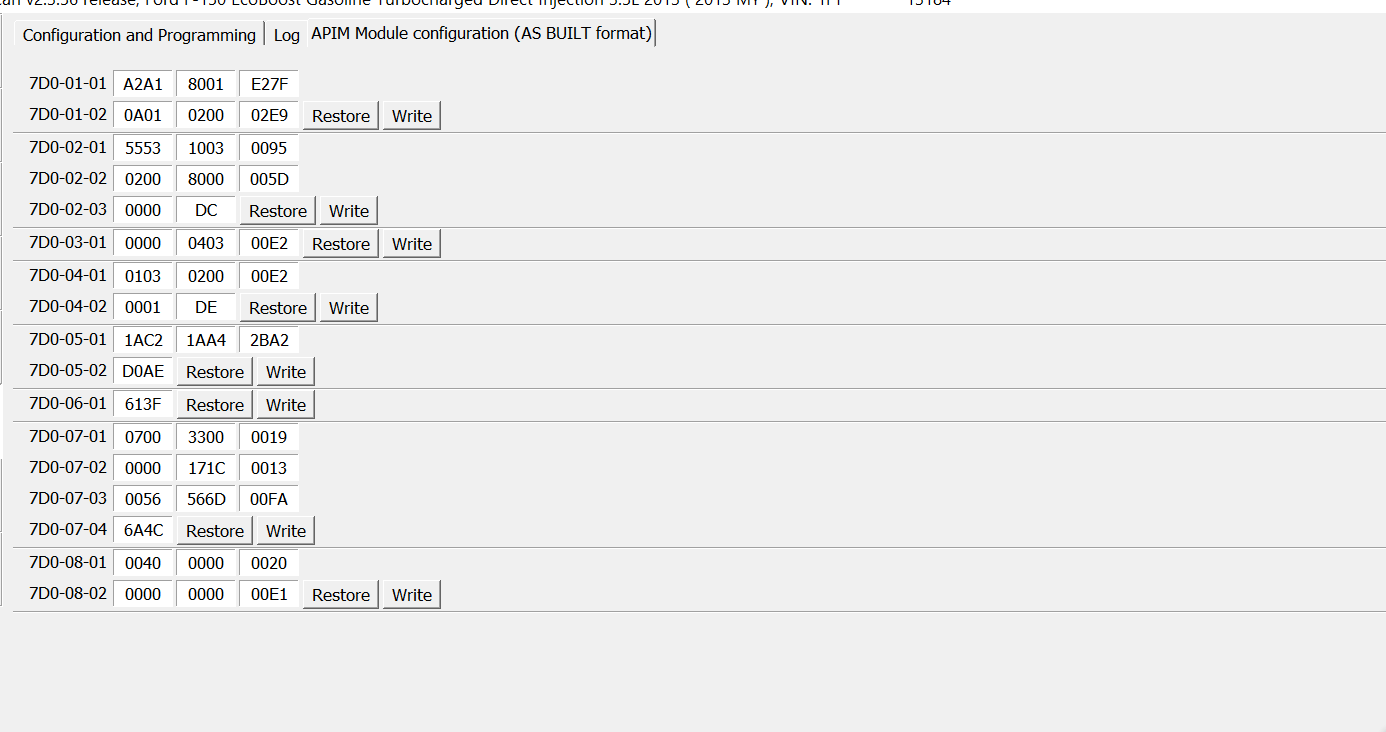
I’ve tried changing asbuilt 7D0-06-01 from x0xx-xx to x1xx-xx but the same results, I’ve gone as far as trying someone else’s asbuilt to no avail, it got late so i pulled the radio fuse, and to say the least I was pissed because i’m generally good with this stuff, any help would be appreciated
Side note I did see that 3.4 doesn’t work well when retrofitted inplace of a sync 2 system, is this related?
I did not do a master reset, I wasn’t aware I needed to after that but thinking about it now, it does make sense so thank you!
I just reloaded my asbuilt and changed the value to 1 again and that did make it goto sleep I believe but it’s daylight now so it’s kinda hard to see if the backlight is still on, I’ll update later when I can confirm.
Also is it normal for it to wake up when the truck is unlocked? It still doesn’t display the splash screen when I turn on the key it just goes directly into the home screen is this normal behavior?
That’s what I thought too, guess I’ll have to look through and see if I can find something that would fix that cause as soon as the truck is unlocked the backlight for it turns on
So changing the value to one and doing a master reset helped, the radio still stays backlit for awhile but eventually goes to sleep after it hits like 10 minutes or longer
Still sounds like the config is off.
Where did you source the config for the APIM from?
You can’t just drop in an APIM from another vehicle that had Sync2/MFT without doing some custom AB work and you can’t use the the AB the vehicle came with.
I understood that I couldn’t just drop it in and expect it to work I’m just not great at building AB from scratch the most AB building I’ve done was at ford and that was mostly by vin stock stuff or minor changes, I’ll upload my AB when I get home tonight thanks guys!
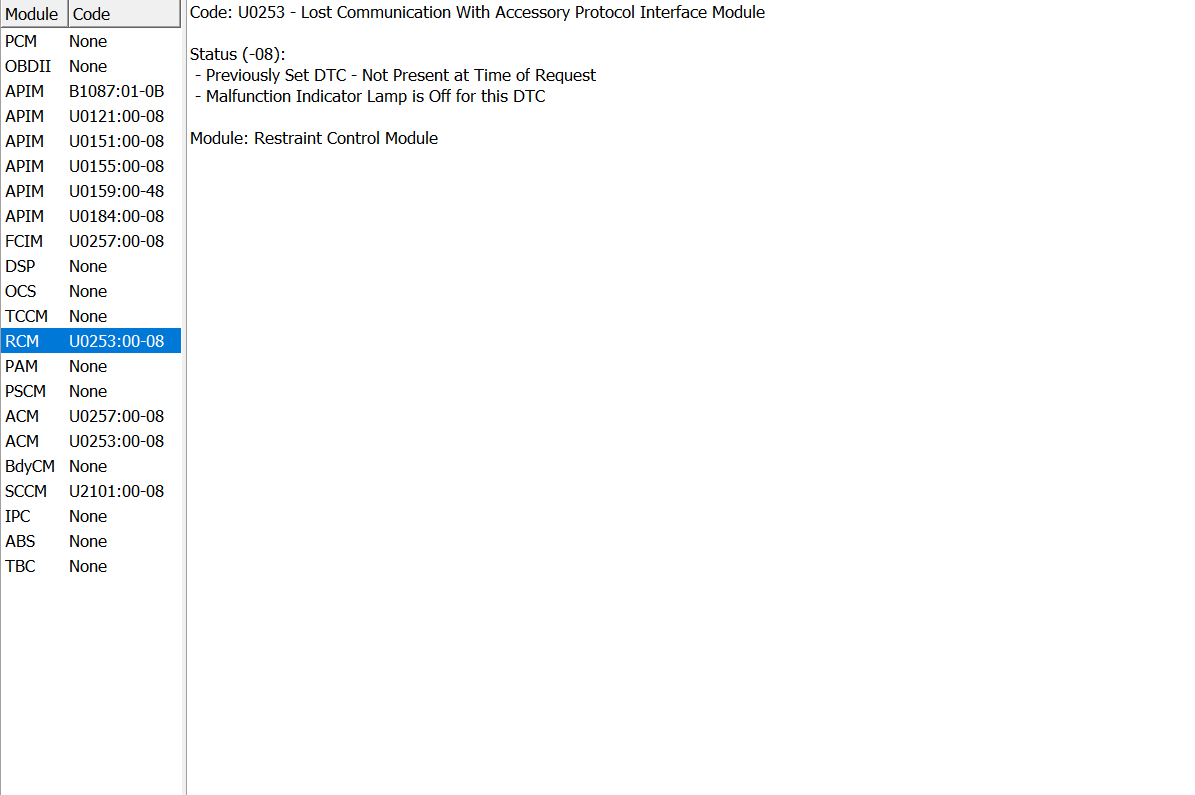
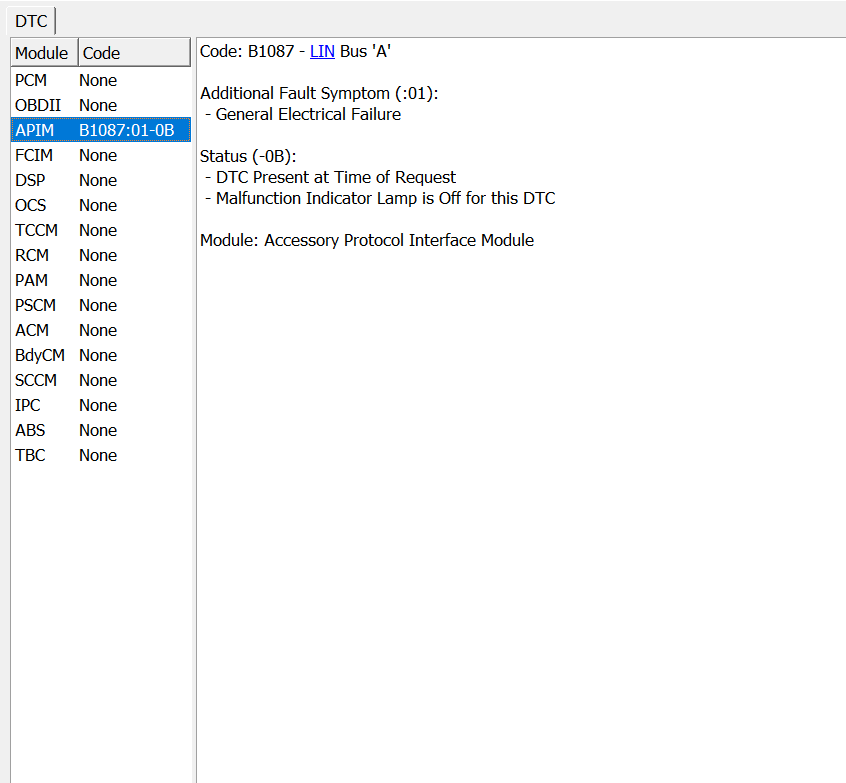
sorry for the book Ok here is my current AB & DTCs. RCM, ACM, SCCM codes just showed up they weren’t there yesterday which makes more sense as to my config being off, my question is then what settings do I need to use? like am I trying to program the APIM to MY truck or am I trying to trick it into thinking its working properly? And what modules do I not need to worry about? my truck is a 2013 F150 FX4 so it has the park sensors, remote start, heated and cooled seats, stuff like that but not so much some of fancy sensors newer fords come with.
if someone has time to go crazy and build me a AB by all means but i’m more than willing to figure it out myself if i can get pointers on the important parts I just couldn’t find the information on what matters and what doesn’t.
Me too they popped up when I scanned it for you guys, I assume it has to do with my asbuilt being off cause it’s all communication errors with the other modules, but see this is part of my question is how do I know what value to make the asbuilt that relates to these modules, like how do I know which one is correct?
You just go through and look at each one addressing them one at a time. Ultimately you should have no DTC’s on the APIM. I would start by clearing all DTC’s and see what you have left.
I would start by pulling the AB from Ford for a 2016 (since that’s the first year for Sync3 in the F150) which had your features and using that as a base, you can pull a VIN from used car sites and go to: https://www.motorcraftservice.com/AsBuilt
Here’s one for 1FTEW1EG0GFA79189 that I pulled from CarFax. 1FTEW1EG0GFA79189.ab (36.5 KB)
You can use AsBuilt Explorer to look at the deltas between what you have in your config now and this one, or you could just drop this one in and work backwards to enable/disable features as needed.
I did what you recommend and found a 2017 (not 2016 i didnt think there was much of a difference) It has sync 3 with similar features and used that to compare to mine using livnitup’s spreadsheet, and when I came across something that should be different I changed it still to no avail, I tried messing with different MC’s at 7D0-01-01 xx**-xxxx-xxxx still with no results, I did master resets on the APIM after rewriting the AB too.
Keep in mind when you look at livnitup’s spreadsheet that you need to pay attention to YEARS as there are settings which only apply to certain years and builds of Sync3 (eg themes that worked in 3.0.x but are deprecated in 3.3.x+).
I would still try a 2016 AB not a 2017 as 2016 is the closest year that the F150 had Sync3, even though there may be no real visible external changes, Ford does make changes to modules, firmware and wiring harnesses.
As a couple of examples, 2016 Fusions which were the last MFT year had one off year harnesses and some folks had compass issues after doing their Sync3 upgrade that they only resolved when by using the GWM from a 2017 (something people with 2013-2015 didn’t have to do). Someone doing a 2013-2016 Sync3 upgrade or folks that have a 2017/2018 can also not just use the AB from a 2019/2020, they’ll lose the steering wheel controls and RVC.
Gotcha. I have been paying attention to the 3.4 settings but I don’t see how it matters that much if I used a 2017 as a general comparison, i get that it could in theory work but everything is working perfectly the only thing that isn’t working is the screen will not fully power off when I turn the truck off, open the door and close it then lock it. I’ve messed with network settings, clock master settings, tried enabling hs4, messed with apim incase that’s keeping it awake etc. every other feature is there where it should be I don’t even have a dtc anymore I fixed all of them, I’m honestly more so leaning towards this being a apim issue being it is a replica
This is what I get after I open and close the door and lock it. Everything shuts off besides the apim and my sync 2 didn’t do this. It even does the shutdown animation
I’m talking to myself at this point but I’m gonna keep a log of my thought process on here for the next guy incase I figure it out. The only thing I can think of is this replica or sync 3 in general is more sensitive to power than my OEM sync 2 was, and I do have an aftermarket sub/amp in place of my factory subwoofer and my hypothesis is my line out converter/amp is back feeding power through the remote wire to the apim causing it to stay lit/awake. I will update if I figure it out tomorrow after work
If you’re taking the sub or any other component ground off the negative battery post it will cause a problem, it needed to be grounded to battery.
Easy way to see if you add ons are the problem, disconnect the power to them.
Keep in mind this is all driven by what is basically ladder logic between the various modules, it’s more like loading Window11 on a PC which is not fully compliant with it.