visual bug that happens sometimes
1 Like
Hello everyone,
I urgently need help
After the Windows update (from 10 to 11 Pro - 25H2),
the Sync3 Updater program (2.14.2.0 Stable) no longer works.
The following message appears in a separate window:
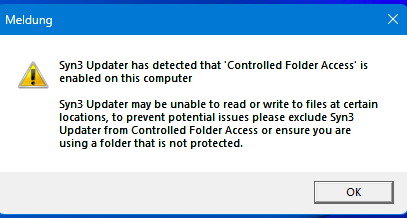
What should I do?
I’m using Bitdefender as my internet security program: App access is all allowed.
Map updates (F13 [2024] - EU [09 2025)) are being downloaded, but not written. So there’s no data.
I hope someone can help me. 
Kind regards
bachi68
Have you tried doing what the message is literally saying?: “to prevent potential issues please exclude Syn3 Updater from Controlled Folder Access or ensure you are using a folder that is not protected”?. Or try running it as administrator.
Hi SaNdMaN,
yes, I’ve tried it. I’ve also deleted and reinstalled the program several times. The same window always appears. I installed the program on a laptop (also Windows 11) – strangely enough, it works there. I’m currently comparing the settings of the two Windows systems, and I’m also comparing the security programs on both devices. At least it works on the laptop. 
That’s a Windows issue, Syn3updater (or any app, really) can’t bypass the OS imposed limitations.
1 Like
Yes, that’s how I see it too. I’ll keep at it until the “knot” is untied – that’s just my nature  Thanks anyway. All the best to you.
The updater seems to have an issue with showing % copied when the file is over 2gb. It counts correctly until the corresponding % at 2GB (e.g. if the file is 2.5GB, it gets to about 80%) and then it starts counting backwards, and the % indicator is negative. So it goes to -79%, -78% etc.
Just a cosmetic thing, but kinda weird.
Yeah its not just relating to 2GB it does it randomly, no idea why, no interest in troubleshooting to fix it, if someone knows why they can put a PR in. interestingly another bit of a software (forgot what) i was using the other day had the same bug.
What language is it written in?
C# it’s on GitHub
1 Like