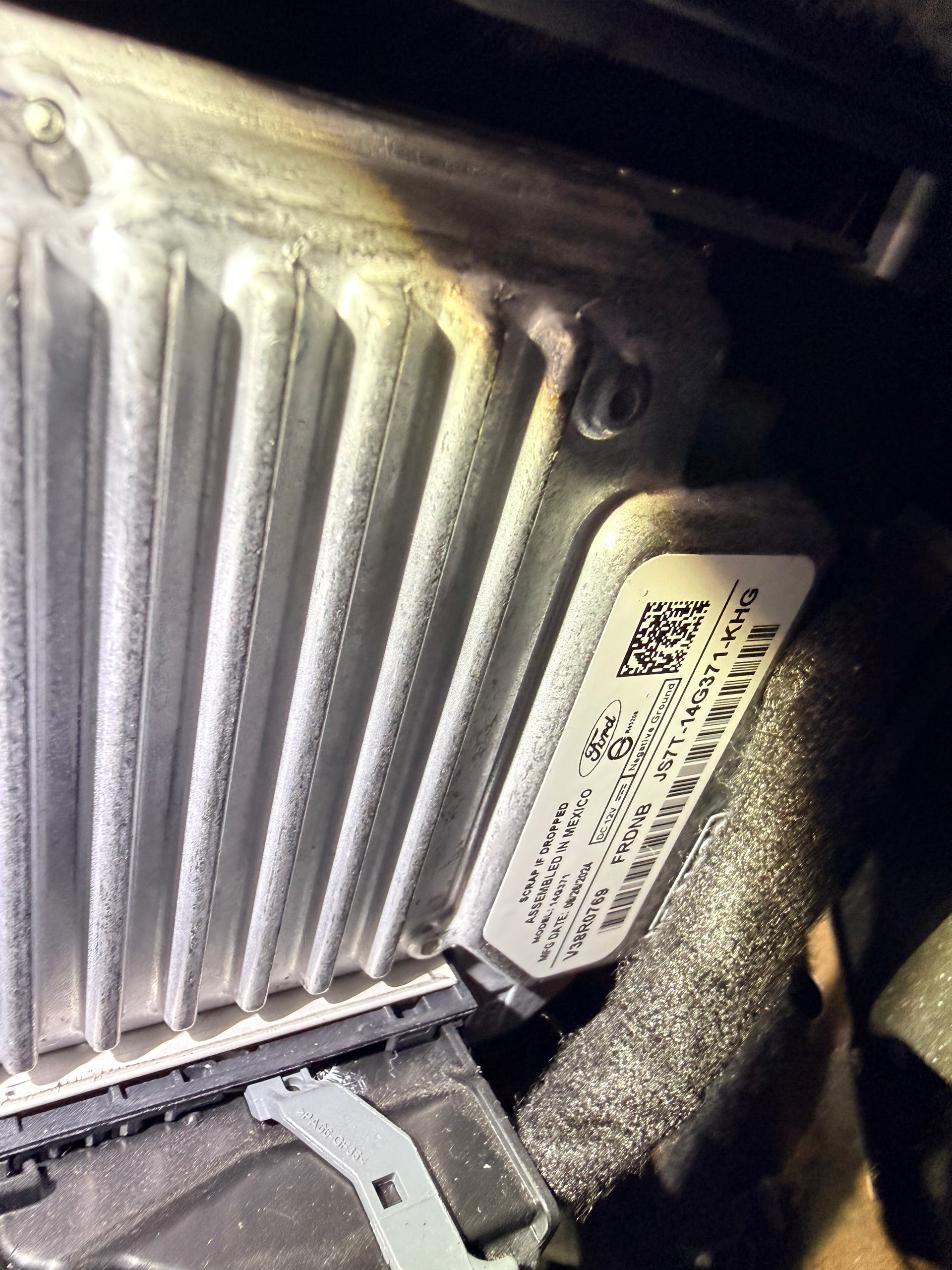
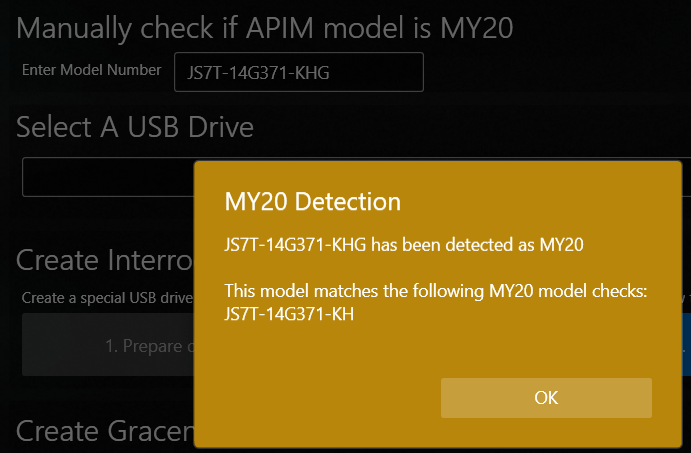
I ordered the CARABC screen upgrade kit like I’m sure a ton of people are doing. Whenever I was going to update to sync 3.4, I pulled the top trim off to get the model number off of my APIM. It is JS7T-14G371-KHG, with a MFG date of 8/26/2024. Based on everything I am seeing, I am unable to update to sync 3.4. Is this accurate? Is there any other way to update to sync 3.4? Current version is 3.0.23219
I have not but can do so in a little bit. Whenever I plugged the model into the manual checker on the application, it stated it was not a 2020MY. The apim was replaced at a ford dealer, probably around the same time as this “MFG date.” I’m wondering if it’s possible they just slapped a sticker on it
If the job has been done in an official dealer chances are it’s actually MY20 and OEM. There are just a little details that caught my eyes, but I will flag it as MY20 until you can get confirmation from the interrogator log.
I figured it was. Do I have any options from here? I’m just trying to get 3.4 to run this bigger screen in the truck. I did find some website selling refurbished APIMS from model years 2016-2025 with 3.4 preloaded on them but I do not know how reliable they are
I am upgrading to the CARABC screen upgrade kit. It takes a 12” screen and connects to everything already in my truck, using the factory apim. They state the apim must run sync 3.4 for it to be compatible and run correctly. Not sure exactly how it works, but I know it changes the theme to a Lincoln theme, even though nothing is changed through forscan. I do not have any issues with 3.0, it runs great. Just trying to modernize my truck and put a bigger infotainment screen in it
Yes basically that’s what it does. No the screen has not come in yet. It arrives tomorrow, I was just getting everything prepped. A few people on some Facebook groups have tried to install it without updating sync and the screen does not display correctly and glitches out some. To my understanding it is because there were no screens larger than 8” that ran off of anything below 3.4, so that version is not optimized for a larger display screen.
Take a look at the Theme section in https://cyanlabs.net/asbuilt-db/sync3-apim/ , that’s the configuration values for the APIM. There are visual themes for 10’’ screens on 3.4, so I believe that’s what you are talking about.
To change the asbuilt for the unit you need to have a valid adapter and forscan.
But for you to go from 3.0 to 3.4 you need to jailbreak the unit and reformat it with their universal reformat package that can handle my20 hardware. You can’t use Syn3updater to reformat the unit because you will brick it.
I’m not sure if there’s no option to run 10/12’’ on 3.0, there’s no value for that… So one option would be to install the new screen and see how it goes… if it does not work as expected, you can then upgrade to 3.4…
Also, I’m unsure if 3.0 (an “old” build) has the proper drivers for a new 12’’ screen… But the vendor should indicate that…
If people going your upgrade path is saying 3.4 is needed, I would start planning doing so.
Sync 3 does not support a screen larger than 10”. What your getting is an android screen that attaches to the APIM. The top half is the Ford APIM UI and the bottom half is the Android UI.
Above is a link for the kit, along with videos of the screen running. The system is not android, it is all sync. I know most kits are android but this one is not. This system itself does not have its own operating system, it functions purely off of sync
Correct, if jailbroken, you can do whatever you want with it but not with the reformat tool Syn3updater uses… You need to use FMODS’ universal reformat package (which can handle MY20 hardware), not Syn3updater’s (which is Ford’s, leaked and can’t handle MY20 hardware)…
It’s not that big of a deal, really… But it’s really important for you to understand you can’t use Syn3updater 's reformat package… All other packages?, ok… But not that one…
About upgrading it via the dealer, I do not think they will do that since your car may not be elegible (to their eyes) for 3.4… that’s why they gave you a 3.0 unit, which was part of the configuration maybe…
If your vehicle is a 2018 F-150 the dealer will decline to work on it to update the software or firmware for the APIM as you have performed modifications outside of the allowed support by Ford. If they do elect to perform updates on it you will be responsible for all of it. That is the Ford tagline, anyways…
Sync 3 does not support the 12" screens supplied in the kits, but will display the 10" Lincoln setting on these screens successfully. Use caution, as if you reformat the screen may go black and you will need to connect an older 8" screen to recover the reformat. This is documented over at F150Forums specifically about these kits. So in short you are getting a blown up 10" resolution (which is actually the 8" resolution) on a 12" screen. Sync does not change the resolution of the video output, the screen is just adjusting the aspect and size, it has no affect on resolution.
This is a MY20+ APIM, DO NOT Reformat this unit!
You are stuck at Sync 3.0.23219 unless you choose to use the FMods tools.
Note: You should be running 3.0.23220 as this is the correct drivers for the 10" and above screens.
My current plan is to update via fmods and if it is successful (hopefully) I will hold off a few days before swapping the screens to ensure everything is functioning properly as is. I’ve read as much as I could all day today. I feel very confident in doing it, still a little iffy about it but I’ve already got everything downloaded onto usb drives and will try it out in the morning. I’ve already sourced a new APIM if this fails.
 Do not reformat the unit with Syn3updater