Hi I have a 2013 F150 Lariat that had a sync 2 (my ford touch). I bought a sync 3 upgrade kit from amazon that seems to have a genuine ford part from 2022. Everything went smoothly except they sent me the wrong parts for the console USB connection (will need to contact them). I have a number of weird things things powering everything back up
Backup camera doesnt function (nothing happens when i go in reverse)
The display seems to operate independently of whether the car is on or not (doesnt power on until power button pressed, doesnt turn off when i turn off car). Maybe this is just how sync 3 works but I expected it to come on as a “home screen” when i powered on the car and then power off when i turned off the car.
The HVAC controls on screen dont work but do seem to reflect the manual buttons
Radio, CD, bluetooth phone connection, NAV all work correctly
Master reset is grayed out
The vehicle information in settings is grayed out
I suspect it has the wrong asbuilt settings. Can i just download the stock asbuilt from the ford website and use the forscan program to overwrite whatever is in there now? The kit came with a ODBII-USB adapter. Does this sound like the right approach?
2013 is a CGEA 1.2 vehicle and you are installing CGEA 1.3 parts, so there will be some things that will not work or at least properly. The HVAC system is not compatible with Sync 3, so you should set it for manual operation. It will be limited in function. If the wiring kit came with rca connectors for the camera you will likely need to remove those and wire direct to the APIM.
You will need to change the asbuilt settings in the APIM to CGEA 1.2 rather than 1.3. This will clear some of the issues immediately.
Post the APIM asbuilt and the part number of the new APIM.
Using FORSCAN I got this to work but now have messed myself up. I have the 2013 lariat with the 402a package, the sony sound system, an APIM with nav, heated and cooled seats. right now i seem to be able to get the NAV to appear (and works), the heated seats buttons appear on the home screen but when i press them nothing lights up and the HVAC tab doesnt appear. does anyone have the forscan settings for this vehicle to make it work? I would be happy to sacrifice the touchscreen HVAC controls because i have the manual ones but i do need the heated and cooled seats button to work. I had it working but then i changed something that made it stop!
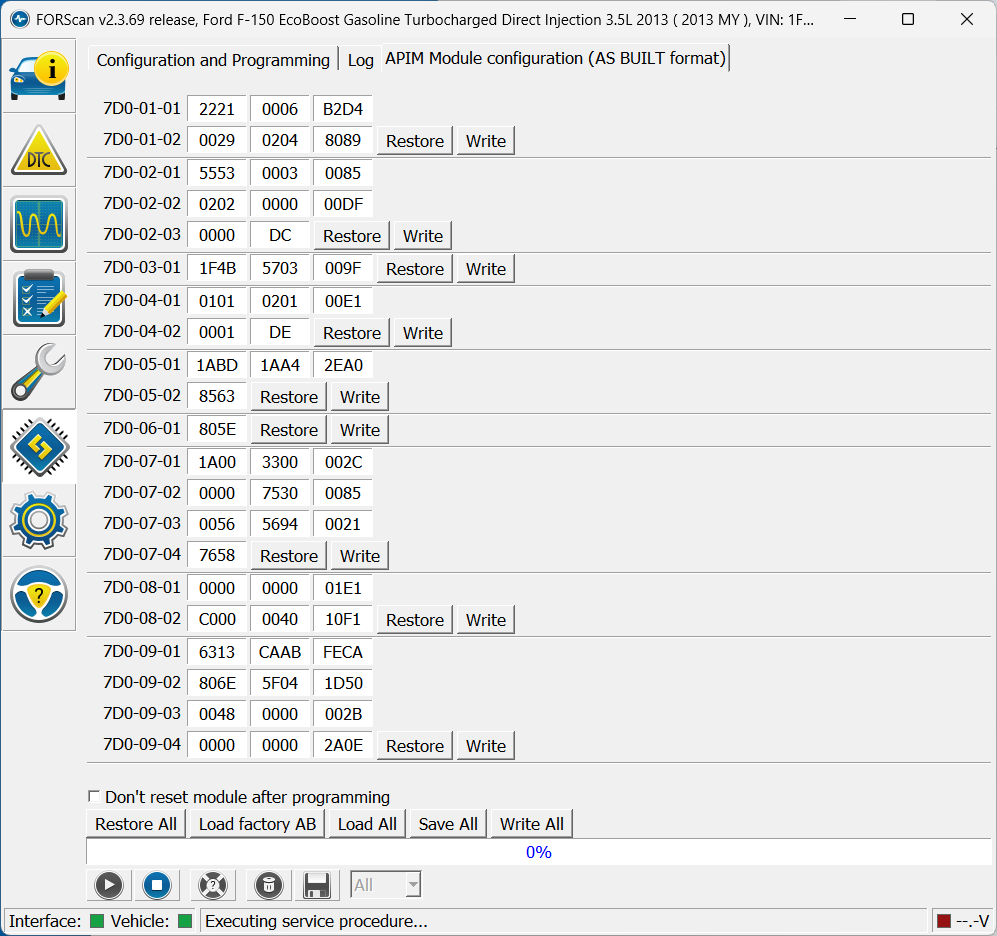
Here is a screenshot of where things stand currently. I had the heated and cooled seats working at one point but was not taking notes so unsure of what combination i was using, same for NAV and onscreen HVAC controls. I know that i will probably have to sacrifice some things, i have a list of things in priority below. Just to clarify, there is no RCA pigtail for the camera, i am using the standard APIM connector for everything.
I need 1-3 to work, #4 would be nice but can be sacrificed, #5 is very optional
Clock, outside air temperature, native sound system, backup camera (all working)
Heated and cooled seats (buttons appear, but dont work)
car play (seller sent wrong USB hub, unsure if it works or not)
ford nav (works but currently not a tab with current forscan settings)
touch screen hvac controls (no tab currently, did have it at one point and it worked, not a priority because i have physical buttons)
for details, this truck has the 402a package (heated and cooled seats, dual climate control, sirius radio, sony sound package, NAV, backup camera, steering wheel controls). at this time i am not planning on using cyanlabs updater for anything, so not worried about that
No one here will know this unless you post the part number. Should work reguardless except you will get a warning about Carplay if it is the wrong one.
Oh i was not aware of that database, thanks! Am I reading this right then?
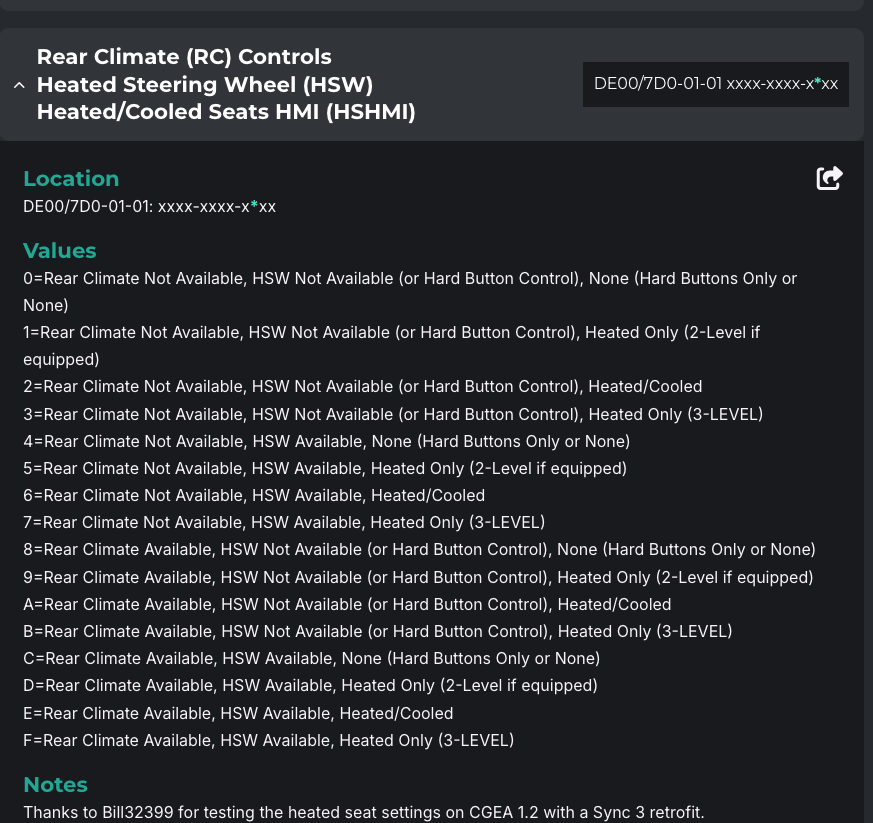
My 7D0-01-01 block currently is 2221-0006-B2D4. Based on the screenshot below from the database, the 2 in the last block should be correct because i dont have rear climate, dont have heated steering wheel but i do have heated and cooled seat? However, i guess this calls into question what “rear climate” means. Does that mean rear climate controls (dont have) or rear climate vents (DO have in back of console)?
Sorry for my ignorance but appreciate everyones advice!
This mean you have a rear HVAC system and controls. Many Explorers and Expeditions have this. I dont belive any F150’s ever had this.
It should be. The HVAC seats are controlled with a module under the passenger seat. This lets the APIM know to send to signal to that instead of the HVAC Module. If you only have heated seats than it would need to know that so it send the signal to the HVAC module instead.
Ok got it, that is how I was interpreting the table. These are heated and cooled seats. It definitely did work with the new APIM, I was making a bunch of tweaks and did not do a good job taking notes so I can’t tell you what the other values were at the time. I suppose this means some other setting is somehow interfering.
I see the database lets you upload an asbuilt file. Would it be useful for me to download the file and then upload into there to see if i can see something that looks obviously wrong?
Nope, You now are Sync 3 so your old Sync 2 values are not the same which means you cannot load the old “APIM” values anymore. Hopefully that makes sense.
Lesson learned, One change at a time and always save you module values in Forscan. I am not aware of other settings effecting this but I never rule anything out since Ford does not give us these values. I did notice the Lariat only comes with heated seats but there was a seating package the put the ventilated seats in so you must have that.
Also a side note, You have a CGEA 1.2 network in your truck. Dont choose anything that is for CGEA 1.3 or you will have problems. You currently have it set to CGEA 1.3 so that could be why your seats are not working. The networks are vastly different.
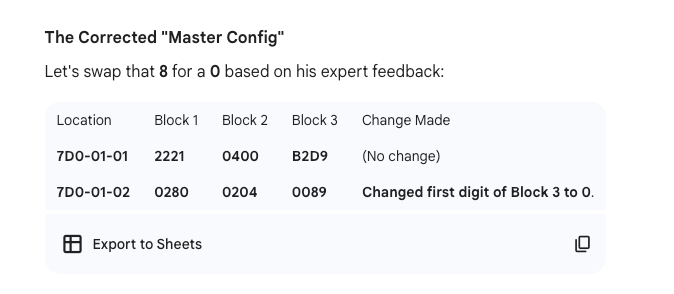
DE00/7D0-01-02: xxxx-xxxx-*xxx needs to be a 0 not an 8.
I meant upload the asbuilt from my current APIM (the sync 3 one) into the decoder on the database website. I don’t know what the output of that will look like, but it might help me spot things like what you did on the 7D0-01-02 line where i had a CGEA 1.3 value in there. I wonder if value is the one that is the problem?
You can, It can help sometimes but I have seen where it confuses people and makes it worse. Your call. My guess is once you get that last value right everything will work.
I just wanted to thank you for all of the help. Using the database link you provided, i was able to get every single thing working correctly including the NAV, steering wheel controls, etc. In case anyone is interested, these are the settings that made it all work.