Battery Drain issue

Recently bricked my 2020 apim. sent it to someone, he said that he had recovered it. it works now. is that possible?

I suspect that he interchanged some parts of the apim or the apim itself with chinese ones or something.

Screen is off when i shut down the car and does not light up.

Or is the coding wrong? What about tcu?

I got no error messages.

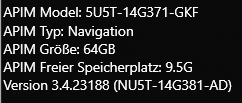
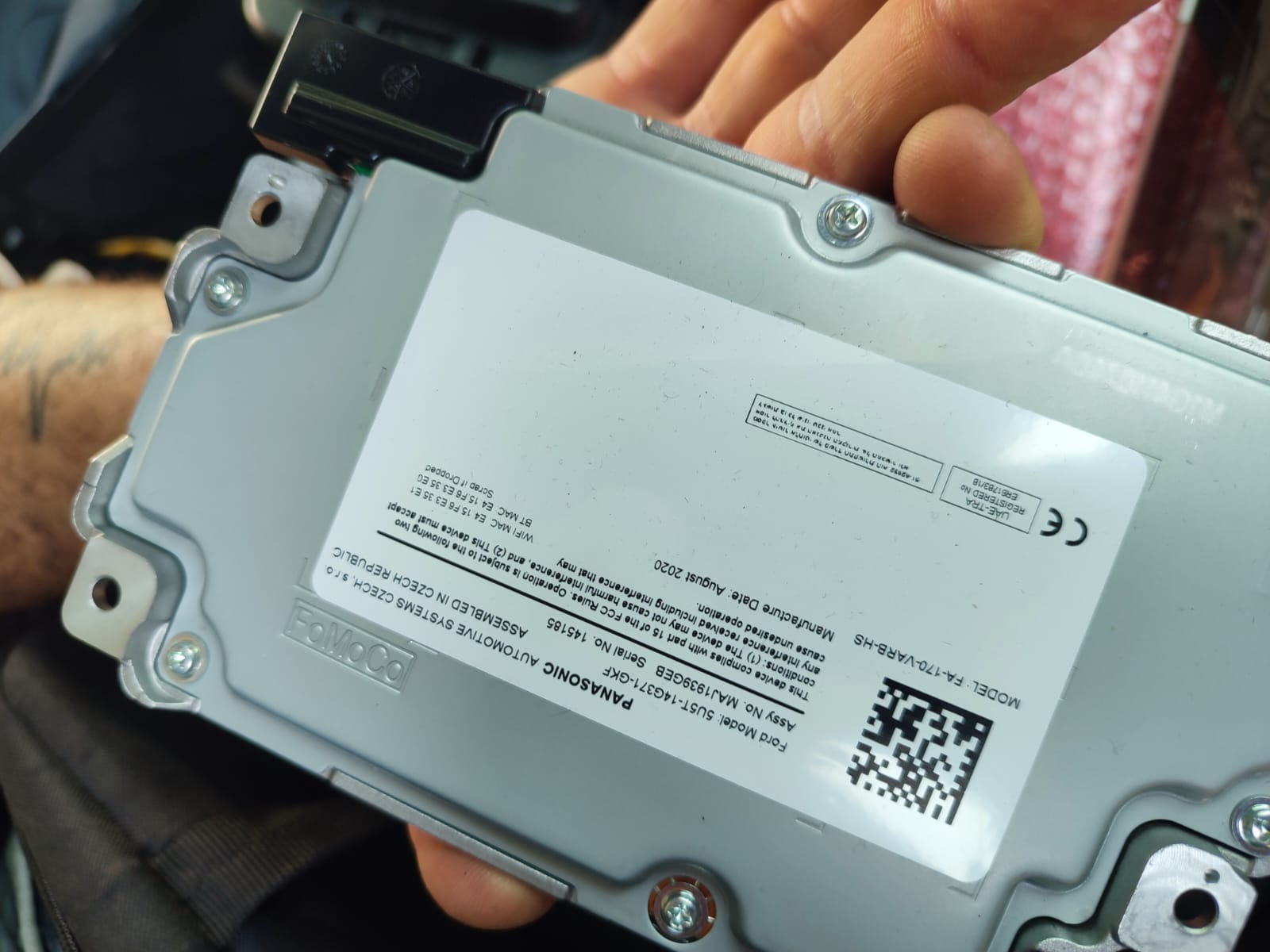
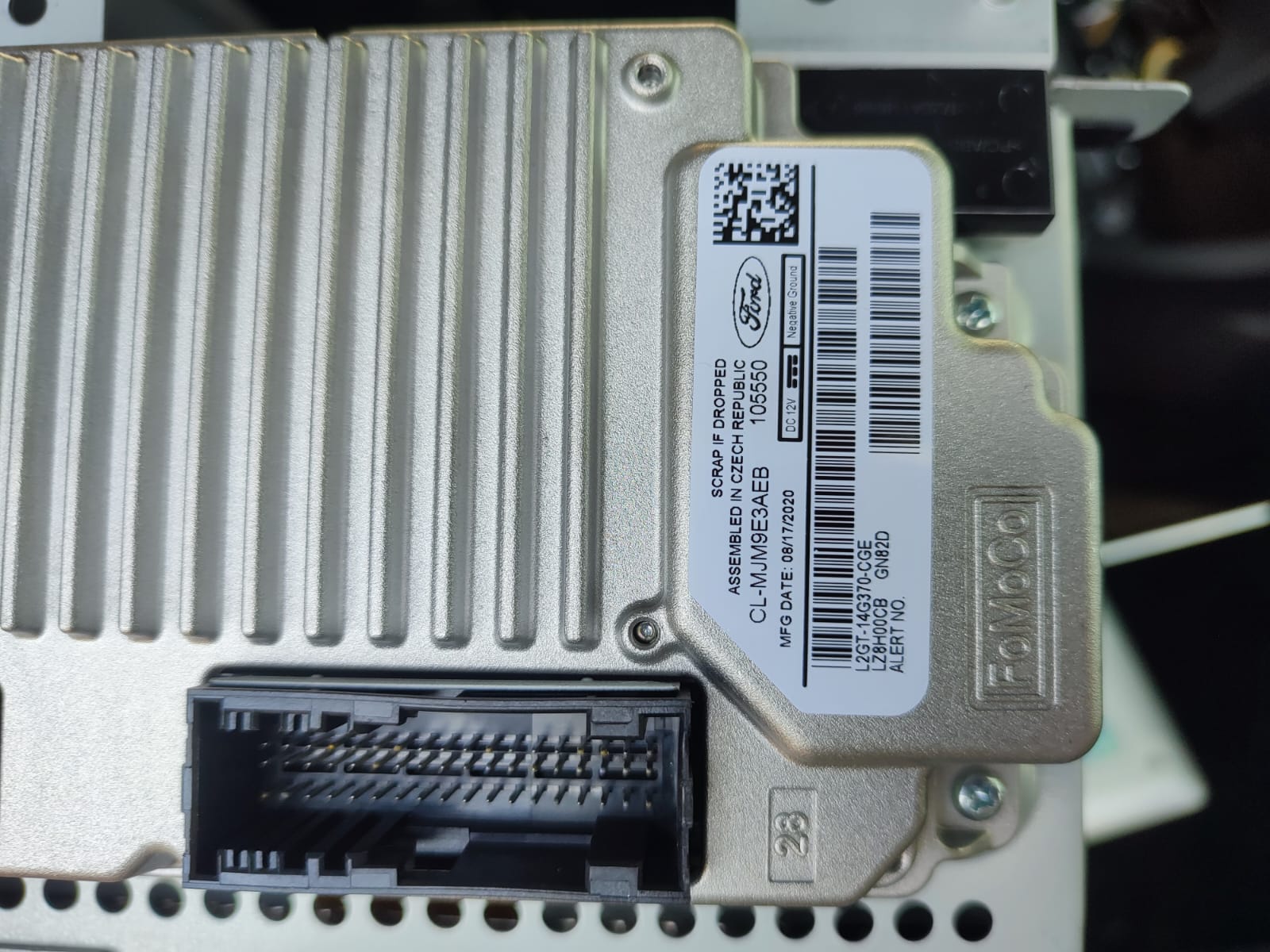
Here in the pictures more info


SYNC Region: EU

Navigation Variant: Nav

Manufacturer Year: MY20

Install Type: OEM

Old SYNC Version: 3.4.23188

New SYNC Version: 3.4.23188

Do you have a error message, if so what is it?
No error messages

Update Method: CyanLabs Syn3 Updater

Syn3 Updater Version: 2.13.3.0

Syn3 Updater Documentation Read: yes

Syn3 Updater Log File

No log


Partition Type = Free / Total
/fs/sd/MAP/ = 976K / 1.2G
/fs/sd/MAP/ = 15M / 3.0G
/fs/sd/MAP/ = 14M / 2.4G
/fs/sd/MAP/ = 7.8M / 1.6G
/fs/sd/MAP/ = 17M / 2.4G
/fs/sd/MAP/ = 26M / 3.7G
/fs/sd/MAP/ = 312K / 41M
/fs/sd/MAP/ = 4.9M / 3.4G
/fs/sd/MAP/ = 27M / 3.4G
/fs/Nuance/ = 29M / 4.9G
/fs/Nuance/ = 30M / 5.0G
/fs/Nuance/ = 26M / 4.5G
/fs/Nuance/ = 37M / 3.8G
/fs/Nuance/ = 8.4M / 1.9G
/fs/Nuance/grace = 21M / 1003M
/fs/rwdata/ = 1.0G / 1.2G
/fs/rwdata/quip/ = 35M / 35M
/fs/rwdata/quip/ = 90M / 90M
/fs/mp/ = 84M / 1.4G
/fs/mp/resources = 332K / 72M
/fs/images/ = 9.5G / 54G

Installed Packages
1U5T-14G421-BAL
1U5T-14G421-BBL
1U5T-14G421-BCL
1U5T-14G421-BDL
1U5T-14G421-BEL
1U5T-14G421-BFL
1U5T-14G421-BGL
1U5T-14G421-BHL
1U5T-14G421-BJL
5U5T-14G391-AT
4U5T-14G422-BAL
4U5T-14G422-BBL
4U5T-14G422-BCL
4U5T-14G422-BDL
4U5T-14G423-AC
1U5T-14G658-AH


The calibration you show does not match an L series APIM you have in the pic. L series would be correct for a 2020 so you logic seems on par with what you think might have happened. It is possible to fix a 2020+ if you know how and have the right stuff.

So what can i do?

Get a genuine device.

It’s probably an AB setting. You probably need to update the calibration if you can and it will take it. You vehicle has supported features that the current calibration does not support. Many AB features you need are not showing until you do.

Or you can just buy a new L series APIM with Nav.

1 Like

I don’t see any calibration info…only software rev.
Run the Interrogator Utility on the unit and post the XML file here.

That APIM looks ok.

Sync_LZ8H00CB_WF0JXXWPCJLE37510.xml (11.1 KB)

The hardware has not been changed. This is proven by the APIM Serial Number value below. The firmware was changed to an earlier version which is not production firmware for your vehicle. This can cause inconsistencies in the asbuilt and possibly disable features you had with the later firmware version.

The production firmware would be…
3.4 APIM NAV & NON-NAV Unit Firmware (Production Release, 2020 L Series)
Secondary Boot Loader: GB5T-14G376-AA
Strategy (F188): 1U5T-14G374-EH (9/25/2019)
Calibration (F124) : 1U5T-14G375-HA (NAV)
ECU Configuration/Sound Profiles (F10A): GB5T-14G379-AA
ECU Configuration/Illumination Strategy (F16B): 5U5T-14G379- BB (9/25/2019)

Based on your VIN, the OEM Factory firmware that your vehicle was equipped with is below. It matches exactly.

OEM Asbuilt
7D0
F10A>GB5T-14G379-AA
F110>DS1U5T-14G371-EH
F111>1U5T-14G380-FE (EMMC is MY20+)
F113>5U5T-14G371-GKF
F124>1U5T-14G375-HA (Calibration )
F141>LZ8H00CB APIM Serial Number
F16B>5U5T-14G379-BB
F188>1U5T-14G374-EH (Strategy)
F18C>blank
F1D0>E4:15:F6:E3:35:E0
F1D1>E4:15:F6:E3:35:E1

The Interrogator Utility Report indicates the following…it does not match the OEM firmware from the factory. Of importance is the Strategy file, which defines features and settings in the asbuilt data. This is an older file that could not be compatible with your present asbuilt.

didType=“On-line Diagnostic Database Reference Number”
didValue=“F110”
d2p1:Response>DS-1U5T-14G371-DA

didType=“ECU Core Assembly Number”
didValue=“F111”
d2p1:Response>1U5T-14G380-FE

didType=“ECU Delivery Assembly Number”
didValue=“F113”
d2p1:Response>5U5T-14G371-GKF

didType=“ECU Calibration Data #1 Number”
didValue=“F124”
d2p1:Response>1U5T-14G375-HA

didType=“Private Sub Node #1 Serial Number”
didValue=“F141”
d2p1:Response>LZ8H00CB

<d2p1:DID didFormat=“State Encoded” didType=“Software Download Specification Version”
didValue=“F162”
d2p1:Response>Blank

<d2p1:DID didFormat=“State Encoded” didType=“Diagnostic Specification Version”
didValue=“F163”
d2p1:Response>03

didType=“Vehicle Manufacturer ECU Software Number”
didValue=“F188”
d2p1:Response>1U5T-14G374-DA

didType=“ECU Serial Number”
didValue=“F18C”
d2p1:Response/>

<d2p1:DID didFormat=“HEX” didType=“ECU MAC Address 1”
didValue=“F1D0”
d2p1:Response>e4:15:f6:e3:35:e0

<d2p1:DID didFormat=“HEX” didType=“ECU MAC Address 2”
didValue=“F1D1”
d2p1:Response>e4:15:f6:e3:35:e1

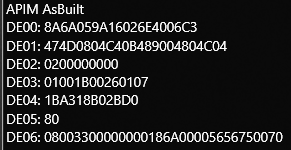
OEM Asbuilt

7D0-01-01 8A6A059A1682
7D0-01-02 026E4006C353
7D0-02-01 474D0804C43E
7D0-02-02 0B4890048042
7D0-02-03 4C042C
7D0-03-01 0200000000DD
7D0-04-01 01001B00261E
7D0-04-02 0107E5
7D0-05-01 1BA318B02B8E
7D0-05-02 D0AE
7D0-06-01 805E
7D0-07-01 08003300001A
7D0-07-02 0000186A0062
7D0-07-03 005656750002
7D0-07-04 7052
7D0-08-01 000500C000A5
7D0-08-02 810003001075
7D0-09-01 0000000000E1
7D0-09-02 0000000000E2
7D0-09-03 0000000000E3
7D0-09-04 0000000000E4

The Interrogator Utility Report indicates the following for the present asbuilt… Keep in mind that there are no checksum bits (last 2 digits) displayed in this report, that is normal.

These are identical.

So in summary, you have an APIM that needs to be loaded with the OEM version of the firmware it was produced with to work correctly in your vehicle. The process would involve loading the correct firmware with FORScan and reloading the entire asbuilt. Not difficult, but time consuming and there are risks to ‘bricking’ the unit again. If you are not comfortable doing this or if you have not used FORScan before, I suggest you communicate with the individual who did the work for you to correct their mistake and fix the unit properly. Giving the benefit of the doubt, they could have loaded the older firmware to recover the unit and forgot to load the production firmware back onto the unit.

Let us know…
What can i do about that myself?

You need a paid version of 2.4 Forscan so you can upgrade the calibration.

Read my post above.
Do you have FORScan?

Oh I am really sorry F150chief. I have overlooked your Post. Thank you For your very detailed reply.

I think I would be comfortable to use forscan.

Ist there a way to get the OEM Version of the Firmware? And how much time do you mean by time consuming?

I’ll help you through it…
What country are you in? Your APIM is coded for 474D?

1 Like

Germany, so the code should be right.

I am gonna buy obdlink ex and a 1 year license For forscan.

I am gonna buy this one. OBDLink EX Adapter / OBD2 Diagnose / ForScan | eBay.de

Where can i get forscan 2.4?

In the forscan Homepage it only Shows v 2.3.66.

Or did i get it right, that I dont necessarily have to buy 1 year license but can use the 2 months free Trial Version and If i activate that Trial, i can Update to 2.4 beta?

You have to purchase Forscan to use the Calibration update feature. The trial will not work for that.

Thank you.
Been Reading alot recently.

I have ordered obdlink ex, which arrives approx tuesday and will buy extended license For forscan.

Also found forscan 2.4.18.beta.exe File.

What Kind of battery charger is sufficient For apim Fw Update? Been Reading that the Update of apim Fw Takes 15 to 30 minutes.

I understand that the necessary Update Files be downloaded by forscan or do i have to find another source?

I read that For apim alle the necessary Files have to be flashed (reflashed)

Additional maybe important info:

The individual, while “unbricking” my original apim lent me another apim without nav. I happen to have an interrogator utility report of that lent apim. Although the sticker said it was made in China, I rhink it worked fine.

I had it for 6 days in the car and I dont think that I experienced battery drain.

Here is the xml:

Sync_PY9200ZL_WF0JXXWPCJLE37510.xml (10.2 KB)

I noticed, that it differs a little bit more to the OEM firmware you posted. But then, it does not math with the OEM Asbuilt.

But the strategy file (F188) 1U5T-14G374-EH does match with the OEM one.

Could you elaborate on that please?

I appreciate your help.

So I would need to flash the following files, to reach OEM firmware status and get rid of the battery drain:

Secondary bootloader: Same as current
Strategy (CAN, F188): 1U5T-14G374-EH
Calibration (CAN, F124): 1U5T-14G375-HA
ECU Configuration/Sound Profiles (CAN, F10A: Same as current
ECU Configuration/Illumination strategy (CAN, F16B): Same as current

Is that correct?

Some APIM’s for the Asian market are made in China and those are legit. It’s the knock-offs you want to stay clear of. Ironically, they are not marked as made in China! Different regions may have different versions of the files, not surprising.

Battery Charger, something like this. NOT a battery tender.

See your PM…

This topic was automatically closed 30 days after the last reply. New replies are no longer allowed.