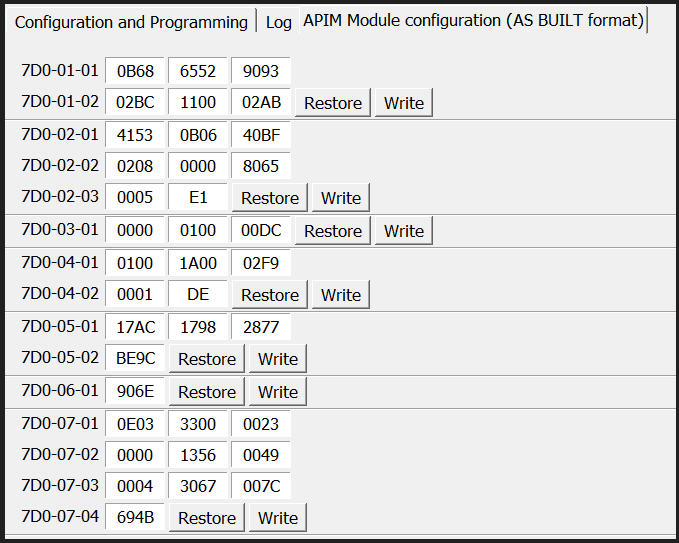
I have a 2013 Ford Focus ST which has been retrofitted with a Sync 3 system. Everything works correctly except for the OEM reversing camera. Can anyone see anything wrong or not set in the APIM settings for it not to work. The camera worked fine before the retrofit.
SYNC Region: ANZ
Navigation Variant: Nav
Manufacturer Year: Pre MY20
Install Type: Retrofit
Old SYNC Version: 3.4.23188
New SYNC Version: 3.4.19101
Do you have a error message, if so what is it?
No error messages.
Update Method: CyanLabs Syn3 Updater
Syn3 Updater Version: 2.13.3.0
Syn3 Updater Documentation Read: yes
Syn3 Updater Log File
CYANLABS - SYN3 UPDATER - V2.13.3.0
Branch: Stable
Operating System: Microsoft Windows 10 Pro (2009)

PREVIOUS CONFIGURATION
Version: 3.4.23188
Region: ANZ
Navigation: True
Install Mode: Auto-Detect (autoinstall)
Install Mode Overridden: False
My20 Protection Enabled: Auto-Detect

DESTINATION DETAILS
Mode: Drive
Model: Lexar USB Flash Drive USB Device
Size: 29.8GB
FileSystem: exFAT
Partition Type: MBR

AUTOINSTALL.LST
; CyanLabs Syn3Updater 2.13.3.0 Stable - Autoinstall Mode - Sync 3.4.19101 ANZ

[SYNCGen3.0_ALL_PRODUCT]
Item1 = RWDataCleaner TOOL - PU5T-14G386-BB_1690840002000.TAR.GZ
Open1= SyncMyRide\PU5T-14G386-BB_1690840002000.TAR.GZ
Item2 = VOICE - 5U5T-14G391-DH_1563811775000.TAR.GZ
Open2 = SyncMyRide\5U5T-14G391-DH_1563811775000.TAR.GZ
Item3 = GRACENOTES - 4U5T-14G423-DA_123696.tar.gz
Open3 = SyncMyRide\4U5T-14G423-DA_123696.tar.gz
Item4 = APPS - 5U5T-14G381-AP_1555085337000.TAR.GZ
Open4 = SyncMyRide\5U5T-14G381-AP_1555085337000.TAR.GZ
Options = AutoInstall


FILES (4)
PU5T-14G386-BB_1690840002000.TAR.GZ (3.2KB)
5U5T-14G391-DH_1563811775000.TAR.GZ (1GB)
4U5T-14G423-DA_123696.tar.gz (716.5MB)
5U5T-14G381-AP_1555085337000.TAR.GZ (891.2MB)

LOG
[16/07/2025 10:07:08 AM] Selected Region: ANZ - Release: Sync 3.4.19101 - Map Version: Keep Existing Maps
[16/07/2025 10:07:08 AM] Install Mode: Auto-Detect (autoinstall) Forced: False
[16/07/2025 10:07:08 AM] MY20 Protection: Auto-Detect
[16/07/2025 10:07:08 AM] Formatting USB drive
[16/07/2025 10:07:08 AM] Re-creating partition table as MBR and formatting as ExFat on selected USB drive
[16/07/2025 10:07:20 AM] Checking Existing File: PU5T-14G386-BB_1690840002000.TAR.GZ
[16/07/2025 10:07:20 AM] Validated: PU5T-14G386-BB_1690840002000.TAR.GZ (Skipping Download)
[16/07/2025 10:07:20 AM] Checking Existing File: 5U5T-14G391-DH_1563811775000.TAR.GZ
[16/07/2025 10:07:20 AM] Validate: 5U5T-14G391-DH_1563811775000.TAR.GZ (Failed!, Downloading)
[16/07/2025 10:07:20 AM] Downloading: 5U5T-14G391-DH_1563811775000.TAR.GZ
[16/07/2025 10:21:22 AM] Validating: 5U5T-14G391-DH_1563811775000.TAR.GZ
[16/07/2025 10:21:26 AM] Downloaded: 5U5T-14G391-DH_1563811775000.TAR.GZ
[16/07/2025 10:21:26 AM] Checking Existing File: 4U5T-14G423-DA_123696.tar.gz
[16/07/2025 10:21:34 AM] Validated: 4U5T-14G423-DA_123696.tar.gz (Skipping Download)
[16/07/2025 10:21:34 AM] Checking Existing File: 5U5T-14G381-AP_1555085337000.TAR.GZ
[16/07/2025 10:21:34 AM] Downloading: 5U5T-14G381-AP_1555085337000.TAR.GZ
[16/07/2025 10:33:44 AM] Validating: 5U5T-14G381-AP_1555085337000.TAR.GZ
[16/07/2025 10:33:47 AM] Downloaded: 5U5T-14G381-AP_1555085337000.TAR.GZ
[16/07/2025 10:33:48 AM] Preparing USB drive
[16/07/2025 10:33:48 AM] Checking Existing File: PU5T-14G386-BB_1690840002000.TAR.GZ
[16/07/2025 10:33:48 AM] Copying: PU5T-14G386-BB_1690840002000.TAR.GZ
[16/07/2025 10:33:48 AM] Validating: PU5T-14G386-BB_1690840002000.TAR.GZ
[16/07/2025 10:33:48 AM] Copied: PU5T-14G386-BB_1690840002000.TAR.GZ
[16/07/2025 10:33:48 AM] Checking Existing File: 5U5T-14G391-DH_1563811775000.TAR.GZ
[16/07/2025 10:33:48 AM] Copying: 5U5T-14G391-DH_1563811775000.TAR.GZ
[16/07/2025 10:35:42 AM] Validating: 5U5T-14G391-DH_1563811775000.TAR.GZ
[16/07/2025 10:35:46 AM] Copied: 5U5T-14G391-DH_1563811775000.TAR.GZ
[16/07/2025 10:35:46 AM] Checking Existing File: 4U5T-14G423-DA_123696.tar.gz
[16/07/2025 10:35:46 AM] Copying: 4U5T-14G423-DA_123696.tar.gz
[16/07/2025 10:36:56 AM] Validating: 4U5T-14G423-DA_123696.tar.gz
[16/07/2025 10:36:58 AM] Copied: 4U5T-14G423-DA_123696.tar.gz
[16/07/2025 10:36:58 AM] Checking Existing File: 5U5T-14G381-AP_1555085337000.TAR.GZ
[16/07/2025 10:36:58 AM] Copying: 5U5T-14G381-AP_1555085337000.TAR.GZ
[16/07/2025 10:38:33 AM] Validating: 5U5T-14G381-AP_1555085337000.TAR.GZ
[16/07/2025 10:38:36 AM] Copied: 5U5T-14G381-AP_1555085337000.TAR.GZ
[16/07/2025 10:38:36 AM] Generating Autoinstall.lst
[16/07/2025 10:38:36 AM] ALL FILES DOWNLOADED AND COPIED TO THE USB DRIVE SUCCESSFULLY!