Ford Mustang - Cyanlabs update not working

I tried to update my Sync 3.4 system to 3.4.23188 and followed all steps.

Once I plugged in the USB, I got the message on the top left that it’s update system and it remains that way for a long time but no update starting.
I plug the USB out, it still says updating system on the top left. I need to switch off and switch on the car, so that the “updating system” status goes away.

I’m not sure what’s going wrong ? checked the USB on my computer, but doesnt look like there’s any change or update to logs.

Any help would be appreciated.


SYNC Region: NA

Navigation Variant: Nav

Manufacturer Year: Pre MY20

Install Type: OEM

Old SYNC Version: 3.4.19101

New SYNC Version: 3.4.19101

Do you have a error message, if so what is it?
None

Update Method: CyanLabs Syn3 Updater

Syn3 Updater Version: 2.13.3.0

Syn3 Updater Documentation Read: yes

Syn3 Updater Log File

CYANLABS - SYN3 UPDATER - V2.13.3.0
Branch: Stable
Operating System: Microsoft Windows 11 Home (2009)

PREVIOUS CONFIGURATION
Version: 3.4.19101
Region: NA
Navigation: False
Install Mode: Auto-Detect (autoinstall)
Install Mode Overridden: False
My20 Protection Enabled: Auto-Detect

DESTINATION DETAILS
Mode: Drive
Model: General UDisk USB Device
Size: 29.3GB
FileSystem: exFAT
Partition Type: MBR

AUTOINSTALL.LST
; CyanLabs Syn3Updater 2.13.3.0 Stable - Autoinstall Mode - Sync 3.4.23188 NA

[SYNCGen3.0_ALL_PRODUCT]
Item1 = RWDataCleaner TOOL - PU5T-14G386-BB_1690840002000.TAR.GZ
Open1= SyncMyRide\PU5T-14G386-BB_1690840002000.TAR.GZ
Item2 = VOICE - 5U5T-14G391-CS_1660783942000.TAR.GZ
Open2 = SyncMyRide\5U5T-14G391-CS_1660783942000.TAR.GZ
Item3 = GRACENOTES - 4U5T-14G423-CC_1615429225000.TAR.GZ
Open3 = SyncMyRide\4U5T-14G423-CC_1615429225000.TAR.GZ
Item4 = APPS - NU5T-14G381-AD_1689364279000.TAR.GZ
Open4 = SyncMyRide\NU5T-14G381-AD_1689364279000.TAR.GZ
Options = AutoInstall


FILES (4)
PU5T-14G386-BB_1690840002000.TAR.GZ (3.2KB)
5U5T-14G391-CS_1660783942000.TAR.GZ (385.5MB)
4U5T-14G423-CC_1615429225000.TAR.GZ (564.2MB)
NU5T-14G381-AD_1689364279000.TAR.GZ (869.8MB)

LOG
[30/06/2025 20:54:13] Selected Region: NA - Release: Sync 3.4.23188 - Map Version: Non Nav APIM 
[30/06/2025 20:54:13] Install Mode: Auto-Detect (autoinstall) Forced: False 
[30/06/2025 20:54:13] MY20 Protection: Auto-Detect 
[30/06/2025 20:54:13] Formatting USB drive
[30/06/2025 20:54:13] Re-creating partition table as MBR and formatting as ExFat on selected USB drive
[30/06/2025 20:54:20] Checking Existing File: PU5T-14G386-BB_1690840002000.TAR.GZ 
[30/06/2025 20:54:20] Validated: PU5T-14G386-BB_1690840002000.TAR.GZ (Skipping Download) 
[30/06/2025 20:54:20] Checking Existing File: 5U5T-14G391-CS_1660783942000.TAR.GZ 
[30/06/2025 20:54:22] Validated: 5U5T-14G391-CS_1660783942000.TAR.GZ (Skipping Download) 
[30/06/2025 20:54:22] Checking Existing File: 4U5T-14G423-CC_1615429225000.TAR.GZ 
[30/06/2025 20:54:24] Validated: 4U5T-14G423-CC_1615429225000.TAR.GZ (Skipping Download) 
[30/06/2025 20:54:24] Checking Existing File: NU5T-14G381-AD_1689364279000.TAR.GZ 
[30/06/2025 20:54:27] Validated: NU5T-14G381-AD_1689364279000.TAR.GZ (Skipping Download) 
[30/06/2025 20:54:27] Preparing USB drive
[30/06/2025 20:54:27] Checking Existing File: PU5T-14G386-BB_1690840002000.TAR.GZ 
[30/06/2025 20:54:27] Copying: PU5T-14G386-BB_1690840002000.TAR.GZ 
[30/06/2025 20:54:27] Validating: PU5T-14G386-BB_1690840002000.TAR.GZ 
[30/06/2025 20:54:27] Copied: PU5T-14G386-BB_1690840002000.TAR.GZ 
[30/06/2025 20:54:27] Checking Existing File: 5U5T-14G391-CS_1660783942000.TAR.GZ 
[30/06/2025 20:54:27] Copying: 5U5T-14G391-CS_1660783942000.TAR.GZ 
[30/06/2025 20:55:57] Validating: 5U5T-14G391-CS_1660783942000.TAR.GZ 
[30/06/2025 20:56:18] Copied: 5U5T-14G391-CS_1660783942000.TAR.GZ 
[30/06/2025 20:56:18] Checking Existing File: 4U5T-14G423-CC_1615429225000.TAR.GZ 
[30/06/2025 20:56:18] Copying: 4U5T-14G423-CC_1615429225000.TAR.GZ 
[30/06/2025 20:58:22] Validating: 4U5T-14G423-CC_1615429225000.TAR.GZ 
[30/06/2025 20:58:51] Copied: 4U5T-14G423-CC_1615429225000.TAR.GZ 
[30/06/2025 20:58:51] Checking Existing File: NU5T-14G381-AD_1689364279000.TAR.GZ 
[30/06/2025 20:58:51] Copying: NU5T-14G381-AD_1689364279000.TAR.GZ 
[30/06/2025 21:02:06] Validating: NU5T-14G381-AD_1689364279000.TAR.GZ 
[30/06/2025 21:03:02] Copied: NU5T-14G381-AD_1689364279000.TAR.GZ 
[30/06/2025 21:03:02] Generating Autoinstall.lst
[30/06/2025 21:03:02] ALL FILES DOWNLOADED AND COPIED TO THE USB DRIVE SUCCESSFULLY!

Hello, assuming your vehicle is no-nav, check out this guide → Sync 3.4 NON-NAV APIM: Failure to Update to Newer Version Sync 3.4

Thanks a lot I will check this out, but im not 100% sure if my unit is non-nav or nav. My car is a USA import model into the Middle East. Initially, it did not come with Navigation but later a dealer added navigation of Middle East Maps to it. The dealer unfortunately is not willing to tell me how he added the maps to the sync unit. Currently I can use those maps for navigation but since Carplay is there I dont use it at all, so I dont mind if it goes away.

The reason im not sure if my unit is considered Maps or not is because under my Sync settings, I dont see the navigation maps version that i’ve seen in some SYNC update videos online.
Not sure if it’s imp., but my Grace Notes version shows “NA”.

Would you happen to tell if my unit is considered Nav or Non-Nav based on the above ?

I would love to, but you are still giving contradictory information.

From your first post:

From your second message:

Do you know your APIM model?, have you ran the interrogator as told in the guide sent before?.

We do not support changing regions (that’s what you would need to do), but first check if the APIM is NAV capable or not.

I have run the interrogator and found the below.

APIM Model: Unknown
APIM Type: Non-Navigation
APIM Size: 8GB
APIM Free Space: 669M

Version 3.4.19101 (5U5T-14G381-AP)

01/07/2025 20:43:29 +00:00

Partition Type = Free / Total
/fs/sd/MAP/ = 404K / 741M
/fs/Nuance/ = 12M / 480M
/fs/Nuance/grace = 57M / 1.0G
/fs/rwdata/ = 830M / 1.2G
/fs/rwdata/quip/ = 35M / 35M
/fs/rwdata/quip/ = 84M / 90M
/fs/mp/ = 64M / 1.4G
/fs/images/ = 669M / 3.0G

Installed Packages
5U5T-14G391-CB
4U5T-14G423-CA
4U5T-14G424-FBJ
4U5T-14G421-FBJ

APIM AsBuilt
DE00: BLANK
DE01: BLANK
DE02: BLANK
DE03: BLANK
DE04: BLANK
DE05: BLANK
DE06: BLANK

I have followed certain steps of the guide you sent and done the following.
Created a RW data cleaner USB and used it
then Created a downgrade USB from the tools tab and used it but while trying to downgrade it gives me an error code: MEM_ERRO3.

No nav, so no maps.

Someone installed maps on a non-nav 8GB apim, that’s not good. The unit is almost out of space.

You have not tried removing gracenotes, try that. Also, try installing the small voice package.

And also, confirm which APIM model it’s by entering the bezel diagnostics menu (google how to trigger that in your model).

I will try gracenotes, small voice, rw packages and then try to downgrade to remove the maps.
I wanted to clarify the best downgrade method, is it through the tools tab to create a downgrade USB directly OR is it through the home tab where you get to select region, versions and packages.
also, between executing gracenotes removal, small voice and rw packages, should I soft reset ?

“Downgrade” is this context ambiguous, so let me clarify that term:

  • Downgrading in the term of syn3updater is installing a 3.3.xxxx build to later reformat the unit. This is required because the reformat tool is blacklisted in later 3.4 builds, so you need to down-grade Sync3 to a version where running the reformat tool is allowed
  • In the context of the guide, downgrading is doing that: installing 3.3.xxxx because it’s smaller, hence releasing some storage on the unit. So you are down-grading from 3.4 to 3.3, but without a reformat (yet)
  • You can’t reformat MY20 APIMs, that’s why it’s imperative for you to confirm which APIM model you have.
  • You can’t remove MAPs without reformatting the unit.

So try making some space by removing Gracenotes and installing the small voice package, then maybe you can continue with Sync3 3.3.xxxx…

before plugging in any USB, I did the bezel diagnostics to try to find the APIM and it shows Assemby Part Number and H/W part number as empty. VMCU version as 5.2.8.0, CCPU as 3.4.19101_PRODUCT, Navigation Applicaltion Ver: 9.32.7.134897. Map Database Ver: 2020.Q4. Voice Control Application Ver: 68.10_RC1. POI Database Version: 2020.Q4.

Then I continued with USBs to remove, gracenotes, reduce voice, RW data and then finally I did the downgrade USB which I set up from the Tools tab using the Syn3 updater. It worked, it downgraded the Sync to 3.3.19052 and I did a master reset, everything works fine and it still has maps.

I then did an interrogator log, and weirdly it shows the APIM Model number now. Check it out below.

APIM Model: JR3T-14G371-BED
APIM Type: Non-Navigation
APIM Size: 8GB
APIM Free Space: 1.9G
Version 3.3.19052 (4U5T-14G381-AN)

02/07/2025 17:46:42 +00:00

Partition Type = Free / Total
/fs/sd/MAP/ = 404K / 741M
/fs/Nuance/ = 940K / 244M
/fs/rwdata/ = 820M / 1.2G
/fs/mp/ = 505M / 1.4G
/fs/images/ = 1.9G / 3.0G

Installed Packages
5U5T-14G391-EM
4U5T-14G424-FBJ
4U5T-14G421-FBJ

APIM AsBuilt
DE00: 4A2A0102000418000080
DE01: 54430D02C002008000000405
DE02: 0000010100
DE03: 01000900060001
DE04: 1856195A29D6
DE05: 40
DE06: 100033000000000B650000565675004C

Is the model number showing because of something from the downgrade USB or is it my actual APIM model number ?

I’m also thinking that since I was already on SYNC 3.4 before, I dont think my unit is a MY20+.

Eitherway do you think I can reformat it now to remove the maps and then upgrade using Syn3 Updated back to 3.4 , the latest version ?

Congratulations on solving the issue, now the APIM has enough space for you to proceed further.

About the APIM not showing the model before, ir could be because of lack of space or some kind of issue with the previous Sync3 version installed.

APIM JR3T-14G371-BED is not MY20 as per our DB, so it should be safe to reformat.

Yes, I think this is the best course of action to leave the APIM as it should. But by reformatting it, you achieve both things at once.

Thank you Sandman, only last thing. I don’t fully understand how to reformat even through the guide provided.

So Current Configuration is: 3.3.19052, NA Region

Under Car Configuration,

  1. Shall select Navigation as “No” ?
  2. Shall I enable Advanced Options and select Install Mode as “Reformat” or keep it as “Auto-detect”?

Under New Version,
I’ll be putting Region NA, Version 3.4.23188 and Nav Version: Non Nav APIM

  1. should I deselect any packages like Voice or Gracenotes ?
  2. Accordingly, I will create the USB with the appropriate install mode and insert the USB in the car to install.
  1. Yes
  2. Reformat, yes, so that the installation mode is overwrote for this install.
  1. Try a “full” install with all the packages installed… if for whatever reason that fails (based on the APIM being 8GB), remove Gracenotes from the installation and try again. (you do not need to redo the USB, just edit the reformat.lst file and remove the line that points to the gracenotes package.
  2. Correct, that will install and run the reformat phase.

I am happy to report that it worked! The final interrogator log is below.
Thank you very much Sandman ! I even used one of the fixes found on these Forums to remove the navigation tab button from Sync using Forscan.

There’s only 1 small issue, the splash screen is now fixed on the standard Blue Ford Oval, even though in Forscan it shows that it’s the Ford GT one as I had previously set up. I tried to change it to default and then change it back to Ford GT but the Splash Screen still remained as the Standard Blue Ford Oval.

APIM Model: JR3T-14G371-BED
APIM Type: Non-Navigation
APIM Size: 8GB
APIM Free Space: 1.7G
Version 3.4.23188 (NU5T-14G381-AD)

Partition Type = Free / Total
/fs/Nuance/ = 3.2M / 465M
/fs/Nuance/grace = 5.8M / 775M
/fs/rwdata/ = 992M / 1.2G
/fs/rwdata/quip/ = 35M / 35M
/fs/rwdata/quip/ = 90M / 90M
/fs/mp/ = 84M / 1.4G
/fs/images/ = 1.7G / 3.0G

Installed Packages
5U5T-14G391-CS
4U5T-14G423-CC

APIM AsBuilt
DE00: 4A2A0102000418000080
DE01: 54430D02C002008000000405
DE02: 0000010100
DE03: 01000900060001
DE04: 1856195A29D6
DE05: 40
DE06: 100033000000000B650000565675004C

Glad we are almost there.
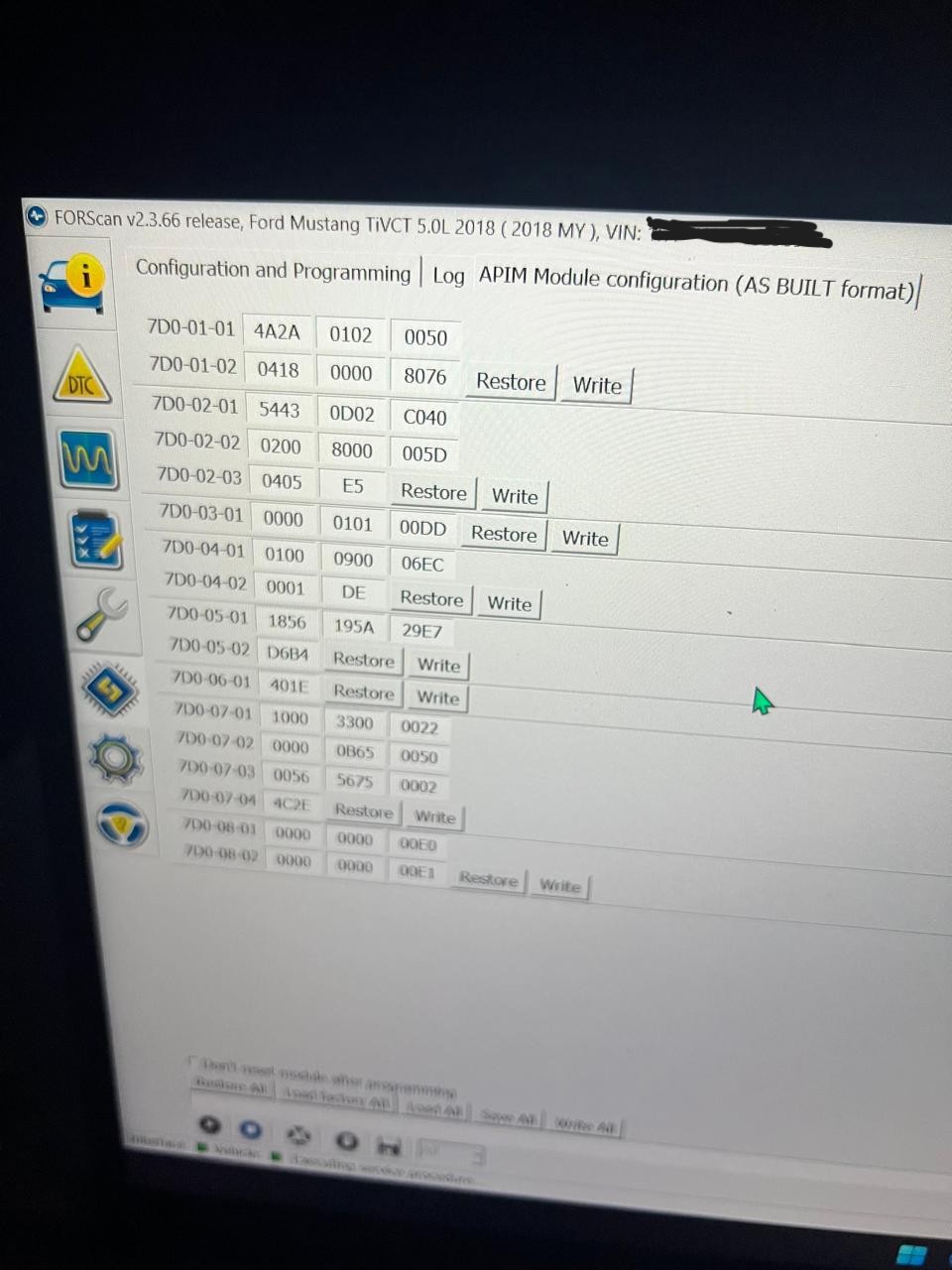
Can you share a photo or screenshot of the APIM’s asbuilt viewed through Forscan? (the section with the numbers, not the easy menu).

Also, when you changed the settings through Forscan, did you reset the module afterwards?.

This was my APIM AsBuilt before I changed 7D0-01-02-04XX-XXXX-XXXX to 7D0-01-02-00XX-XXXX-XXXX to remove the navigation button from the sync system.

Actually, i’ve never reset module’s after changing settings on Forscan ? is it necessary ? do you mind telling me how to do it ? I’ve done changes to other modules as well before, should I reset those modules too ?

I did a bit of read up and found that the Ford GT splash is not available in sync 3.4. So technically there’s no issue and I was able to go into the bezel diagnostics screen and change the splash to the mustang GT one. I think we’re all good now.

Please still do let me know about the resetting the module and if it’s required.

Thank you.

If you make changes to a module that affect the feature set or function, or especially change the software or firmware, you should always reset the module to clear the old cache files. If the module is working fine and not sluggish, you could leave it be.
I never have either but it does work.