Hi everyone! Thanks for doing great stuff, first of all.
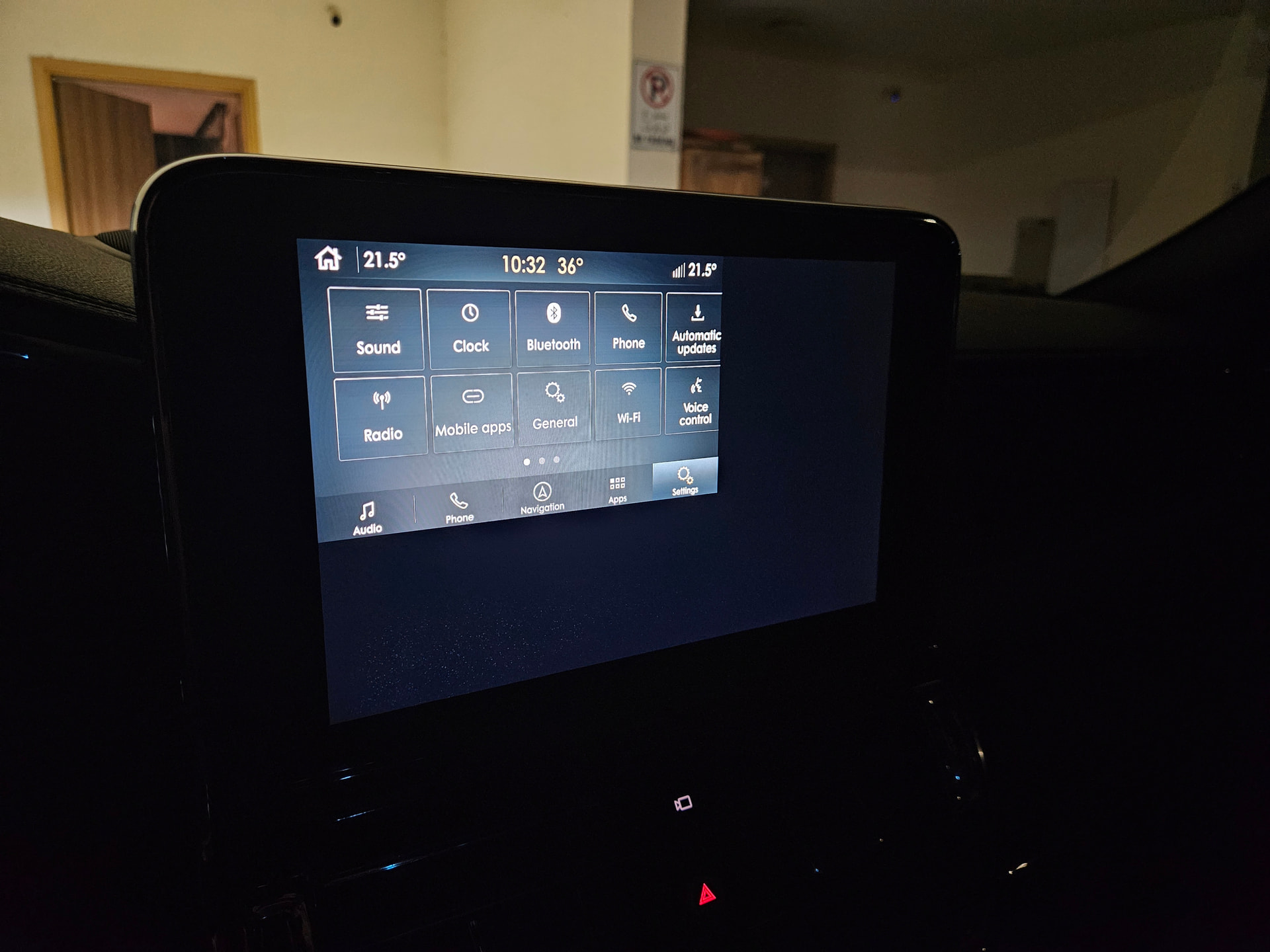
I recently bought 2018 Lincoln Navigator, found this website and decided to update (details below). Update took around 7min because I skipped Voice and Maps. After restart, the infotaiment screen takes only part of the screen (top left side of the screen). Tried Master Reset and turning the car off for about 10min and turning back on.
Reverse camera works in fullscreen mode. Android auto as well, but touchscreen works only in the top left corner, so I can’t switch the apps at the bottom for example.
Please advise of how this could be fixed. I checked the updater app again, it doesn’t have 3.4.23188 as a current system so not sure if I can upgrade to the very latest or downgrade to any other version.
SYNC Region: ROW
Navigation Variant: Nav
Manufacturer Year: Pre MY20
Install Type: OEM
Old SYNC Version: 3.0.17279
New SYNC Version: 3.4.23188
Do you have a error message, if so what is it?
No error messages
Update Method: CyanLabs Syn3 Updater
Syn3 Updater Version: 2.14.2.0 Stable
Syn3 Updater Documentation Read: yes
Syn3 Updater Log File
CYANLABS - SYN3 UPDATER - V2.14.2.0
Branch: Stable
Operating System: Microsoft Windows 11 Pro (2009)

PREVIOUS CONFIGURATION
Version: 3.0.17279
Region: ROW
Navigation: True
Install Mode: Auto-Detect (reformat)
Install Mode Overridden: False
My20 Protection Enabled: Auto-Detect

DESTINATION DETAILS
Mode: Drive
Model: SanDisk Ultra USB Device
Size: 28.6GB
FileSystem: exFAT
Partition Type: MBR

REFORMAT.LST
GRACENOTES=4U5T-14G423-FC_1615431949000.TAR.GZ
ENH_DAB=1U5T-14G658-AH_1644006443000.TAR.GZ
APPS=NU5T-14G381-AE_1778770590000.TAR.GZ


AUTOINSTALL.LST
; CyanLabs Syn3Updater 2.14.2.0 Stable - reformat  Mode - Sync 3.4.23188 ROW

[SYNCGen3.0_ALL_PRODUCT]
Item1 = RWDataCleaner TOOL - PU5T-14G386-BB_1690840002000.TAR.GZ
Open1 = SyncMyRide\PU5T-14G386-BB_1690840002000.TAR.GZ
Item2 = REFORMAT TOOL  - 1u5t-14g386-cb.tar.gz
Open2 = SyncMyRide\1u5t-14g386-cb.tar.gz
Options = AutoInstall

FILES (5)
1u5t-14g386-cb.tar.gz (8.5MB)
PU5T-14G386-BB_1690840002000.TAR.GZ (3.2KB)
4U5T-14G423-FC_1615431949000.TAR.GZ (923.8MB)
1U5T-14G658-AH_1644006443000.TAR.GZ (57.5MB)
NU5T-14G381-AE_1778770590000.TAR.GZ (869.9MB)

LOG
[16-Jul-26 21:58:26] Selected Region: ROW - Release: Sync 3.4.23188 - Map Version: 2022 Q4 - ROW (Middle East and North Africa)
[16-Jul-26 21:58:26] Install Mode: Auto-Detect (reformat) Forced: False
[16-Jul-26 21:58:26] MY20 Protection: Auto-Detect
[16-Jul-26 21:58:26] Formatting USB drive
[16-Jul-26 21:58:26] Re-creating partition table as MBR and formatting as ExFat on selected USB drive
[16-Jul-26 21:59:01] Checking Existing File: 1u5t-14g386-cb.tar.gz
[16-Jul-26 21:59:01] Validated: 1u5t-14g386-cb.tar.gz (Skipping Download)
[16-Jul-26 21:59:01] Checking Existing File: PU5T-14G386-BB_1690840002000.TAR.GZ
[16-Jul-26 21:59:01] Validated: PU5T-14G386-BB_1690840002000.TAR.GZ (Skipping Download)
[16-Jul-26 21:59:01] Checking Existing File: 4U5T-14G423-FC_1615431949000.TAR.GZ
[16-Jul-26 21:59:01] Downloading: 4U5T-14G423-FC_1615431949000.TAR.GZ
[16-Jul-26 22:00:43] Validating: 4U5T-14G423-FC_1615431949000.TAR.GZ
[16-Jul-26 22:00:51] Downloaded: 4U5T-14G423-FC_1615431949000.TAR.GZ
[16-Jul-26 22:00:51] Checking Existing File: 1U5T-14G658-AH_1644006443000.TAR.GZ
[16-Jul-26 22:00:52] Validated: 1U5T-14G658-AH_1644006443000.TAR.GZ (Skipping Download)
[16-Jul-26 22:00:52] Checking Existing File: NU5T-14G381-AE_1778770590000.TAR.GZ
[16-Jul-26 22:00:59] Validated: NU5T-14G381-AE_1778770590000.TAR.GZ (Skipping Download)
[16-Jul-26 22:00:59] Preparing USB drive
[16-Jul-26 22:00:59] Checking Existing File: 1u5t-14g386-cb.tar.gz
[16-Jul-26 22:00:59] Copying: 1u5t-14g386-cb.tar.gz
[16-Jul-26 22:00:59] Validating: 1u5t-14g386-cb.tar.gz
[16-Jul-26 22:00:59] Copied: 1u5t-14g386-cb.tar.gz
[16-Jul-26 22:00:59] Checking Existing File: PU5T-14G386-BB_1690840002000.TAR.GZ
[16-Jul-26 22:00:59] Copying: PU5T-14G386-BB_1690840002000.TAR.GZ
[16-Jul-26 22:00:59] Validating: PU5T-14G386-BB_1690840002000.TAR.GZ
[16-Jul-26 22:00:59] Copied: PU5T-14G386-BB_1690840002000.TAR.GZ
[16-Jul-26 22:00:59] Checking Existing File: 4U5T-14G423-FC_1615431949000.TAR.GZ
[16-Jul-26 22:00:59] Copying: 4U5T-14G423-FC_1615431949000.TAR.GZ
[16-Jul-26 22:01:32] Validating: 4U5T-14G423-FC_1615431949000.TAR.GZ
[16-Jul-26 22:01:39] Copied: 4U5T-14G423-FC_1615431949000.TAR.GZ
[16-Jul-26 22:01:39] Checking Existing File: 1U5T-14G658-AH_1644006443000.TAR.GZ
[16-Jul-26 22:01:39] Copying: 1U5T-14G658-AH_1644006443000.TAR.GZ
[16-Jul-26 22:01:42] Validating: 1U5T-14G658-AH_1644006443000.TAR.GZ
[16-Jul-26 22:01:42] Copied: 1U5T-14G658-AH_1644006443000.TAR.GZ
[16-Jul-26 22:01:42] Checking Existing File: NU5T-14G381-AE_1778770590000.TAR.GZ
[16-Jul-26 22:01:42] Copying: NU5T-14G381-AE_1778770590000.TAR.GZ
[16-Jul-26 22:03:12] Validating: NU5T-14G381-AE_1778770590000.TAR.GZ
[16-Jul-26 22:03:20] Copied: NU5T-14G381-AE_1778770590000.TAR.GZ
[16-Jul-26 22:03:20] Generating reformat.lst
[16-Jul-26 22:03:20] Generating autoinstall.lst
[16-Jul-26 22:03:20] ALL FILES DOWNLOADED AND COPIED TO THE USB DRIVE SUCCESSFULLY!