Kit APIM/used screen compatibility

Hi all,I did my best to look through the FAQ and topics and didn’t find anything, so apologies if I missed relevant info.

Short version of my question: Is it possible for a 3U5T-14G371-DEE APIM to work with a GJ5T‑18B955‑SB screen? If so, does anybody know what changes to as-built would resolve a situation where many options for the second nibble of 7D0-01-01 result in the screen cycling from full bright to dim to off in all situations, while the others cause it to cycle for the logo, then settle in to unadjustable dim once the menus come up?

I have tried modifying 7D0-01-01 (second nibble):
2028, 2228, 2428, 2628, 2828: Stable (Cycles during boot logo, then settles into a permanent, unadjustable dim state in the menus).
2128, 2328, 2528, 2928: Unstable (Cycles brightness constantly, even inside the menus).
Note: I also tried 2B28 and it threw one of these results, though I can’t recall which.
I tried changing the second nibble of 7D0-04-02 to 1 (from 0) with no change.

Starting Sync 3 APIM As-Built Data (pulled from a similarly-equipped 2016 C-Max Energi):
Block 1: 7D0-01-01 2328 6503 800C | 7D0-01-02 0288 1680 0A04
Block 2: 7D0-02-01 5553 0106 C049 | 7D0-02-02 8200 1000 006D | 7D0-02-03 0000 DC
Block 3: 7D0-03-01 0001 0000 00DC
Block 4: 7D0-04-01 0100 0401 00E2 | 7D0-04-02 0001 DE
Block 5: 7D0-05-01 17A2 1798 286D | 7D0-05-02 BE9C
Block 6: 7D0-06-01 805E
Block 7: 7D0-07-01 1104 3300 0027 | 7D0-07-02 0000 0682 0068 | 7D0-07-03 0004 306A 007F | 7D0-07-04 6446
Block 8: 7D0-08-01 0000 0000 00E0 | 7D0-08-02 0000 0000 00E1

Background: My wife gave me an eBay kit to upgrade our 2015 C-Max Energi to Sync 3. The APIM worked great with the included knockoff screen, once I programmed in that as-built, but that screen doesn’t fit our car. Unfortunately they sent it before we gave them a VIN to make sure we received the correct hardware, then slow-walked us, claiming they were sending a new screen, until we had no recourse. Lesson learned. I wouldn’t doubt this APIM is a knockoff as well–I understand this part number is infamous–but it worked so well with the car and the non-fitting screen that I ordered this used GJ5T‑18B955‑SB screen that seems in good condition, since it is Sync 3 and the “standard” profile that fits my car. So far no luck getting it to work with research and AIs.

Thanks so much for any help! (unit was billed as 3.4.x, so filled 3.4.12345 below; can pull the actual if it would be important, but am away from the car)


SYNC Region: NA

Navigation Variant: Nav

Manufacturer Year: MY20

Install Type: Replica

Old SYNC Version: 3.4.12345

New SYNC Version: 3.4.12345

Do you have a error message, if so what is it?
No

Update Method: CyanLabs Manual Method
If it’s helpful, VIN the screen was pulled from is 1FMCU0JD0HUE12776 and its APIM as-built data is:

7D0-01-01 	AB28 	4503 	8074 
7D0-01-02 	02AA 	1500 	0AA5 
7D0-02-01 	5553 	0104 	40C7 
7D0-02-02 	0240 	1000 	002D 
7D0-02-03 	0005 	E1 	 
7D0-03-01 	0000 	0100 	00DC 
7D0-04-01 	0100 	0601 	08EC 
7D0-04-02 	0001 	DE 	 
7D0-05-01 	1806 	1810 	294C 
7D0-05-02 	5F3D 	 	 
7D0-06-01 	805E 	 	 
7D0-07-01 	1504 	3300 	002B 
7D0-07-02 	0000 	00FA 	00DA 
7D0-07-03 	0004 	3070 	0085 
7D0-07-04 	5739 	 	 
7D0-08-01 	0000 	0000 	00E0 
7D0-08-02 	0000 	0000 	00E1 

Already tried the B again in the second nibble on 7D0-01-01, based on this, but no luck.

Should work without any problem with no AB changes.

The issue you describe is common when someone tries to drop Sync3.4 into a Sync2/MFT Cmax/Escape/Focus. Its a hardware compatibility issue with other modules in the car. The only solution is to disable auto dim in the screen menus, I don’t quite remember which builds had that toggle in the screen menus as it was dropped later on.

Thanks, I appreciate you getting back. So strangely the screen worked fine when I fired it up to try your tip, so I got excited and shut the car down and connected the correct USB hub, and then when I started the car again the screen was back to cycling. At that point I tried your tip, but no difference. The APIM works flawlessly with the screen that came with the kit, with everything connected, which makes me think my particular problem is either the screen itself or between the screen and the APIM, though I certainly respect that people here know more about the topic than I do.

That would lead me to believe that either the digitizer is bad or the control board inside the screen housing.

Thanks, yeah, I’m leaning similarly myself. It’s really helpful to have your knowledge, given that the feedback loop is so long (I.E. return and order another one). I put it back to the config where it worked, just to be sure, even though USB hubs should be unrelated, and it still didn’t work. Then I reattached the kit screen and it worked great, so I’m feeling pretty confident this is a screen hardware issue. Thanks again!

If any mods see this and it belongs somewhere else, please feel free to move it. I don’t think this is even the category I meant to post it in.

I found a junkyard in town that has a few GJ5T’s at a reasonable price and worked out with them that I can go try one before buying to make sure it works. Will report back results.

You should look for J series for your vehicle, not G series.

Awesome tip, thanks. Sounds like a better chance of getting a good one. Glad I got busy and couldn’t make it to the yard today.

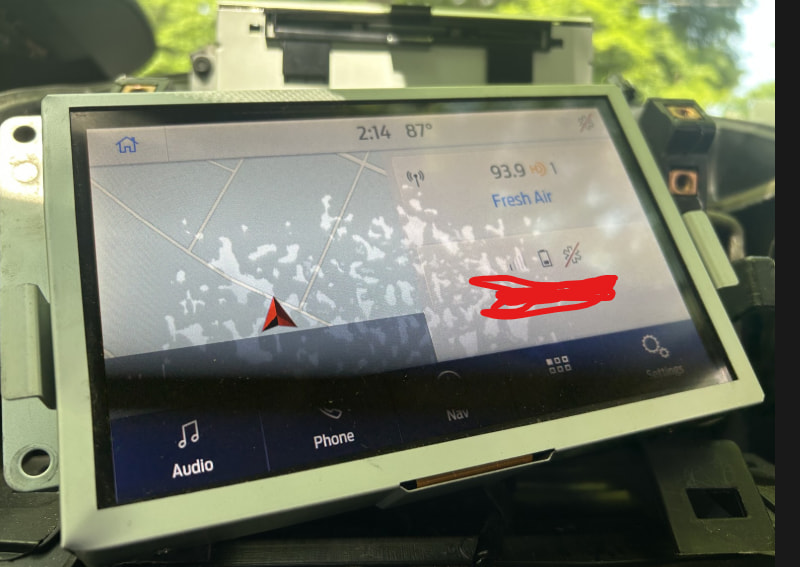
Well I tried a KL3T actually and it worked great, but had blotches inside the screen from some sort of damage. Then I ordered a JL3T at a good price and despite being listed as only a screen it came with the APIM. So now I have not only a working screen in great condition but a legit late pre-2020 APIM and everything works. I regret I already sent the GJ5T back—it would have been interesting to see whether it played with the legit APIM. Thanks all for the help!

Btw they seem to have other listings that also include the APIM despite only talking about the display and carrying display-only prices: https://ebay.io/m/Jg9oqc

btw the way, a lot of problems where the screen seems blotchy, dead to touch and cracked/scratched are usually a bad digitizer. You can find these on line fairly cheaply.

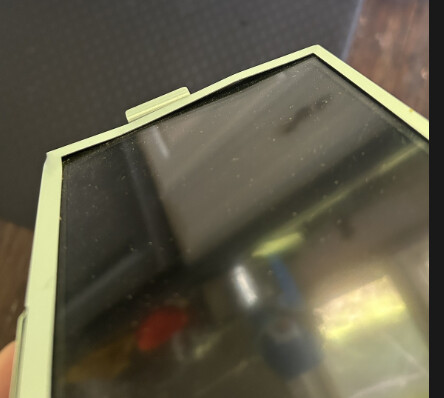
Well I initiated a return and told them about the blotches and they refunded me and told me to keep it, so if anybody wants it, I’m happy to send it along to whoever pays shipping. Note the housing has a couple bends as well, pictured, but seems to work fine other than the blotches.

bad digitizer, model tag for the assembly should be on top to indicate if its supposed to be a G or a K

eg https://www.ebay.com/itm/388555173159?_skw=sync3+digitizer&itmmeta=01KWPXAWV7HQYF0ME0V5N4RM45&hash=item5a77b16d27:g:CGYAAOSwFOdoRpIc&itmprp=enc%3AAQALAAAA8GfYFPkwiKCW4ZNSs2u11xBFZGlu4J0cxcT1PPJnHpHNjNefm1gqN4%2Fv%2BxN5Jix32oD3kcCopQmbcuEW5rj3vzLWTPEF85NdTq9QR84IgfrcUQLS1RTuQPdUsUajVweMPHbRTAmkmQqttuoWXow8K6LN6J%2BCxQDYJlu2CPpZ3akY49pmUdOPLgNuXQOqrPruCbIGqf8PNN9UYLoxiyEgRScS%2FELqDUhyrl13gjLAyunh6WYJtQp3pprowSjX32G32pAfSzgKoWAEeEoum3CHfs8Jn1gzbi%2FeaWOuSklXP56AGbrBtU7TNb%2FeCaQi656RhQ%3D%3D|tkp%3ABk9SR-LNq93lZw