Sync 3 Map Update Loop: F12 to F13 (MEM_ERR03 after interrupted install)

Hi everyone,
I’m seeking some help with a map update loop on my Sync 3 system. I’m currently trying to move from F12 to F13 (as per screenshot), but I’ve run into a persistent cycle.

Ford Puma 2024 - EU version - APIM Model: NU5T-14G371-GAF with Navigation

The Issue:
When I insert the USB, the update starts and after awhile the system reboots as expected. Upon rebooting, it immediately prompts me to update again. If I accept, it eventually fails with the error MEM_ERR03.

The Backstory:
I likely caused this by interrupting the initial installation. Here is the sequence of events:

  1. Started the F13 update via USB.
  2. Mistake: Had to shut off the car mid-update for an emergency.
  3. Upon restart, I saw a “Navigation Malfunction” error (which cleared after a key cycle).
  4. Before retrying the update, I used the RW Data Cleaner and performed a Master Reset.
  5. Prepared a fresh USB with F13 maps, but I am now stuck in the loop described above.

Does anyone have advice on how to fully clear the cache or bypass this loop? Any suggestions would be greatly appreciated!
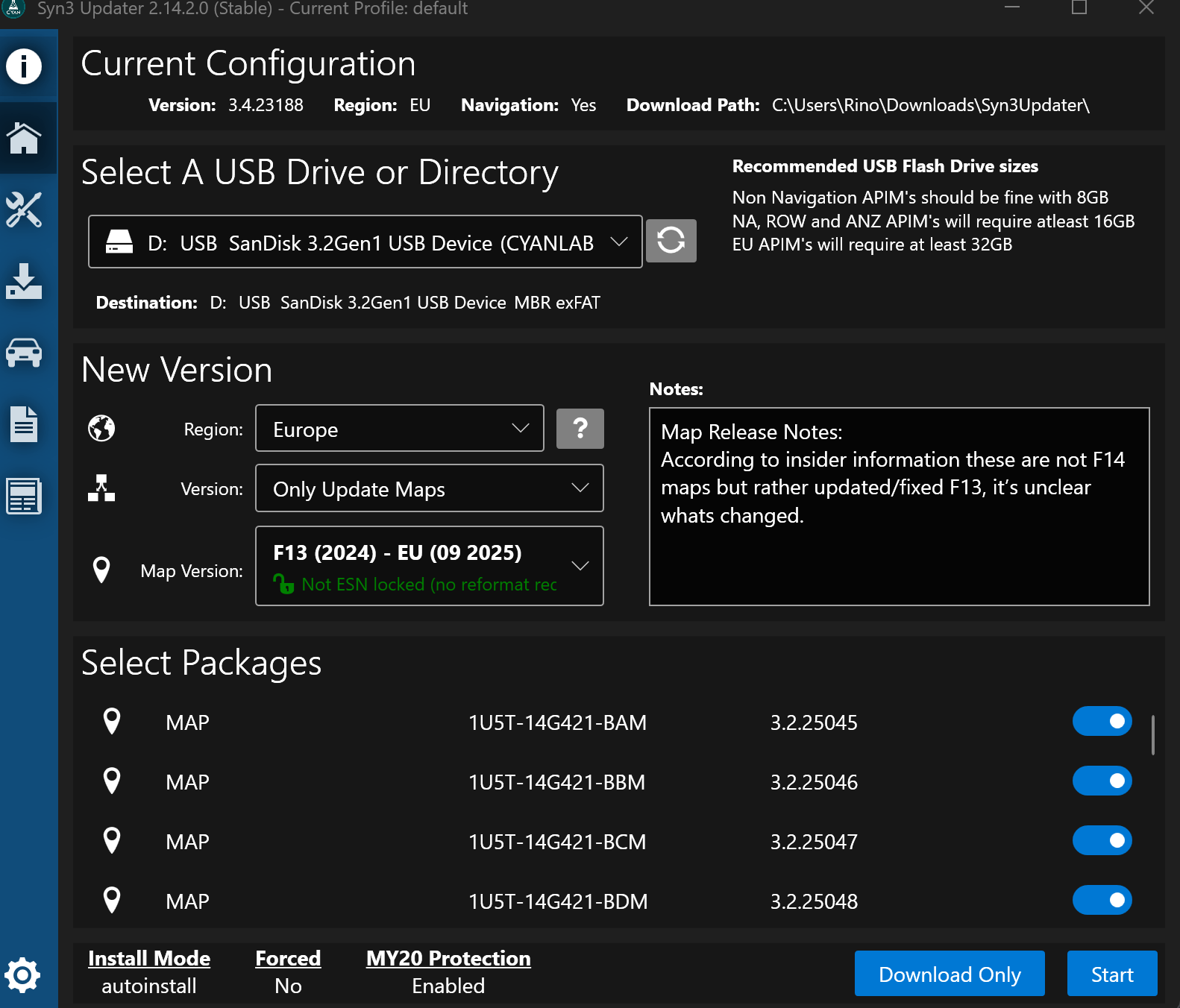

SYNC Region: EU

Navigation Variant: Nav

Manufacturer Year: MY20

Install Type: OEM

Old SYNC Version: 3.4.23188

New SYNC Version: 3.4.23188

Do you have a error message, if so what is it?
MEM_ERR03

Update Method: CyanLabs Syn3 Updater

Syn3 Updater Version: 2.14.2.0 (Stable)

Syn3 Updater Documentation Read: yes

Syn3 Updater Log File

VIN: WF02XXERK2RG49775
APIM Model: NU5T-14G371-GAF
APIM Type: Navigation 
APIM Size: 64GB 
APIM Free Space: 9.0G 
Version 3.4.23188 (NU5T-14G381-AD)

13/02/2026 19:01:26 +00:00

Partition Type = Free / Total
/fs/sd/MAP/ = 976K / 1.2G
/fs/sd/MAP/ = 15M / 3.0G
/fs/sd/MAP/ = 14M / 2.4G
/fs/sd/MAP/ = 7.8M / 1.6G
/fs/sd/MAP/ = 17M / 2.4G
/fs/sd/MAP/ = 26M / 3.7G
/fs/sd/MAP/ = 312K / 41M
/fs/sd/MAP/ = 4.9M / 3.4G
/fs/sd/MAP/ = 27M / 3.4G
/fs/Nuance/ = 29M / 5.0G
/fs/Nuance/ = 30M / 5.2G
/fs/Nuance/ = 27M / 4.6G
/fs/Nuance/ = 38M / 3.9G
/fs/Nuance/ = 8.4M / 1.9G
/fs/Nuance/grace = 21M / 1003M
/fs/rwdata/ = 959M / 1.2G
/fs/rwdata/quip/ = 35M / 35M
/fs/rwdata/quip/ = 90M / 90M
/fs/mp/ = 84M / 1.4G
/fs/mp/resources = 332K / 72M
/fs/images/ = 9.0G / 54G

Installed Packages
1U5T-14G421-BAM
1U5T-14G421-BBM
1U5T-14G421-BCM
1U5T-14G421-BDM
1U5T-14G421-BEM
1U5T-14G421-BFM
1U5T-14G421-BGM
1U5T-14G421-BHM
1U5T-14G421-BJM
1U5T-14G658-AH
4U5T-14G422-BCM
4U5T-14G422-BAM
4U5T-14G422-BBM
4U5T-14G422-BDM
4U5T-14G423-AC
5U5T-14G391-AT

1U5T-14G424-BP


APIM AsBuilt
DE00: 8A6A01DA50027C044282
DE01: 554B0004C08B1C90ACB88E04
DE02: 0000010000
DE03: 00001D8239010A
DE04: 190819082653
DE05: 80
DE06: 0B053300000000642800005656690061

Hello.

Do you actually have an issue with NAV?, does it display a version other than F13 in the about sync3 screen?. Log seems ok, F13 maps are installed.

I do think 9GB of free space is very low, so something else might be at play…

Oh wow, I didn’t notice / I could not grasp the F13 are installed by looking at the log. Thanks!
Yeah the screen shows I am still on F12 - and indeed when I insert the USB key with the F13 maps, it asks me to start the update.
I don’t have any issue tbh - the NAV works perfectly

The interrogator log you sent before shows which packages are installed on the unit (or reported by the unit at least). As you can see, they are the same Syn3updater’s log reference…

That’s odd…

Do yo have the log for the USB you used for upgrading?. If so, please share it. I would like to double check something before trying something out.

Thanks for explaining that!

I do have the log - but it is the one I used the second time - the one keeps failing. The first log got overwritten, but I am pretty sure the settings were the same

CYANLABS - SYN3 UPDATER - V2.14.2.0
Branch: Stable
Operating System: Microsoft Windows 11 Home (2009)

PREVIOUS CONFIGURATION
Version: 3.4.23188
Region: EU
Navigation: True
Install Mode: Auto-Detect (autoinstall)
Install Mode Overridden: False
My20 Protection Enabled: Enabled

DESTINATION DETAILS
Mode: Drive
Model: USB SanDisk 3.2Gen1 USB Device
Size: 57.3GB
FileSystem: exFAT
Partition Type: MBR

AUTOINSTALL.LST
; CyanLabs Syn3Updater 2.14.2.0 Stable - Autoinstall Mode - Only Update Maps EU

[SYNCGen3.0_3.0.1_PRODUCT]
Item1 = RWDataCleaner TOOL - PU5T-14G386-BB_1690840002000.TAR.GZ
Open1 = SyncMyRide\PU5T-14G386-BB_1690840002000.TAR.GZ
Item2 = MAP_LICENSE - 1U5T-14G424-BP_1748959609000.TAR.GZ
Open2 = SyncMyRide\1U5T-14G424-BP_1748959609000.TAR.GZ
Item3 = MAP - 1U5T-14G421-BHM_1748462644000.TAR.GZ
Open3 = SyncMyRide\1U5T-14G421-BHM_1748462644000.TAR.GZ
Item4 = MAP - 1U5T-14G421-BEM_1748461035000.TAR.GZ
Open4 = SyncMyRide\1U5T-14G421-BEM_1748461035000.TAR.GZ
Item5 = VOICE_NAV - 4U5T-14G422-BCM_1748464896000.TAR.GZ
Open5 = SyncMyRide\4U5T-14G422-BCM_1748464896000.TAR.GZ
Item6 = MAP - 1U5T-14G421-BCM_1748460093000.TAR.GZ
Open6 = SyncMyRide\1U5T-14G421-BCM_1748460093000.TAR.GZ
Options = AutoInstall

[SYNCGen3.0_3.0.1]
Item1 = MAP - 1U5T-14G421-BFM_1748461472000.TAR.GZ
Open1 = SyncMyRide\1U5T-14G421-BFM_1748461472000.TAR.GZ
Item2 = VOICE_NAV - 4U5T-14G422-BAM_1748464396000.TAR.GZ
Open2 = SyncMyRide\4U5T-14G422-BAM_1748464396000.TAR.GZ
Item3 = VOICE_NAV - 4U5T-14G422-BBM_1748464677000.TAR.GZ
Open3 = SyncMyRide\4U5T-14G422-BBM_1748464677000.TAR.GZ
Item4 = MAP - 1U5T-14G421-BBM_1748459859000.TAR.GZ
Open4 = SyncMyRide\1U5T-14G421-BBM_1748459859000.TAR.GZ
Options = AutoInstall, Include, Transaction

[SYNCGen3.0_ALL]
Item1 = MAP - 1U5T-14G421-BAM_1748461682000.TAR.GZ
Open1 = SyncMyRide\1U5T-14G421-BAM_1748461682000.TAR.GZ
Item2 = VOICE_NAV - 4U5T-14G422-BDM_1748465073000.TAR.GZ
Open2 = SyncMyRide\4U5T-14G422-BDM_1748465073000.TAR.GZ
Item3 = MAP - 1U5T-14G421-BGM_1748462187000.TAR.GZ
Open3 = SyncMyRide\1U5T-14G421-BGM_1748462187000.TAR.GZ
Item4 = MAP - 1U5T-14G421-BDM_1748460770000.TAR.GZ
Open4 = SyncMyRide\1U5T-14G421-BDM_1748460770000.TAR.GZ
Item5 = MAP - 1U5T-14G421-BJM_1748462970000.TAR.GZ
Open5 = SyncMyRide\1U5T-14G421-BJM_1748462970000.TAR.GZ
Options = Delay, Include, Transaction

FILES (15)
PU5T-14G386-BB_1690840002000.TAR.GZ (3.2KB)
1U5T-14G421-BAM_1748461682000.TAR.GZ (2.5GB)
1U5T-14G421-BBM_1748459859000.TAR.GZ (539.6MB)
1U5T-14G421-BCM_1748460093000.TAR.GZ (1.8GB)
1U5T-14G421-BDM_1748460770000.TAR.GZ (1.1GB)
1U5T-14G421-BEM_1748461035000.TAR.GZ (1.8GB)
1U5T-14G421-BFM_1748461472000.TAR.GZ (2.5GB)
1U5T-14G421-BGM_1748462187000.TAR.GZ (2.1GB)
1U5T-14G421-BHM_1748462644000.TAR.GZ (2.6GB)
1U5T-14G421-BJM_1748462970000.TAR.GZ (26MB)
4U5T-14G422-BAM_1748464396000.TAR.GZ (2.4GB)
4U5T-14G422-BBM_1748464677000.TAR.GZ (2.3GB)
4U5T-14G422-BCM_1748464896000.TAR.GZ (1.8GB)
4U5T-14G422-BDM_1748465073000.TAR.GZ (2.1GB)
1U5T-14G424-BP_1748959609000.TAR.GZ (1.7KB)

LOG
[13/02/2026 18:19:50] Selected Region: EU - Release: Only Update Maps - Map Version: F13 (2024) - EU (09 2025)
[13/02/2026 18:19:50] Install Mode: Auto-Detect (autoinstall) Forced: False
[13/02/2026 18:19:50] MY20 Protection: Enabled
[13/02/2026 18:19:50] Formatting USB drive
[13/02/2026 18:19:50] Re-creating partition table as MBR and formatting as ExFat on selected USB drive
[13/02/2026 18:19:59] Checking Existing File: PU5T-14G386-BB_1690840002000.TAR.GZ
[13/02/2026 18:19:59] Validated: PU5T-14G386-BB_1690840002000.TAR.GZ (Skipping Download)
[13/02/2026 18:19:59] Checking Existing File: 1U5T-14G421-BAM_1748461682000.TAR.GZ
[13/02/2026 18:20:10] Validated: 1U5T-14G421-BAM_1748461682000.TAR.GZ (Skipping Download)
[13/02/2026 18:20:10] Checking Existing File: 1U5T-14G421-BBM_1748459859000.TAR.GZ
[13/02/2026 18:20:13] Validated: 1U5T-14G421-BBM_1748459859000.TAR.GZ (Skipping Download)
[13/02/2026 18:20:13] Checking Existing File: 1U5T-14G421-BCM_1748460093000.TAR.GZ
[13/02/2026 18:20:21] Validated: 1U5T-14G421-BCM_1748460093000.TAR.GZ (Skipping Download)
[13/02/2026 18:20:21] Checking Existing File: 1U5T-14G421-BDM_1748460770000.TAR.GZ
[13/02/2026 18:20:26] Validated: 1U5T-14G421-BDM_1748460770000.TAR.GZ (Skipping Download)
[13/02/2026 18:20:26] Checking Existing File: 1U5T-14G421-BEM_1748461035000.TAR.GZ
[13/02/2026 18:20:33] Validated: 1U5T-14G421-BEM_1748461035000.TAR.GZ (Skipping Download)
[13/02/2026 18:20:33] Checking Existing File: 1U5T-14G421-BFM_1748461472000.TAR.GZ
[13/02/2026 18:20:45] Validated: 1U5T-14G421-BFM_1748461472000.TAR.GZ (Skipping Download)
[13/02/2026 18:20:45] Checking Existing File: 1U5T-14G421-BGM_1748462187000.TAR.GZ
[13/02/2026 18:20:54] Validated: 1U5T-14G421-BGM_1748462187000.TAR.GZ (Skipping Download)
[13/02/2026 18:20:54] Checking Existing File: 1U5T-14G421-BHM_1748462644000.TAR.GZ
[13/02/2026 18:21:05] Validated: 1U5T-14G421-BHM_1748462644000.TAR.GZ (Skipping Download)
[13/02/2026 18:21:05] Checking Existing File: 1U5T-14G421-BJM_1748462970000.TAR.GZ
[13/02/2026 18:21:06] Validated: 1U5T-14G421-BJM_1748462970000.TAR.GZ (Skipping Download)
[13/02/2026 18:21:06] Checking Existing File: 4U5T-14G422-BAM_1748464396000.TAR.GZ
[13/02/2026 18:21:16] Validated: 4U5T-14G422-BAM_1748464396000.TAR.GZ (Skipping Download)
[13/02/2026 18:21:16] Checking Existing File: 4U5T-14G422-BBM_1748464677000.TAR.GZ
[13/02/2026 18:21:27] Validated: 4U5T-14G422-BBM_1748464677000.TAR.GZ (Skipping Download)
[13/02/2026 18:21:27] Checking Existing File: 4U5T-14G422-BCM_1748464896000.TAR.GZ
[13/02/2026 18:21:34] Validated: 4U5T-14G422-BCM_1748464896000.TAR.GZ (Skipping Download)
[13/02/2026 18:21:34] Checking Existing File: 4U5T-14G422-BDM_1748465073000.TAR.GZ
[13/02/2026 18:21:44] Validated: 4U5T-14G422-BDM_1748465073000.TAR.GZ (Skipping Download)
[13/02/2026 18:21:44] Checking Existing File: 1U5T-14G424-BP_1748959609000.TAR.GZ
[13/02/2026 18:21:44] Validated: 1U5T-14G424-BP_1748959609000.TAR.GZ (Skipping Download)
[13/02/2026 18:21:44] Preparing USB drive
[13/02/2026 18:21:44] Checking Existing File: PU5T-14G386-BB_1690840002000.TAR.GZ
[13/02/2026 18:21:44] Copying: PU5T-14G386-BB_1690840002000.TAR.GZ
[13/02/2026 18:21:44] Validating: PU5T-14G386-BB_1690840002000.TAR.GZ
[13/02/2026 18:21:44] Copied: PU5T-14G386-BB_1690840002000.TAR.GZ
[13/02/2026 18:21:44] Checking Existing File: 1U5T-14G421-BAM_1748461682000.TAR.GZ
[13/02/2026 18:21:44] Copying: 1U5T-14G421-BAM_1748461682000.TAR.GZ
[13/02/2026 18:23:50] Validating: 1U5T-14G421-BAM_1748461682000.TAR.GZ
[13/02/2026 18:24:12] Copied: 1U5T-14G421-BAM_1748461682000.TAR.GZ
[13/02/2026 18:24:12] Checking Existing File: 1U5T-14G421-BBM_1748459859000.TAR.GZ
[13/02/2026 18:24:12] Copying: 1U5T-14G421-BBM_1748459859000.TAR.GZ
[13/02/2026 18:24:40] Validating: 1U5T-14G421-BBM_1748459859000.TAR.GZ
[13/02/2026 18:24:44] Copied: 1U5T-14G421-BBM_1748459859000.TAR.GZ
[13/02/2026 18:24:44] Checking Existing File: 1U5T-14G421-BCM_1748460093000.TAR.GZ
[13/02/2026 18:24:44] Copying: 1U5T-14G421-BCM_1748460093000.TAR.GZ
[13/02/2026 18:26:22] Validating: 1U5T-14G421-BCM_1748460093000.TAR.GZ
[13/02/2026 18:26:37] Copied: 1U5T-14G421-BCM_1748460093000.TAR.GZ
[13/02/2026 18:26:37] Checking Existing File: 1U5T-14G421-BDM_1748460770000.TAR.GZ
[13/02/2026 18:26:37] Copying: 1U5T-14G421-BDM_1748460770000.TAR.GZ
[13/02/2026 18:27:39] Validating: 1U5T-14G421-BDM_1748460770000.TAR.GZ
[13/02/2026 18:27:50] Copied: 1U5T-14G421-BDM_1748460770000.TAR.GZ
[13/02/2026 18:27:50] Checking Existing File: 1U5T-14G421-BEM_1748461035000.TAR.GZ
[13/02/2026 18:27:50] Copying: 1U5T-14G421-BEM_1748461035000.TAR.GZ
[13/02/2026 18:29:28] Validating: 1U5T-14G421-BEM_1748461035000.TAR.GZ
[13/02/2026 18:29:44] Copied: 1U5T-14G421-BEM_1748461035000.TAR.GZ
[13/02/2026 18:29:44] Checking Existing File: 1U5T-14G421-BFM_1748461472000.TAR.GZ
[13/02/2026 18:29:44] Copying: 1U5T-14G421-BFM_1748461472000.TAR.GZ
[13/02/2026 18:32:05] Validating: 1U5T-14G421-BFM_1748461472000.TAR.GZ
[13/02/2026 18:32:26] Copied: 1U5T-14G421-BFM_1748461472000.TAR.GZ
[13/02/2026 18:32:26] Checking Existing File: 1U5T-14G421-BGM_1748462187000.TAR.GZ
[13/02/2026 18:32:26] Copying: 1U5T-14G421-BGM_1748462187000.TAR.GZ
[13/02/2026 18:34:23] Validating: 1U5T-14G421-BGM_1748462187000.TAR.GZ
[13/02/2026 18:34:40] Copied: 1U5T-14G421-BGM_1748462187000.TAR.GZ
[13/02/2026 18:34:41] Checking Existing File: 1U5T-14G421-BHM_1748462644000.TAR.GZ
[13/02/2026 18:34:41] Copying: 1U5T-14G421-BHM_1748462644000.TAR.GZ
[13/02/2026 18:37:09] Validating: 1U5T-14G421-BHM_1748462644000.TAR.GZ
[13/02/2026 18:37:29] Copied: 1U5T-14G421-BHM_1748462644000.TAR.GZ
[13/02/2026 18:37:29] Checking Existing File: 1U5T-14G421-BJM_1748462970000.TAR.GZ
[13/02/2026 18:37:29] Copying: 1U5T-14G421-BJM_1748462970000.TAR.GZ
[13/02/2026 18:37:30] Validating: 1U5T-14G421-BJM_1748462970000.TAR.GZ
[13/02/2026 18:37:30] Copied: 1U5T-14G421-BJM_1748462970000.TAR.GZ
[13/02/2026 18:37:30] Checking Existing File: 4U5T-14G422-BAM_1748464396000.TAR.GZ
[13/02/2026 18:37:30] Copying: 4U5T-14G422-BAM_1748464396000.TAR.GZ
[13/02/2026 18:39:43] Validating: 4U5T-14G422-BAM_1748464396000.TAR.GZ
[13/02/2026 18:40:03] Copied: 4U5T-14G422-BAM_1748464396000.TAR.GZ
[13/02/2026 18:40:04] Checking Existing File: 4U5T-14G422-BBM_1748464677000.TAR.GZ
[13/02/2026 18:40:04] Copying: 4U5T-14G422-BBM_1748464677000.TAR.GZ
[13/02/2026 18:42:15] Validating: 4U5T-14G422-BBM_1748464677000.TAR.GZ
[13/02/2026 18:42:34] Copied: 4U5T-14G422-BBM_1748464677000.TAR.GZ
[13/02/2026 18:42:34] Checking Existing File: 4U5T-14G422-BCM_1748464896000.TAR.GZ
[13/02/2026 18:42:34] Copying: 4U5T-14G422-BCM_1748464896000.TAR.GZ
[13/02/2026 18:44:13] Validating: 4U5T-14G422-BCM_1748464896000.TAR.GZ
[13/02/2026 18:44:27] Copied: 4U5T-14G422-BCM_1748464896000.TAR.GZ
[13/02/2026 18:44:27] Checking Existing File: 4U5T-14G422-BDM_1748465073000.TAR.GZ
[13/02/2026 18:44:27] Copying: 4U5T-14G422-BDM_1748465073000.TAR.GZ
[13/02/2026 18:46:27] Validating: 4U5T-14G422-BDM_1748465073000.TAR.GZ
[13/02/2026 18:46:45] Copied: 4U5T-14G422-BDM_1748465073000.TAR.GZ
[13/02/2026 18:46:45] Checking Existing File: 1U5T-14G424-BP_1748959609000.TAR.GZ
[13/02/2026 18:46:45] Copying: 1U5T-14G424-BP_1748959609000.TAR.GZ
[13/02/2026 18:46:45] Validating: 1U5T-14G424-BP_1748959609000.TAR.GZ
[13/02/2026 18:46:45] Copied: 1U5T-14G424-BP_1748959609000.TAR.GZ
[13/02/2026 18:46:45] Generating Autoinstall.lst
[13/02/2026 18:46:45] ALL FILES DOWNLOADED AND COPIED TO THE USB DRIVE SUCCESSFULLY!

On the USB, for sure. But Syn3updater keeps a copy locally for each USB created in the Logs tab. Check if it’s the same as the one as you sent before..

The files above are the files on the USB you are using… Maps and NAV_Voices are 14G21-BxM and 15G422_BxM respectively.

The above files are the one installed on the unit as per the interrogator log. So they are all there.

But it should not show F12 in the about sync3 screen…

Right - I cannot unfortunately check the original log, I had to uninstall syn3 Updater today since it kept crashing, so the folder shows only the latest log created today. I might have uploaded it when I created it - I remember it prompted me and I am pretty sure I did.
Any way I can find it?

I mean I don;t understand the F12 either but if the F13 files are there - I am nearly there saying who cares right?

There’s something I would try, but it’s going to be a pain…

My thought is that maybe the overall process left some corrupted unfinished data on the unit that is not affected by a master reset. I mean, the interrogator log has been done after the master reset, right?. Just to double check, perform a master reset again, re run the interrogator log and see if the available space increases and all the same packages are listed are installed.

If nothing changes, maybe forcing a package installation could help.

From the following list, manually re-install all one at a time. You can reuse the files there are currently on the USB, you just need to change the autoinstall.lst file on its root.

To make things easier, you can download the required autoinstall.lst file from the links for each file:

So you can download all autoinstall.lst files and you just have to change it for each file.
Try with smaller size ones and see how it goes.

The extreme test would be to install F12 maps once again, but I’m unsure if that would change the test’s results…

My reasoning behind this is that the way Syn3updater creates the USB it’s processed in sections:

This is just the first section, the files (compressed) are well over 10GB…

So if my suspicion is correct, by reinstalling the NAV related packages it may clear the temp/not accounted for storage…

Does this make sense at all?. Another thing to note is that if it shows F12 it’s because there’s a mixture of packages (which does not seems to be the case from the interrogator log’s output), which points towards a corrupted/broken installation.

After a successful install, check if the map version changes… After some installations are ok, check if the free storage has changed.

And yes, you do not need to create the interrogator log with Syn3updater (which would format the USB)… You can download the interrogator log package and create the autoinstall.lst referencing to it…

Check this guide for manually creating the interrogator log → APIM Interrogator Utility/Create Interrogator Log .You need package:

As before, you can download it to the SyncMyRide folder and just “invoke it” by using its autoinstall.lst file.

Thank you so so much! Look let me digest it and I might give it a try during the weekend - this seems indeed going to be such a pain :sweat_smile:

To confirm - I did a master reset yesterday evening and this was the result of the interrogator log this morning

APIM Model: NU5T-14G371-GAF
APIM Type: Navigation
APIM Size: 64GB
APIM Free Space: 9.0G
Version 3.4.23188 (NU5T-14G381-AD)

13/02/2026 11:13:12 +00:00

Partition Type = Free / Total
/fs/sd/MAP/ = 976K / 1.2G
/fs/sd/MAP/ = 15M / 3.0G
/fs/sd/MAP/ = 14M / 2.4G
/fs/sd/MAP/ = 7.8M / 1.6G
/fs/sd/MAP/ = 17M / 2.4G
/fs/sd/MAP/ = 26M / 3.7G
/fs/sd/MAP/ = 312K / 41M
/fs/sd/MAP/ = 4.9M / 3.4G
/fs/sd/MAP/ = 27M / 3.4G
/fs/Nuance/ = 29M / 5.0G
/fs/Nuance/ = 30M / 5.2G
/fs/Nuance/ = 27M / 4.6G
/fs/Nuance/ = 38M / 3.9G
/fs/Nuance/ = 8.4M / 1.9G
/fs/Nuance/grace = 21M / 1003M
/fs/rwdata/ = 952M / 1.2G
/fs/rwdata/quip/ = 35M / 35M
/fs/rwdata/quip/ = 90M / 90M
/fs/mp/ = 84M / 1.4G
/fs/mp/resources = 332K / 72M
/fs/images/ = 9.0G / 54G

Installed Packages
1U5T-14G421-BAM
1U5T-14G421-BBM
1U5T-14G421-BCM
1U5T-14G421-BDM
1U5T-14G421-BEM
1U5T-14G421-BFM
1U5T-14G421-BGM
1U5T-14G421-BHM
1U5T-14G421-BJM
1U5T-14G658-AH
4U5T-14G422-BCM
4U5T-14G422-BAM
4U5T-14G422-BBM
4U5T-14G422-BDM
4U5T-14G423-AC
5U5T-14G391-AT

1U5T-14G424-BP

APIM AsBuilt
DE00: 8A6A01DA50027C044282
DE01: 554B0004C08B1C90ACB88E04
DE02: 0000010000
DE03: 00001D8239010A
DE04: 190819082653
DE05: 80
DE06: 0B053300000000642800005656690061

This afternoon, not happy about the loop, I did a RW Cleaner and a Master reset again. And this is the output (the one I copied - pasted in my first post). They look to me pretty the same don’t they?

APIM Model: NU5T-14G371-GAF
APIM Type: Navigation
APIM Size: 64GB
APIM Free Space: 9.0G
Version 3.4.23188 (NU5T-14G381-AD)

13/02/2026 19:01:26 +00:00

Partition Type = Free / Total
/fs/sd/MAP/ = 976K / 1.2G
/fs/sd/MAP/ = 15M / 3.0G
/fs/sd/MAP/ = 14M / 2.4G
/fs/sd/MAP/ = 7.8M / 1.6G
/fs/sd/MAP/ = 17M / 2.4G
/fs/sd/MAP/ = 26M / 3.7G
/fs/sd/MAP/ = 312K / 41M
/fs/sd/MAP/ = 4.9M / 3.4G
/fs/sd/MAP/ = 27M / 3.4G
/fs/Nuance/ = 29M / 5.0G
/fs/Nuance/ = 30M / 5.2G
/fs/Nuance/ = 27M / 4.6G
/fs/Nuance/ = 38M / 3.9G
/fs/Nuance/ = 8.4M / 1.9G
/fs/Nuance/grace = 21M / 1003M
/fs/rwdata/ = 959M / 1.2G
/fs/rwdata/quip/ = 35M / 35M
/fs/rwdata/quip/ = 90M / 90M
/fs/mp/ = 84M / 1.4G
/fs/mp/resources = 332K / 72M
/fs/images/ = 9.0G / 54G

Installed Packages
1U5T-14G421-BAM
1U5T-14G421-BBM
1U5T-14G421-BCM
1U5T-14G421-BDM
1U5T-14G421-BEM
1U5T-14G421-BFM
1U5T-14G421-BGM
1U5T-14G421-BHM
1U5T-14G421-BJM
1U5T-14G658-AH
4U5T-14G422-BCM
4U5T-14G422-BAM
4U5T-14G422-BBM
4U5T-14G422-BDM
4U5T-14G423-AC
5U5T-14G391-AT

1U5T-14G424-BP

APIM AsBuilt
DE00: 8A6A01DA50027C044282
DE01: 554B0004C08B1C90ACB88E04
DE02: 0000010000
DE03: 00001D8239010A
DE04: 190819082653
DE05: 80
DE06: 0B053300000000642800005656690061

Not lucky I am afraid. Installed only these packages one by one - the Sync page still shows I am on F12.
Couple of things I noticed though

  • only the Voice packages took about 15 - 20min to install. And after the restart, I got the pop-up message from Sync screen stating “Your sync software was succefully updated to 3.4.23188_PRODUCT. For …”
  • All the remaining ones took less then few minutes, sometimes even few seconds! And no such pop-up message after the restart
  • Note: I did follow the list you linked, so I didn’t install the package related to the Map License

1U5T-14G421-BAM_1748461682000.TAR.GZ (2.5GB)
1U5T-14G421-BBM_1748459859000.TAR.GZ (539.6MB)
1U5T-14G421-BCM_1748460093000.TAR.GZ (1.8GB)
1U5T-14G421-BDM_1748460770000.TAR.GZ (1.1GB)
1U5T-14G421-BEM_1748461035000.TAR.GZ (1.8GB)
1U5T-14G421-BFM_1748461472000.TAR.GZ (2.5GB)
1U5T-14G421-BGM_1748462187000.TAR.GZ (2.1GB)
1U5T-14G421-BHM_1748462644000.TAR.GZ (2.6GB)
1U5T-14G421-BJM_1748462970000.TAR.GZ (26MB)
4U5T-14G422-BAM_1748464396000.TAR.GZ (2.4GB)
4U5T-14G422-BBM_1748464677000.TAR.GZ (2.3GB)
4U5T-14G422-BCM_1748464896000.TAR.GZ (1.8GB)
4U5T-14G422-BDM_1748465073000.TAR.GZ (2.1GB)

No change on the free space either, still 9GB. This is the interrogator log after installing all the packages - there is basically no change respect before.
I am wondering if I try to install the F12 - but I guess I am supposed to do it package by package? Quite a painful process

VIN: WF02XXERK2RG49775
APIM Model: NU5T-14G371-GAF
APIM Type: Navigation
APIM Size: 64GB
APIM Free Space: 9.0G
Version 3.4.23188 (NU5T-14G381-AD)

14/02/2026 11:15:44 +00:00

Partition Type = Free / Total
/fs/sd/MAP/ = 976K / 1.2G
/fs/sd/MAP/ = 15M / 3.0G
/fs/sd/MAP/ = 14M / 2.4G
/fs/sd/MAP/ = 7.8M / 1.6G
/fs/sd/MAP/ = 17M / 2.4G
/fs/sd/MAP/ = 26M / 3.7G
/fs/sd/MAP/ = 312K / 41M
/fs/sd/MAP/ = 4.9M / 3.4G
/fs/sd/MAP/ = 27M / 3.4G
/fs/Nuance/ = 29M / 5.0G
/fs/Nuance/ = 30M / 5.2G
/fs/Nuance/ = 27M / 4.6G
/fs/Nuance/ = 38M / 3.9G
/fs/Nuance/ = 8.4M / 1.9G
/fs/Nuance/grace = 21M / 1003M
/fs/rwdata/ = 952M / 1.2G
/fs/rwdata/quip/ = 35M / 35M
/fs/rwdata/quip/ = 90M / 90M
/fs/mp/ = 84M / 1.4G
/fs/mp/resources = 332K / 72M
/fs/images/ = 9.0G / 54G

Installed Packages
1U5T-14G421-BAM
1U5T-14G421-BBM
1U5T-14G421-BCM
1U5T-14G421-BDM
1U5T-14G421-BEM
1U5T-14G421-BFM
1U5T-14G421-BGM
1U5T-14G421-BHM
1U5T-14G421-BJM
1U5T-14G658-AH
4U5T-14G422-BCM
4U5T-14G422-BAM
4U5T-14G422-BBM
4U5T-14G422-BDM
4U5T-14G423-AC
5U5T-14G391-AT

1U5T-14G424-BP

APIM AsBuilt
DE00: 8A6A01DA50027C044282
DE01: 554B0004C08B1C90ACB88E04
DE02: 0000010000
DE03: 00001D8239010A
DE04: 190819082653
DE05: 80
DE06: 0B053300000000642800005656690061

So, you went through and reinstalled everything NAV and VOICE_NAV related without errors, but only the voice packages actually took time… No change…

I’ve done some research about this and having 9GB is low but not that low. I’ve not found another log with 9.5GB of free space, usually users have over 10GB of free space… 11GB, 14GB, but I found a log with 9.5GB of free space… So it’s low, but not that low…

This is strange but also points to uncomplete / corrupted installation since you didn’t do anything to Sync3 as an OS.

That’s fine, my main idea was about the storage, license is quite small, but just to be thorough you reinstall it, I do not think it will change anything, but your case is strange, who knows…

At this point, I’m running out of ideas but these are things I would try:

  • Do the license thing mentioned before
  • Perform a master reset, install 3.4.21265 keeping current maps and then perform a master reset. Check if maps version change, then go back to the latest 3.4.
  • Try going back to F11 maps, you can first try “the whole package” created by Syn3updater, use only the “reduced package” strategy if you get mem errors… The reason I’m suggesting F11 is to see if the “about sync3 information” changes… Then you can move back to F13…

If EVERYTHING fails, unless some one else have something to suggest, you are left with 2 options:

  • leave it as it’s until a new map update is available (and maybe will sort things out). I mean, as per your comment everything works.
  • jailbreak the unit and perform a reformat using FMODS’ universal reformat package that can handle MY20 hardware. :warning: DO NOT REFORMAT THE UNIT USING SYN3UPDATER.

Hi Sandman, first of all thank you so much for such a great support!

I tried to install the license … no luck, still showing F12.

I’ll give it a try to the other two suggestions, Sync 3.4.21265 and eventually F11 maps. If either of them don’t work, I will be honestly waiting for a new update to come out and hope it will sort things out.

All sorted out! Thanks Sandman. These are the steps I followed

  1. Perform a master reset
  2. install 3.4.21265 keeping current maps
  3. perform a master reset. Note: the map version DIDN’T change, still on F12
  4. install the latest 3.4.
  5. Go back and install F11 maps, “the whole package” created by Syn3updater. Note: I noticed here the free space jumped from 9Gb to 11Gb
  6. Install F13… SUCCESS!

Thank you for the detailed step by step, I’m sure it was very time consuming.

Now that’s more like it, yes.

Anyways, I’m glad you managed to solve it.