Sync 3 possibly bricked after update

Good morning, everyone.

I have a Sync 3 retrofitted into a Ford Edge Titanium that originally came with Sync 2. I did the retrofit using a screen and an APIM probably from a Ford Ranger (JB3T-14G370-MEF) with navigation. Because the front camera was not working, I made some updates using FORScan, and it did fix the camera, but it ended up causing a problem with the native navigation.

In an attempt to fix the navigation issue, I performed an update using Sync3 Updater, and since I was not completely sure whether my APIM was (or was not) a MY20 unit, I ran the update process using the downgrade option (MY20 protection – auto-enable).

Anyway, the first part went well, and my Sync 3 went back to version 3.3.19052. The software then asked me to turn off the car, but right after that it went to a black screen and never came back. I tried the standard procedures, such as a soft reset, removing the fuse, and disconnecting the battery, but my Sync 3, which was working on 3.4.20146, apparently got ā€œbrickedā€ (black screen).

Question: According to the logs, was my Sync 3 a MY20 unit? Is it really bricked?!

I ran the Interrogator beforehand exactly to try to make sure that the APIM was not a MY20 unit, in order to avoid this kind of problem. Another confusing point: the sticker on the APIM shows JB3T-14G370-MEF, but the Interrogator identifies it as KU5T-14G371-EJA.

Now, analyzing it more carefully using FORScan, I see that the ā€œCalibration Levelā€ does not match the files. If the Sync 3 is not actually bricked, how can I fix this, since FORScan does not allow me to flash the file ā€œ1U5T-14G375-DA.vbfā€, which, according to my research, was the one installed before the update process?

Thanks for the help.

Bruno


SYNC Region: ANZ

Navigation Variant: Nav

Manufacturer Year: Unknown

Install Type: Retrofit

Old SYNC Version: 3.4.20136

New SYNC Version: 3.4.20136

Do you have a error message, if so what is it?
Current behavior: black screen only, with the USB ports lighting up blue for about 10 seconds.

Update Method: CyanLabs Syn3 Updater

Syn3 Updater Version: 2.14.2.0

Syn3 Updater Documentation Read: yes

Syn3 Updater Log File

https://drive.google.com/drive/folders/1PFXWcd3WaTjXwaOEgmJCFokAXJf_ZCef?usp=sharing
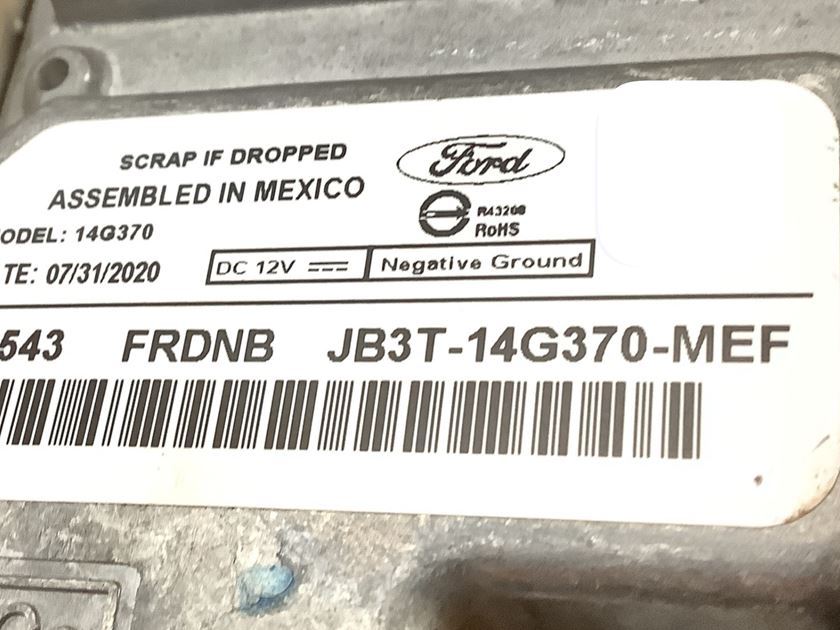
Got a picture of the label on the APIM?

1 Like

Seems it’s within the files in the google drive share he posted.

2 Likes

Thx

1 Like

My main concern is to confirm whether my Sync 3 unit is actually a MY20 (even though the checker reports that it is not). If it really is a MY20 unit, then I understand that I am in trouble. Since the unit is now confirmed (or luckily not) as ā€œbrickedā€ one, I will proceed to purchase another one. That’s my question. Thank you.

Well based on the sticker it is a MY20. Looks like a replacement APIM. This sticker looks suspect to me though as not being authentic. I am just waiting for someone else to chime in and see if their opinion matches mine.

Some of the issues you were having are symptoms of a counterfit APIM. It also looks like it got water on it at some point.

1 Like

It’s either a Ford Service Replacement or a Chinese fake. I could not find either the-EJA or -MEF in the Ford database. The file mismatch is a dead give away that the unit has been modified, not in a good way. Either way it’s likely bricked.

You could replace it or send it to someone for recovery.

1 Like

​"Good afternoon! Here in Brazil, it is very difficult to find the correct APIM for the Edge. I found this one, part number GR26AH3BT-14G371-BGA, but it came from an Ecosport with Sync 3 and a 4-inch screen. I tried to install it and program it via FORScan, but the image remains small and the touch screen doesn’t work. Am I missing a step or is it physically impossible to make this APIM work with an 8-inch screen?

Thank you!"

Bruno

You had been unlucky. As per it’s documented, the hardware db (what syn3updater uses for my20 checking) is user driven… Ford used to have a naming convention, like J series from 2018, K series 2019, L series are 2020 and such…

That worked very well since a simple ā€œIFā€ would determine if an APIM was MY20 or not, that worked until some years ago Ford start pushing J series APIMs that were in fact MY20+…

And it seems the have started doing so with the K series…

I’ve not been able to find any information about KU5T-14G371-EJA in our forums, there are a few found in our hardware DB, but no user complained before… Until you came along.

So, assuming the APIM is OEM and in fact MY20, we have added KU5T-14G371-EJA to the MY20 list.

About recovering it, your options are limited:

You need to install the 8’’ variant, that should fix the issue. What version is it running?, do you know?. (or guess based on the UI)

1 Like

"I can’t tell exactly which version is running. Since I can’t activate the touch screen, I have no way to navigate through the options on this Sync 3. I ended up forgetting to check the firmware via FORScan and I’ve already removed this APIM. All I have is a photo of the screen, and back label shows JR3T-14G371-BED. I think it’s completely useless to me!

Att

Bruno

I think this is a no-nav APIM (most registered in our hw db are no-nav), your old -EJA APIM was 32GB.
Does your car have NAV?

Yep. 32Gb Apim

It is likely that the unit is running sink 3.0 and not the later Sync versions. Since it is not a MY20 unit, you can just reformat it to Sync 3.4 if you want.

1 Like

In fact, the downgrade process via USB drive was done (first part) to version 3.3.19052. However, now with a black screen and the USB port not being recognized, how can I attempt to reformat?

Did you previously downgrade the APIM?
Did you remove the usb after that? Before the reformatting?

1 Like

Let me clarify that I didn’t perform a manual downgrade or any standalone process. The entire procedure was handled by the Syn3 Updater tool. I selected the ā€˜MY20’ option, which enabled the automated ā€˜Downgrade’ to version 3.3.19052 (which, as I understand, allows for a safe reformat) followed by the ā€˜Reformat’ stage, once I had the confirmation after Interrogator tool.

The first stage completed successfully; I even saw the UI of the older version (3.3). At that point, the software prompted me to perform a power cycle (turn the ignition off and back on). The USB drive remained plugged into the port, and the engine was running during the whole process. However, after restarting the engine, the Ford logo no longer appears, and the screen remains black…"

MY20 cannot be reformatted or it will brick. Like this one.

"I managed to find the Interrogator Log (XML) generated before the issue. The APIM Part Number is KU5T-14G371-EJA and the Main CPU is 1U5T-14G374-DA. According to these details, it shouldn’t be a MY20 unit. However, after the Syn3 Updater automated downgrade/reformat process, I’m stuck on a black screen. I’ve attached the XML for expert review and to warn about the issue.

Att

Bruno

Where did you hide the log?

I’ve already replied to you about this:

Just in case you do not understand that: based on what you shared your K series APIM is likely MY20 which was not previously known based solely on naming convention.

1 Like