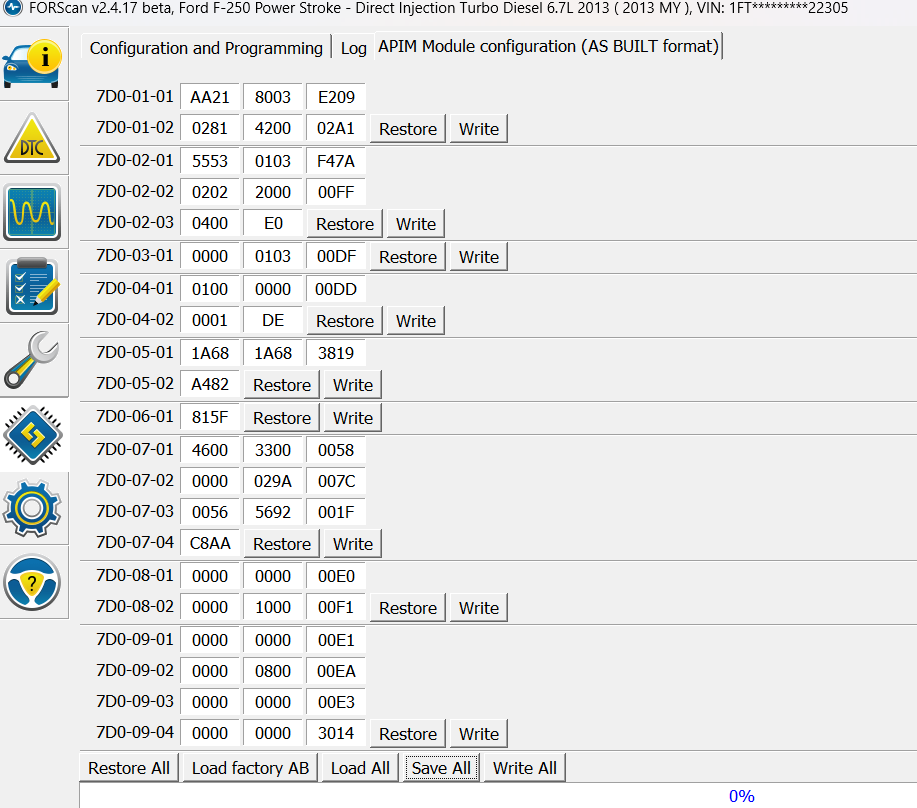
So I completed the Sync 3 retrofit on my 2013 F250 and I have been using the Forscan to get the AS BUILT data correct for my application and I have a few questions as I can’t seem to find them in the AS BUILT database.
When I am receiving text messages, it always comes in twice.
When I adjust the fan speed, it does not display on the screen. If I go to the climate screen I can see the bars move (they move up and down) but, not when on say the radio or nav screen, nothing shows (my old Sync2 it would display in the lower right corner).
When in motion (driving) I cannot input a new nav destination or view text messages. Is there a way to change this in Sync 3.4? (I could do this with my old Sync2).
Is gracenotes the same as album art? If so, how do I enable that? I have channel ID info and it shows the name of the song but there is a box on the right side of the screen that just shows a musical note.
SYNC Region: NA
Navigation Variant: Nav
Manufacturer Year: Pre MY20
Install Type: Retrofit
Old SYNC Version: 3.4.23188
New SYNC Version: 3.4.23188
Do you have a error message, if so what is it?
n/a
So I figured out question 1 & 3.
If I changed 7D0-02-01-x7xx-xxxx-xxxx it will allow me to input a new nav destination while in motion. Coincidently, it fix the double test messages.
I’ve got 21 lines, it’s all confusing, some of the stuff that’s in the AS BUILT database works, some do not.
Basically all I was able to do was to Hit the key that says “Load Factory AB” and then made 1 line correction to get the Nav to work. Then made the other correction I mentioned above to be able to get nav inputs while in motion. So far everything seems to be working correctly.
My Sirius works fine.
I don’t know any other way to get Nav input to work while in motion. I tired the DREP at location 7D0-09-01-xxxx-xxxx-*xxx but none of them worked. Maybe I’m doing something wrong
This makes no sense since your vehicle came with Sync 2 and the AB is different than Sync 3. If you loaded the OEM AB that would give you a bunch of DTC’s due to the difference. Forscan would also give you an error because the option structure is different as the calibrations have more lines in Sync 3.
You’re also trying to get something to work that the older hardware does not support.
I don’t know. I only have 2 DTC for the APIM that won’t clear. One is for the “lost communication with IPC” and the other is for “APIM configuration not compatible”.
When I load an AB from a similar vehicle (2017 F250) with the same features as mine (2013 F250) there are several things that don’t work, like NAV, voice control to tune to a SiriusXM channel, backup camera, climate controls (shows single vs. dual), no heated/cool seats and some more I’m forgetting right now. (NOTE: I have all the same stuff as the 2017 except for heated steering wheel).
When I do the “Load Factory AB” everything works but NAV and I have to change the line character to activate it.
Should I reattempt to reload the 2017 F250 AB data and then configure again?
(If it makes any difference, the Sync3 APIM I installed came from a 2019 Fusion).
Sorry for all the confusion, that I am causing.
If anything you want the factory AsBuilt from a 2016 F150 as a source, not a 2017.
When you’re doing an upgrade like this its best to start with the first year Sync3 was offered on the model.
Ahh…ok, I did not know that. I thought that any year would work to use the AB. I’ll give that a shot, just have to find a 2016 F150 that has the same options as mine does.
You are configuring a CGEA 1.2 vehicle with CGEA 1.3 data. There is no valid asbuilt you can copy to your vehicle for this as it just does not exist. The key here is CGEA 1.2. Your APIM asbuilt needs to reflect that where that is an option. Even the same features between a CGEA 1.2 and 1.3 vehicles do not communicate the same due to the electrical architecture being different. There is a bit of hope for you though, at F150Forum. In the Gen 12 section they have a thread or two that deal with installing Sync 3 in a Gen 12 F-series. This is probably the most comprehensive set of info on the subject.
OK, I have been Forscan programing this Sync 3 retrofit now for the last few days and I think I may have it all figured out except for the Nav input while in motion.
I’ve tried every combination in the DRPE in 7D0-09-xxxx-xxxx-*xxx in the AB APIM database. Does this mean that my vehicle/system is not capable of this feature? I attached my current AB for my 2013 F250, if someone wouldn’t mind checking my work.
DRPE is Driver Resriction Passenger Exception. If you have a “passenger” in the front seat you can use the nav and the features normally restricted. Otherwise you need to cheat the system and change the country code. Keep in mind that doing that disables several safety features including 911 assist. You can always voice command Sync or AA/CP for nav inputs.
Yeah that’s what I’m trying to accomplish. I sometimes don’t have my phone hooked up for AA or have no cell reception and wanted to use the factory nav and other restricted features.
I did change the country code to make it work, but then I lose Sync voice command help like tune to Sirius channel X. So I put it back.
Seems like I have to choose one or the other. I’ll leave it for now and see how I like the new Sync 3 system. It’ll be my first time with AA.
Thanks for the help!
I think once you start using the technology you’ll adjust and won’t even notice. I did, and being a bit senior (but not senile yet…) I was surprised how fast I became comfortable with it. It’s amazing I design and make these systems work (not for automotive, but for TV broadcast systems) and I don’t use half the capabilities of the technology. Old dog, new tricks…