The multimedia system doesn't support Android Auto.

My Sync system doesn’t recognize my phone; it shows communication error 8. The software in your car failed the Android Auto security settings. I’ve already changed the cable and nothing works. When I go to the Ford website looking for an update, it says: “Your car does not have Ford Sync or it is already up to date.” The software version is 1.3.5.1.


SYNC Region: ANZ

Navigation Variant: Non Nav

Manufacturer Year: Pre MY20

Install Type: Unknown

Old SYNC Version: 1.5

New SYNC Version: 1.5

Do you have a error message, if so what is it?
This is an english speaking community, so please re-post in english.

Update Method: CyanLabs Manual Method

That’s not Sync3. Post a picture of that screen, but I do not believe your car supports Android Auto.

1 Like

Thank you for the picture, I do not recognize that version.
Are you the first owner of the car?.

Let’s to this: try confirming which APIM your car has. This can be done via the bezel diagnostics or even with the interrogator log.

Based on the screen, that makes me think it’s not Sync3… Maybe Sync2.5 or something like that, but not Sync3…

1 Like

How can I get this information? I have absolutely no experience with this. I searched for some videos on YouTube, but I didn’t find anything. I already bought the car used.

You can google for “ford bezel diagnostics” and many videos will appear. Generally speaking, you can activate that with the engine running or just in contact while pressing the buttons skip+eject CD.

Or you can try running the interrogator log (instructions are in the link on the left). You can create that manually or with syn3updater.

Another question: have you paired your phone via bluetooth to it?. If so, what’s the name it appears on your phone?.

1 Like

What is the year and model of your car?

The profile says 2019, but I do not think that’s an actual 2019 unit… I do not know what that is…

Sorry for the delay, but the car is in the shop :confused: The model year is 2019/2020

The model year vs the Sync version does not seem to align. This looks like it could be Sync with MyFord, not the Touch version. Seems odd.

Could you post your VIN for the vehicle?

FYI it’s SYNC 2.5. it was fitted to some base trim MK8 fiesta, MK4 Focus etc in the UK for sure and I’m pretty sure ANZ gets the same cars as the UK. Limited hardware, can’t be upgraded to SYNC3, and I don’t even think it’s upgradable by USB etc, I think it’s a dealer job but don’t quote me on that.

Id start by trying some other android phones/cables to see if the same error comes up to prive phone or car at fault . But fact OP has not replied for 6 days, maybe they have got it fixed
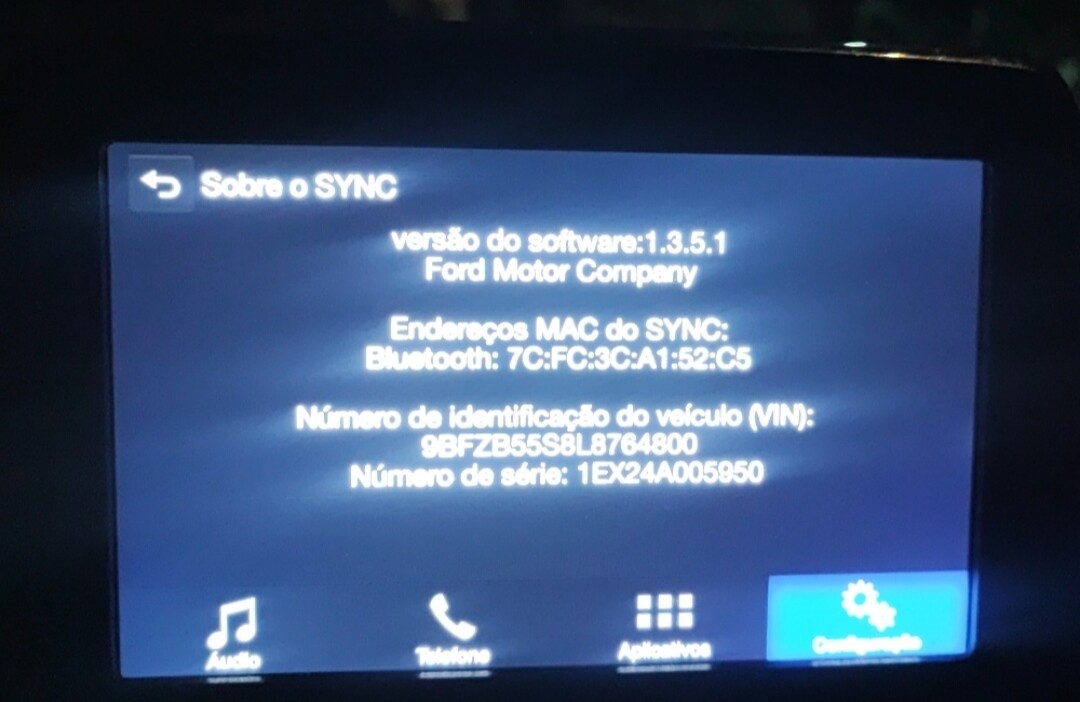
I’ve already tried several cell phone models and none of them worked. I didn’t reply sooner because my car was in the shop.

Is the VIN the chassis number?

Maybe. It is a number usually made of numbers and letters about 17 characters long.

9BFZB55S8L8764800

Can anyone else help me?

Not really familiar with your error but if we try Google AI this is wha it comes up with.

Common Solutions for Error 8

Fix Date & Time: Go to your car’s system settings and ensure the date and time exactly match your phone. Enable GPS/automatic time synchronization.

Check USB Cable: Switch to a high-quality, original, or data-transfer-supported cable, as poor cables cause authentication failures.

Restart/Re-pair: Restart both the car and your phone. Delete the car from your phone’s Bluetooth settings and re-pair.

Clear Android Auto Cache: Go to phone Settings > Apps > Android Auto > Storage, then select “Clear cache” and “Clear data”.

Update Apps: Ensure Google Play Services and the Android Auto app are updated to the latest versions.

Update Car Firmware: Check with your car manufacturer for any available head unit firmware updates.

I know you tried some of those recommendations like a new cable. Have you tried any other recommendations.