Hi,
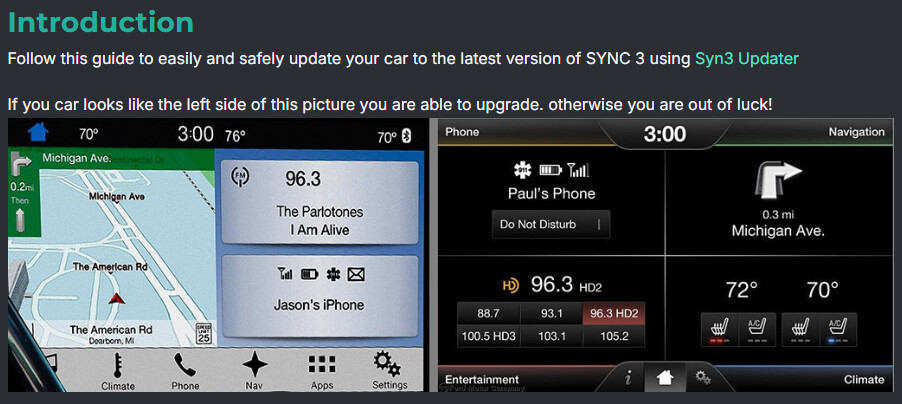
I updated my Ford F150 2018 to the latest Sync 3 3.423188 and it was an 8" software, cyanlabs didnt let me know it was for an 8" and I needed the 4" one. So none of the physical buttons worked on the software, just radio buttons.
Then I saw a user posted that I needed to install this version NU5T-14G381-BB - SYNC 3 APIM Software (IVSU) Database - CyanLabs which is for the 4" screen 3.4.22251.
I installed that and now the screen is black. I start the truck I see the ford logo shop up then it is gone and stays black.
**UPDATE: I inserted the DOWNGRADE usb stick that cyanlabs made from the updated and now the screne loads up. But it is still 8" software display. and the buttons dont work.
Can somone please show me which files i need to install to get the 4" screen size and the buttons to work? Thank you so much.
SYNC Region: NA
Navigation Variant: Non Nav
Manufacturer Year: Pre MY20
Install Type: OEM
Old SYNC Version: 2.3.23254
New SYNC Version: 3.4.22251
Do you have a error message, if so what is it?
Nothing, just black screen.
Update Method: CyanLabs Syn3 Updater
Syn3 Updater Version: Latest
Syn3 Updater Documentation Read: yes
Syn3 Updater Log File
CYANLABS - SYN3 UPDATER - V2.14.2.0
Branch: Stable
Operating System: Microsoft Windows 11 Pro (2009)

PREVIOUS CONFIGURATION
Version: 3.4.22251
Region: NA
Navigation: False
Install Mode: Auto-Detect (autoinstall)
Install Mode Overridden: False
My20 Protection Enabled: Enabled

DESTINATION DETAILS
Mode: Drive
Model: Samsung Flash Drive USB Device
Size:
FileSystem: exFAT
Partition Type: MBR

AUTOINSTALL.LST
; CyanLabs Syn3Updater 2.14.2.0 Stable - Autoinstall Mode - Enforced Downgrade

[SYNCGen3.0_ALL_PRODUCT]
Item1 = APPS - 4U5T-14G381-AN_1552583626000.TAR.GZ
Open1 = SyncMyRide\4U5T-14G381-AN_1552583626000.TAR.GZ
Options = AutoInstall


FILES (1)
4U5T-14G381-AN_1552583626000.TAR.GZ (479.7MB)

LOG
[5/15/2026 4:48:03 PM] Selected Region:  - Release: Enforced Downgrade - Map Version:
[5/15/2026 4:48:03 PM] Install Mode: Auto-Detect (autoinstall) Forced: False
[5/15/2026 4:48:03 PM] MY20 Protection: Enabled
[5/15/2026 4:48:03 PM] Formatting USB drive
[5/15/2026 4:48:03 PM] Re-creating partition table as MBR and formatting as ExFat on selected USB drive
[5/15/2026 4:48:11 PM] Checking Existing File: 4U5T-14G381-AN_1552583626000.TAR.GZ
[5/15/2026 4:48:11 PM] Downloading: 4U5T-14G381-AN_1552583626000.TAR.GZ
[5/15/2026 4:49:04 PM] Validating: 4U5T-14G381-AN_1552583626000.TAR.GZ
[5/15/2026 4:49:08 PM] Downloaded: 4U5T-14G381-AN_1552583626000.TAR.GZ
[5/15/2026 4:49:08 PM] Preparing USB drive
[5/15/2026 4:49:08 PM] Checking Existing File: 4U5T-14G381-AN_1552583626000.TAR.GZ
[5/15/2026 4:49:08 PM] Copying: 4U5T-14G381-AN_1552583626000.TAR.GZ
[5/15/2026 4:49:24 PM] Validating: 4U5T-14G381-AN_1552583626000.TAR.GZ
[5/15/2026 4:49:27 PM] Copied: 4U5T-14G381-AN_1552583626000.TAR.GZ
[5/15/2026 4:49:27 PM] Generating Autoinstall.lst
[5/15/2026 4:49:27 PM] ALL FILES DOWNLOADED AND COPIED TO THE USB DRIVE SUCCESSFULLY!