Sync 2.2 to 3.0 (possibly incomplete install?) freezing issues after update

Hello, so I had sync 2.2 that was stable on my 2016 F150. I upgraded to 3.0 version from Fords website and I believe it got interrupted, I only had it in for a very short amount of time (upgrade to 2.2 took me almost 2 hours) and then it said 3.0 upgrade completed. Since then, my Sync 3 freezes constantly, for extended periods of time, even after a master reset (both soft, hard, and the master reset button).

I get no error codes.

Would just upgrading to Cyanlabs 3.4 fix my issue? Or is there something else I should do first?


SYNC Region: NA

Navigation Variant: Nav

Manufacturer Year: Pre MY20

Install Type: OEM

Old SYNC Version: 2.2

New SYNC Version: 3.0.23219

Do you have a error message, if so what is it?
No error

Update Method: Official Ford

Hello.
Does the Master Reset actually do anything?.
Can you run an interrogator log against the unit and share the XML file?.

APIM Model: GJ5T-14G371-CFC
APIM Type: Navigation
APIM Size: 32GB
APIM Free Space: 6.8G
Version 3.0.23219 (JR3T-14G381-AY)

11/25/2025 9:18:29 AM +00:00

Partition Type = Free / Total
/fs/usb0/ = 57G / 57G
/fs/tmpfs/ = 127M / 128M
/fs/sd/MAP/ = 635M / 12G
/fs/Nuance/ = 230M / 4.6G
/fs/Nuance/ = 2.5M / 482M
/fs/Nuance/grace = 5.1M / 1.0G
/fs/rwdata/ = 646M / 1024M
/fs/mp/ = 40M / 1024M
/fs/images/ = 6.8G / 26G

Installed Packages
GB5T-14G422-CJ
GB5T-14G421-CJ
GB5T-14G424-CH
JR3T-14G391-CE
JR3T-14G423-CB

APIM AsBuilt
DE00: 2A2A040600028906048A
DE01: 55530103C402028000000000
DE02: 0000010300
DE03: 01000001000001
DE04: 1A681A6838A4
DE05: 80
DE06: 47003300000000029A000056569400C8

Sync_VV2LPDZZ.xml (10.2 KB)

(with VIN deleted)

Do this and see if it solves the issues:

The maps are way out of date and can be causing issues for you on the newest software.
You can stay on 23219 but reinstall it.

The note in there says I’d need to buy a license for $110+ for that to work it looks like?

Yes, all NA maps are ESN locked and are a paid subscription.

Alternative is to upgrade the Sync 3.4 with current maps. But a word of caution here: You have an old APIM, xxx, which can exhibit issues with the upgrade to Sync 3.4. Specifically, your APIM is loaded with the strategy file GB5T-14G374-AF. This file is known to have bad addressing and can result in result in issues. This file should be replaced with GB5T-14G374-CD to update, regardless if you stay with Sync 3.0 or upgrade to Sync 3.4.

Reference: APIM Firmware Flash Rescue - Ford / Information - CyanLabs Official Community

I’m glad you said that about 3.4 having issues with this one. I’ll probably avoid it then and probably bite the bullet on the map thing, because the lag is atrocious and constant.

Should I replace that GB5T file before doing that map update you linked?

I also don’t have Forscan. Can I get rid of the lag without doing the flash first buy buying the map USB from Ford? Or should I really do the flash first?

Highly recommended.

Before you do the maps or anything, take a look at replacement APIM modules. Without the screens they are about $200 or so. (Use your old screen.) If you were to get a replacement APIM, like a late-J or K series unit to replace the G series you have, you can use Sync 3.4 and load the new maps for no additional cost going forward. Also, you will need to replace the USB hub for CarPlay regardless of the direction you go. Get it from a reputable Ford source. There are a ton of fakes out there. Just a suggestion…

FORScan is free for just the asbuilt programming, but the firmware programming will cost like $20 a year. Always use a good USB adapter for programming.

Yeah I was trying to avoid the additional cost of a good USB adapter.

I have an Android phone and Android Auto works well with the current USB hub I have, so I’m guessing it’ll continue to be unnecessary?

If I replaced the APIM, would I avoid having to flash anything and buy the maps update? What’s the benefit to that?

You’ll probably just get a nag message upon startup…

If you replace the APIM with a newer version, you can load current maps using the reformat tool from Ford. This is what the Syn3 Updater is all about. No purchasing of maps necessary.

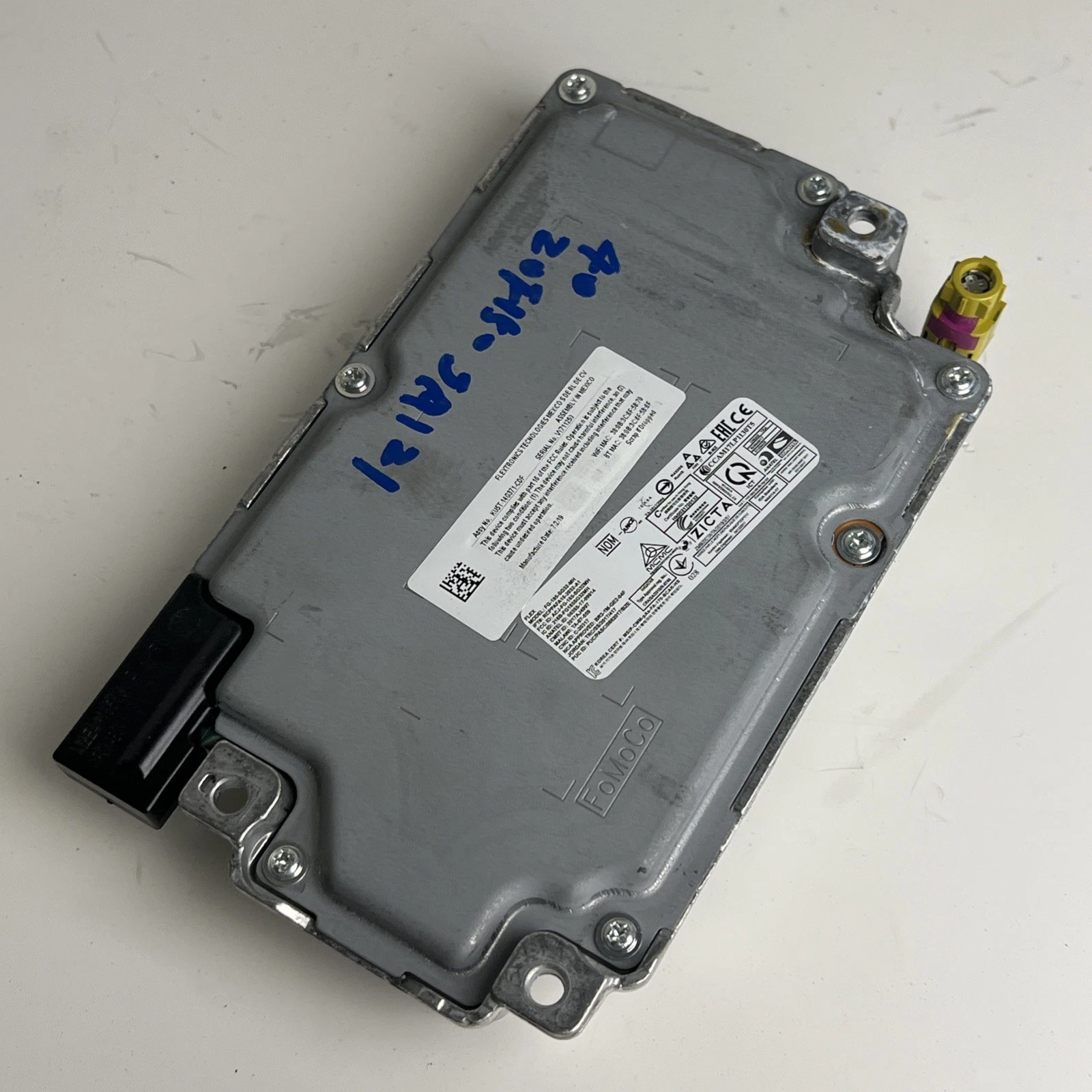
I’ll attach a photo of something I found for an example:

The guy that posted it said it’s out of a 2018 Mustang.

Couple questions. Is this the only type of piece I need?

And does it have to be out of an F150? What numbers should I be looking for on the module to make sure it’s compatible/has maps?

You only need this unit. This unit is not NAV. You can look up part numbers here… SYNC 3 APIM Hardware Database - CyanLabs

The unit can be virtually out of any Ford or Lincoln model. However, you will want a late-J or K series unit. The part numbers will start with J or K. (Or 3 or 4 for the Lincoln versions.) This will help identifying the APIM’s… APIM Firmware Production Releases - Ford / Information - CyanLabs Official Community

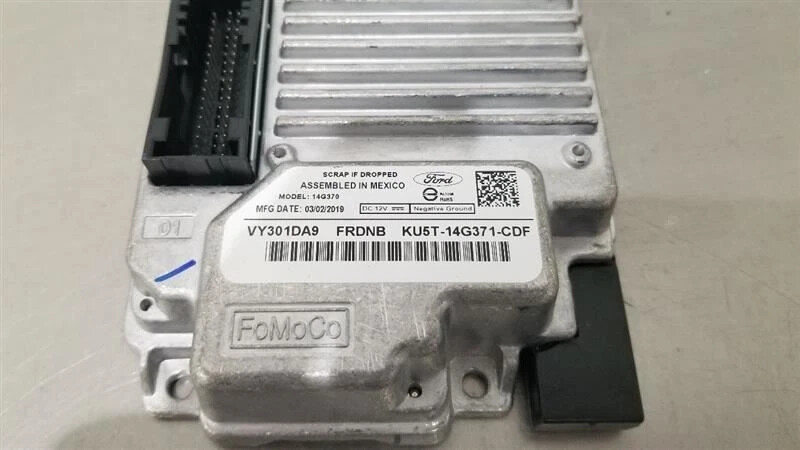
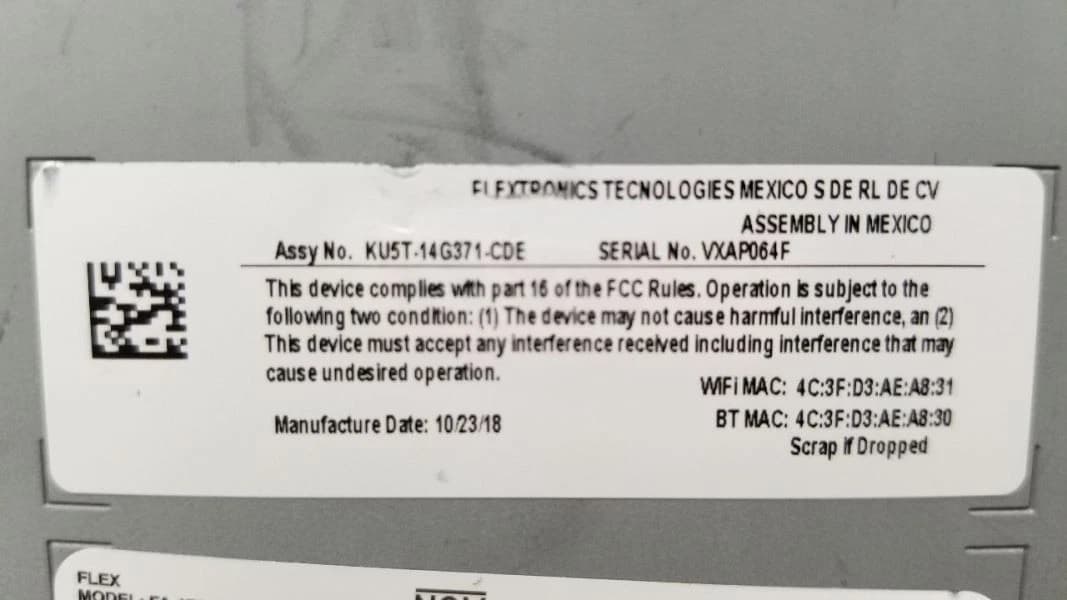
Note: You are looking for a 14G371 number, this is the actual APIM. The 370 number is an assembly number for an installation in a vehicle. Manufacturer date should be 2018 or 2019.

Okay thank you. How do I know if it’s specifically a ā€˜late’ J?

And that it’ll be compatible with NAV? Or maybe you just answered that with your last note (being a 14G371)

Edit: I’m guessing an L part number wouldn’t work? Mfg in 2020+

Early J’s usually have a 2017 build date. Look at the pic in the article, it will not have the second USB port also.

Stay away from L’s. They will brick if you reformat them…

Okay, think I have enough info to find one.

Any places you recommend to check other than ebay?

I use this in my 2015 F-150 with Sync 3.4 and current maps. No issues.
2020 FORD F-150 SYNC COMMUNICATION MODULE KL3T-14G370-PCH OEM | eBay


KU5T-14G371-CDF

Look around and see if you can find one a bit cheaper but this is a good price. Verify with the seller that it works and you can return it.

I checked the one you linked but it doesn’t appear to be a 14G371.

I found this one I attached a pic of, and it’s weird..The full string number has 14G371 in it, but specifically where it says ā€œModel:ā€ it has it as a 14G370

Also, will installing a new APIM affect my remote start or anything?

Yeah I guess I’m confused what number I should be looking at for the 14G371

This one I linked here shows it on the other side under the assembly number, but it shows 14G370 on the back.

Edit: Actually the one you linked is a good example. It has the 14G370 on the one side, and the assembly number is 14G371.

1 Like